Free Maintenance Log Template for Excel
A ready-to-use maintenance log for equipment, vehicles, and facilities — record every service, repair, and inspection, then plan the next one on a built-in preventive-maintenance schedule that flags anything overdue. Three tabs, dropdowns wired to your asset list, works in Microsoft Excel.
What is a maintenance log?
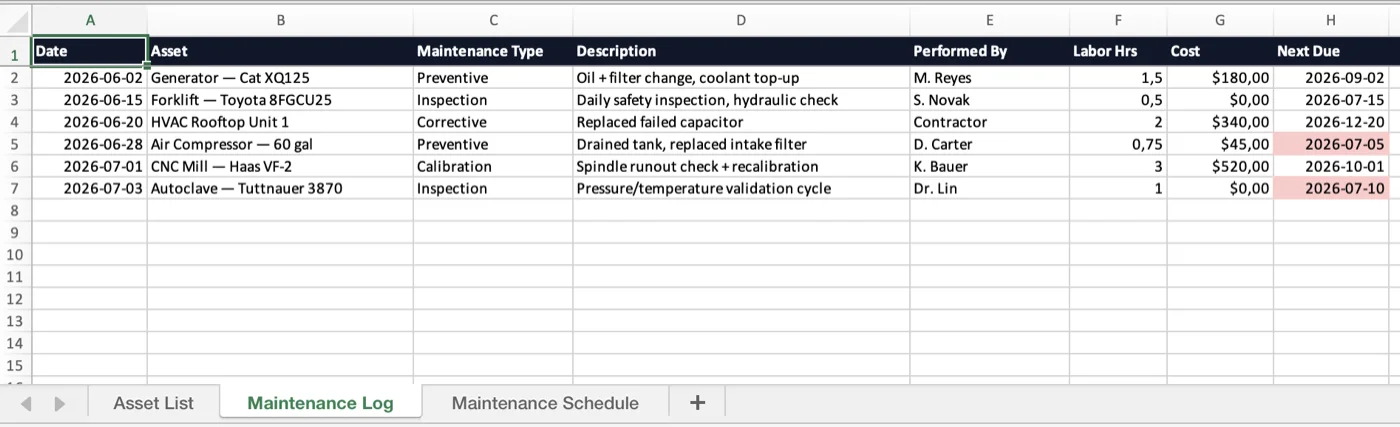
A maintenance log is a running record of the work done on a piece of equipment: each service, repair, inspection, or calibration, with the date, who did it, what it cost, and when the next one is due. Kept consistently, it turns "we think the compressor was serviced sometime last spring" into an exact history you can stand behind at an audit, a warranty claim, or a resale.
This free template ships three tabs. The Asset List holds everything you track and feeds the dropdowns on the other two tabs, so names stay consistent. The Maintenance Log is the history — one row per job, with an overdue flag on the next-due date. The Maintenance Schedule is the plan — set an interval per task and it calculates the next due date and marks anything overdue. It opens in Microsoft Excel (.xlsx) and works in Google Sheets.
A log tells you what already happened; a schedule tells you what is coming. Both are only as good as the asset record behind them — the same cost, in-service date, and service history that a tool like the asset management module keeps current automatically instead of by hand.
To list the equipment you are maintaining in the first place, use the equipment inventory template; for computers, servers, and other IT gear, the IT asset inventory template; and for smaller portable tools that move between crews, the tool inventory template.
Who uses a maintenance log
Anywhere equipment has to keep running — start the log today and schedule the rest.
Fleet & vehicles
Service intervals, mileage, and repairs per vehicle — a clean history for warranty and resale.
Facilities & building systems
HVAC, generators, and elevators on a preventive schedule so nothing lapses between inspections.
Manufacturing & machinery
Line equipment and CNC tools — log calibrations and PMs to cut unplanned downtime.
Construction equipment
Generators, compressors, and heavy kit across yards and sites — one shared service record.
Labs & clinics
Autoclaves, analyzers, and instruments — validation cycles and inspections on a fixed cadence.
IT & data-center hardware
Servers, UPS units, and cooling — scheduled checks with a record of every intervention.
Spreadsheet or UNIO24 — what fits your team?
A log is a great start. Once assets and schedules multiply, an app keeps the plan from slipping.
| Capability | Free Template | UNIO24 FreeRecommended for busy teams |
|---|---|---|
| Logging the work | ||
| Record a service or repairThe template does this by hand. UNIO24 logs each job against the asset with a tap, timestamped. | Partial | Yes |
| Attach photos and receiptsA spreadsheet cannot hold the before/after photo or the invoice. UNIO24 keeps them on the record. | No | Yes |
| Staying ahead of the next one | ||
| Preventive-maintenance scheduleThe template calculates the next due date. UNIO24 also generates the work order automatically. | Partial | Yes |
| Overdue alertsThe sheet highlights overdue rows. UNIO24 notifies the assigned tech and the manager. | Partial | Yes |
| Automatic recurring remindersA nudge before each service is due, without anyone watching the sheet | No | Yes |
| Data & reliability | ||
| Full service history per assetEvery past job for an item, kept automatically and never overwritten | Partial | Yes |
| Works from anywhereWeb, iOS, and Android — not just wherever the file lives | Partial | Yes |
| Full support | 0/ 7 | 7/ 7 |
Frequently Asked Questions
Everything you need to know about the free maintenance log template
Is the maintenance log template really free?
Yes — no cost, no subscription, no card. Enter your name and email and the Excel file downloads instantly.
What is the difference between a maintenance log and a maintenance schedule?
They work as a pair, and the order helps: set up the Maintenance Schedule tab first so the template knows what is due and when, then record each completed job on the Maintenance Log as it happens. You can keep just the log if all you need is a service history, but on its own nothing warns you the next service is coming — which is where most missed PMs start. In this template the two tabs are linked only by the shared Asset List; a dedicated tool closes the loop so logging a finished job rolls its schedule forward automatically.
Can I use it for vehicles as well as equipment?
Yes. The columns fit any serviced asset — vehicles, machinery, HVAC, lab instruments, IT hardware. For vehicles you would typically add a mileage column next to the date; the Asset List tab already mixes fleet and equipment in one place.
How do I create a maintenance log in Excel?
Give each service its own row, with columns for date, asset, maintenance type, description, who performed it, cost, and the next due date. Turn the asset column into a dropdown with Data Validation so names stay consistent, and add a rule that highlights any next-due date on or before today. This template already has all of that built across three tabs, so you can skip the setup and start logging.
What is the difference between a maintenance log and a repair report?
A repair report documents a single fix after something breaks — the fault, the parts, the outcome. A maintenance log is the broader running record that includes those repairs alongside routine preventive work, inspections, and calibrations. The log is where a repair report ends up once the job is closed.
When should I move from a spreadsheet to maintenance software?
Usually when the schedule stops being watched — services slip because no one opens the file in time — or when you need photos, receipts, and a per-asset history the sheet cannot hold, or when several people update it and overwrite each other. That is the point teams move to a tool that raises the next work order automatically instead of relying on a highlighted cell.
Go deeper on maintenance
While the log fills up, see how teams keep equipment running without the firefighting.
Total Productive Maintenance (TPM): A Practical Guide
The framework behind fewer breakdowns — autonomous upkeep, OEE, and preventive discipline.
Read more: Total Productive Maintenance (TPM): A Practical Guide
Preventive vs Predictive vs Pre-emptive Maintenance
Which maintenance strategy fits which asset — and how the terms actually differ.
Read more: Preventive vs Predictive vs Pre-emptive Maintenance
Asset Tagging Best Practices: A Practitioner's Guide
Label types, placement, and numbering — so scanning an asset to log its service actually works.
Read more: Asset Tagging Best Practices: A Practitioner's Guide