IT Asset Tracking Software
Track every IT asset across its full lifecycle.
From laptops and servers to docking stations, headphones, and conference-room remotes. UNIO24 keeps every IT asset on one register. Each record carries the full history: who has it, where it lives, what was repaired, when it's due for refresh, and how it was retired.
Start for Free- 50 assets free forever
- No credit card required
- Active + passive coverage

Most IT inventories show what you bought, not where it is.
The market is full of IT asset tools. Most of them track active equipment: laptops, servers, IP phones, anything that connects to the corporate network and can be discovered by an agent or scanner. They tell you what exists. They rarely tell you where it physically is or who actually has it right now.
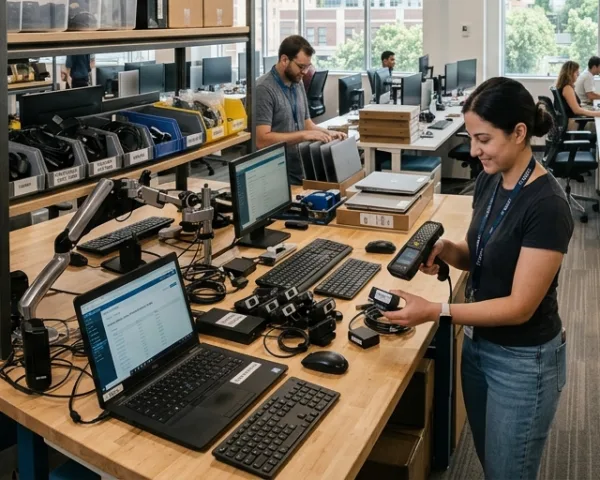
And they almost always miss the passive equipment that surrounds every workstation: headphones, microphones, webcams, keyboards, mice, docking stations, USB hubs, monitor arms, cables, adapters, conference-room remotes. None of it shows up on a network scan. All of it is company property. Most of it walks off without anyone noticing.
The result is a partial inventory that drives partial decisions, and a procurement budget that buys things you already own, somewhere, with somebody.
How UNIO24 covers the full lifecycle
Tag and import everything
The UNIO24 Discovery Agent scans your network and auto-imports every active device (laptops, servers, switches, IP phones, printers) with serial number, MAC, IP, and OS version populated. Passive items get tagged once with QR or NFC and stay on the register. Existing inventory bulk-imports from MDM, UEM, or spreadsheets in one pass.
Assign with full context
Each asset is tied to an employee, location, department, and cost center. Custody chain captures every transfer with timestamp and responsible party. The register stays accurate even as people move between teams or offices.
Capture every lifecycle event
Repairs, part replacements, configuration changes, warranty claims, audits: every event lands on the asset record. The history is searchable, exportable, and signed by whoever made the change.
Run audits and refresh forecasts
Annual audits, cycle counts, and surprise verifications run from the same register. Refresh-cohort reports flag laptops nearing warranty expiry or lease end so capex planning is ahead of the curve.
Retire with full disposition record
When an asset reaches end of life, the retirement workflow logs data wipe, disposition (sold, donated, recycled), and recycling certificate. The asset record stays archived, auditable years later.
Custody chain on every transfer.
Every asset carries a record of who has had it and when. When a laptop moves from one employee to another, UNIO24's IT asset management software logs the transfer with timestamp, responsible party, and condition note. Office equipment moving between rooms or floors lands on the same chain. The register stays current because handing something over is the act of updating the system.
Per-asset custody history with timestamps and signatures
UNIO24 Discovery Agent scans the network for active gear; QR/NFC scan handles passive equipment
Visibility per employee: what every person has, with last-seen date
Visibility per location: what is at HQ, in branches, and at home offices
Maintenance, repairs, and warranty in one place.
Every laptop, printer, server, and conference-room TV carries its own maintenance and repair history. UNIO24 schedules preventive checks per device class. Repair tickets log assignee, parts replaced, downtime, and outcome. External service-center tracking covers vendor handoffs from check-out to return. Warranty status sits on every asset, with expiry alerts before claims become impossible.
Preventive maintenance schedules per device class (cleaning, firmware, battery checks)
Internal work orders for IT-handled repairs: assignee, parts, time on ticket, SLA
External service-center tracking: check-out, vendor, expected return, status updates
Warranty expiry alerts; per-asset warranty terms and claim history
Refresh forecast and retirement, planned not reactive.
Each asset carries acquisition date, useful life, lease terms, warranty window, and depreciation schedule. Refresh-cohort reports show what is coming up for replacement 12 to 24 months out. Capex planning meets the budget cycle, not the surprise quarter. When an asset reaches end of life, the retirement workflow captures data wipe, disposition (sold, donated, recycled, scrapped), and any recycling or destruction certificate. The asset record stays archived for compliance review years later.
Per-asset acquisition cost, useful life, lease terms, and warranty window
Refresh-cohort forecasting 12 / 24 / 36 months out
Retirement workflow: data wipe, disposition method, recycling certificate
Archived records preserved indefinitely for audit and compliance review
Audit-ready inventory and compliance evidence on demand.
UNIO24 logs every change to an asset record with user, timestamp, and reason. Annual audits, cycle counts, and surprise verifications run against the same register that drives day-to-day operations, so the evidence packet is the data, not a spreadsheet built the week before the audit.
Per-record audit log with user, timestamp, and field-level change history
Annual and cycle-count audit workflows on the same register
Role-based access controls so each team sees only what they own
CSV / PDF export when reviewers ask for evidence
IT asset tracking: common questions
Plain-English answers for IT admins, finance partners, and audit coordinators evaluating UNIO24 for full-lifecycle IT asset tracking.
Does UNIO24 track passive equipment, not just active devices?
Yes. The UNIO24 Discovery Agent scans your network and auto-discovers active equipment (laptops, servers, IP phones, printers, switches), alongside imports from your MDM, UEM, or RMM. Passive equipment (headphones, mics, docking stations, monitor arms, USB hubs, cables, conference-room remotes) gets tagged with QR or NFC and tracks the same way: same register, same custody chain, same audit log.How does UNIO24 know where an asset physically is?
Custody chain captures every transfer with the responsible person and timestamp. When an asset is reassigned, moved between rooms, sent to repair, or shipped to a remote office, the location updates on the record. For active network gear, the custody chain supplements last-seen network location. The register reflects current physical state, not just acquisition history.
Don't see your question? Talk to sales
