Free IT Asset Inventory Template for Excel & Google Sheets
A ready-to-use IT asset inventory workbook for small teams — a device register with warranty status, a software license sheet that flags unused seats and upcoming renewals, check-out and service logs, and a dashboard. Works in Excel and Google Sheets.
What is an IT asset inventory template?
An IT asset inventory template is a ready-made Excel or Google Sheets file for recording every device, license, and piece of network gear your team owns — who holds each one, what it cost, when the warranty or renewal is due, and where it sits right now. You get a working asset register, software license sheet, check-out and service logs, and a dashboard without building formulas from scratch.
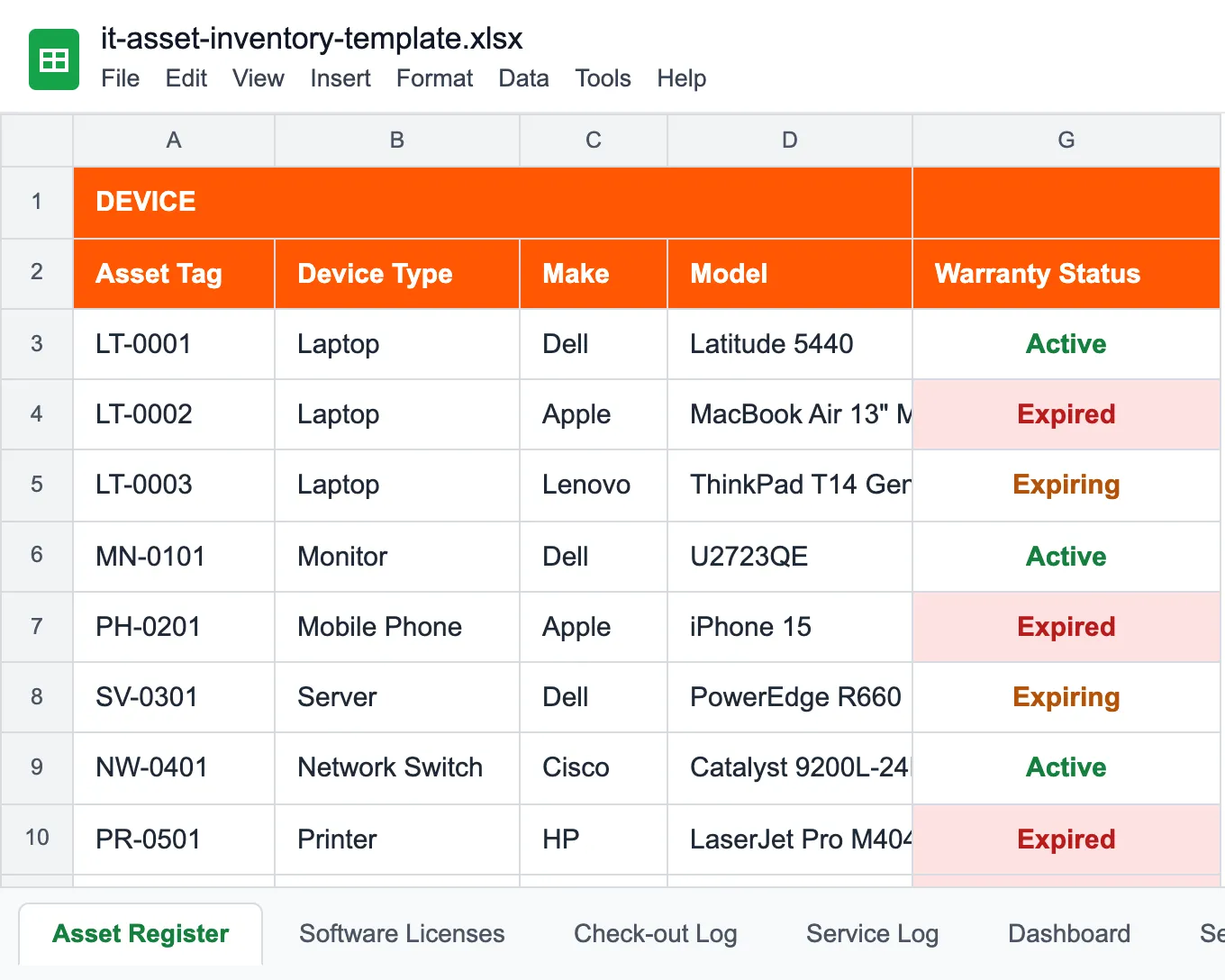
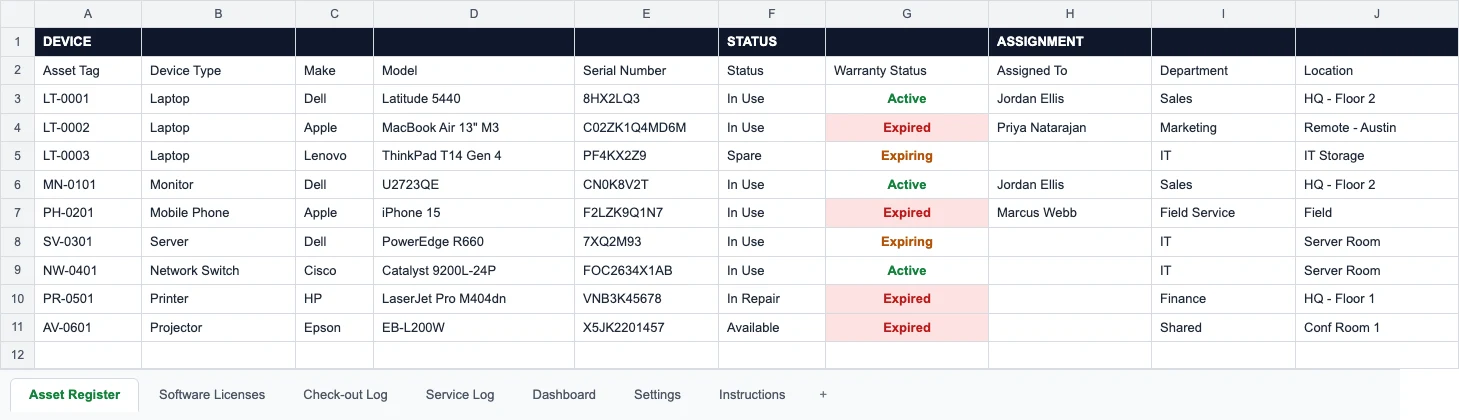
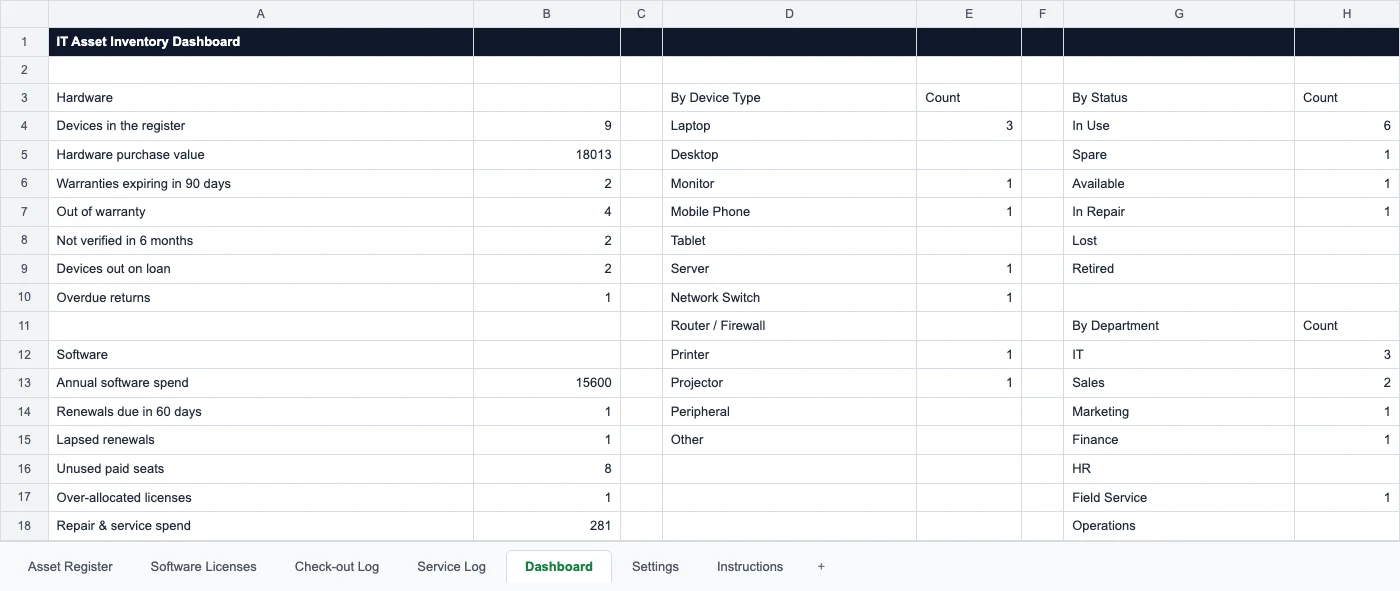
It is built for IT assets rather than general equipment. The Asset Register has the columns an IT team actually fills — status, assignee, warranty expiry, hostname, IP and MAC address, OS, and the date someone last saw the device — and the Warranty Status column marks each one Active, Expiring (90 days or less) or Expired by itself. Software licenses get their own sheet: seats bought against seats assigned, annual cost, and a renewal date that turns to Renew soon 60 days out. The dashboard adds it up: warranties running out, renewals due, paid seats nobody uses, devices out on loan. The same file opens in Excel (.xlsx) and Google Sheets.
For larger machines and facility equipment, use the equipment inventory template; for portable field tools that move between crews, the tool inventory template; to log repairs and scheduled service on their own, the maintenance log template; and for stock and consumables you reorder, see inventory management.
What's Inside the Template
7 sheets with formulas and drop-downs filled down 200 rows — here is what comes in the download.



Who uses an IT asset inventory template
Built for teams up to 50 assets — set it up for your estate and start tracking today.
Internal IT teams
Laptops, monitors, peripherals, and licenses — know who has what and what renews when.
MSPs & IT support
One register per client for hardware and software, ready when an audit or handover lands.
Startups & SMBs
Get off scattered spreadsheets early — track devices from the first hire, not the first audit.
School & university IT
Student and staff devices, lab machines, AV gear — with check-out logs per room or department.
Remote & hybrid teams
Track gear sitting in people’s homes: who holds it, since when, and what comes back at offboarding.
Security & compliance
A complete device list with owners and change notes — the evidence a SOC 2 or ISO 27001 review opens with.
Spreadsheet or UNIO24 — what fits your team?
The template is a great start. Once your estate grows, a cloud platform pays off.
| Capability | Free Template | UNIO24 FreeRecommended for 50+ |
|---|---|---|
| Daily tracking | ||
| Asset limitTemplate handles unlimited but slows past hundreds. UNIO24 free tier covers 50 assets with unlimited users. | Partial | Yes |
| Team collaborationShared file = one editor at a time. UNIO24 = real-time editing, unlimited users. | Partial | Yes |
| Mobile accessNative iOS and Android apps to look up and update devices away from the desk | No | Yes |
| Renewals & automation | ||
| License & warranty renewal alertsNotifications before a license or warranty lapses | No | Yes |
| Check-in / check-out logsManual tab in the template. UNIO24 records check-outs automatically with full history. | Partial | Yes |
| Data & compliance | ||
| BackupsTemplate relies on you remembering to save. UNIO24 backs up automatically every day. | Partial | Yes |
| Audit trailFull change history per asset — who edited what, when | No | Yes |
| Full support | 0/ 7 | 7/ 7 |
Frequently Asked Questions
Everything you need to know about the free IT asset inventory template
Is the IT asset inventory template really free?
Yes — no hidden costs, no subscription, no card required. Fill out the form and the .xlsx file downloads right away. It opens in Excel, and in Google Sheets through File → Import.
Does it cover software licenses and cloud, or just hardware?
Both. Add software licenses and cloud or SaaS subscriptions as their own rows with a renewal date and seat count, right alongside the hardware. A good inventory tracks everything you own or pay for, not only what you can physically touch.
Can I use it as SOC 2 or ISO 27001 audit evidence?
It gives you the starting artifact an auditor asks for — a complete device list with owners. What a spreadsheet cannot produce is an automatic, tamper-evident change history; auditors increasingly want that. For a small estate the template is enough to pass; past a certain size, a system with a real audit log like UNIO24 saves the week-long scramble.
What fields should an IT asset inventory template include?
At minimum, per asset: a unique asset ID or tag, category, make/model, serial number, purchase date and cost, warranty or license expiry, current assignee and location, status, and a last-verified date. For software, add seat count and renewal date; for networked hardware, add IP or MAC and a last-seen note. This template ships with all of them: the hardware columns on the Asset Register sheet, and seats and renewal dates on the Software Licenses sheet.
Is this different from a general asset tracking template?
Yes. The general asset tracking spreadsheet is built for any mix of equipment and furniture. This one is built for IT: network columns (hostname, IP, MAC, OS), a warranty status that calculates itself, a Last Verified date that flags devices nobody has seen in six months, and a separate Software Licenses sheet for seats and renewals. If you mostly track machines and facility equipment, use the equipment inventory template instead.
When does a spreadsheet stop working for IT assets?
Usually around 50 assets, or the moment a second person needs to edit the record, or when manual entry starts drifting out of date. Past that you feel the missing pieces most: no automated discovery, no renewal alerts, no mobile scanning, no reliable audit trail. That is the point most teams move to a cloud tool.
Go deeper on IT asset tracking
While you set up the template, learn how teams keep the record accurate at scale.

Asset Tagging Best Practices: A Practitioner's Guide
Label types, placement, and numbering schemes. Everything we learned tagging thousands of assets.
Read more: Asset Tagging Best Practices: A Practitioner's Guide
Physical Asset Inventory: A Step-by-Step Checklist
Confessions from someone who found a $4,000 projector in a coat closet — and how to run your first count.
Read more: Physical Asset Inventory: A Step-by-Step Checklist
How to Choose the Right Asset Tracking System
Cloud vs on-premise, must-have features, and the costly mistakes teams make when picking software.
Read more: How to Choose the Right Asset Tracking System