SCAN · IDENTIFY · ACT
Scan any tag, see everything, right from your phone.
Point your phone at a QR or NFC tag and the full asset record opens instantly: who has it, where it lives, its history and what's next. Check in and out, complete work orders, run audits and file tickets. Offline too.



What this looks like without a real mobile platform.
Field crews call the office to look up an asset
Tech on-site needs the service history before opening the panel. Calls the office, waits for someone to log in, gets a partial answer back. The phone in their pocket should already have the answer.
No signal in the basement = no system
Storage rooms, mechanical floors, parking decks. Companion apps stop working: read-only fallback or full failure. Real work stalls until you walk back outside.
Work orders closed from the desk, not the floor
Tech finishes the job, drives back, opens a laptop, types up what they remember. Closing detail goes in late or wrong. Audit trail full of best guesses.
Office equipment audit eats a full week
IT walks every floor with a clipboard, ticks laptops and monitors against a stale spreadsheet, types it all back in afterward. By reconciliation, the data is two weeks old.
Built for the field, not the office.
Modules on mobile
Every module (assets, parts, tracking, maintenance, work orders, tickets, audits, licenses, analytics, mobile UI itself) fully usable from a phone.
Scan to asset card
From camera point at QR to full asset record on screen: owner, location, history, attached documents.
Scan formats
QR and NFC both supported. Choose what fits your tagging strategy or mix per asset class.
Lost edits offline
Local data persists across app launches and device restarts. Pending actions queue up and sync when network returns, never silently dropped.
Scan anything: QR or NFC.
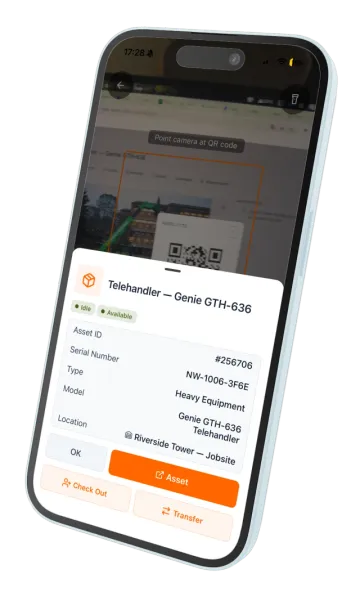
Point the camera at a QR tag or tap an NFC sticker. UNIO24Mobile reads them both. The full asset card loads in under two seconds: who has it, where it is, full history, attached documents, pending work orders. No login friction, no menu hunting, no separate scanner app.
QR scanning via the device camera, no extra hardware
NFC tap on devices that support it
Auto-focus and torch for low-light warehouses and basements
Continuous-scan mode for audits: scan many tags in a row without leaving the camera
Offline-first. Sync without surprises.
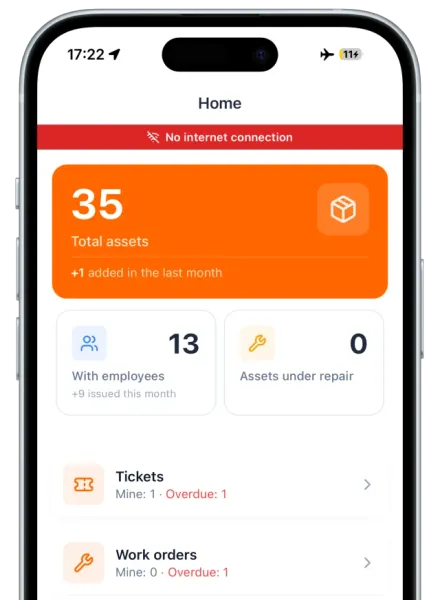
Storage basements, remote sites, airplanes, vehicle fleets in dead zones. Signal isn't always there. UNIO24Mobile runs fully offline. Check assets in and out, scan tags, file tickets, complete work-order checklists, run audits. Everything queues locally and syncs when the network returns.
All main actions work without network, not a read-only fallback
Local data persists across app launches and device restarts
Pending-sync counter shows what is waiting to upload
Concurrent edits are surfaced, not silently overwritten
Automatic retry when network flickers: no manual sync push needed
Every action, every module. No desktop needed.
This is not a stripped-down view-only viewer. Technicians, auditors, and field staff complete the entire workflow on a phone: file a ticket, accept the work order, complete the checklist, log parts consumed, and close it out, without ever logging into the web.
Accept and complete work orders with checklist progress and parts consumed
Run audit sessions: bulk-scan assets and reconcile against the register
Sign-off transfers with on-screen signature capture
Switch interface language per user
What separates a real mobile platform from a "companion app".
Most asset-management and CMMS vendors ship a stripped mobile companion: view-only, 2 or 3 modules, online-only. Here is what to expect from a true mobile platform.
| Capability | UNIO24MobileFull parity | Typical CMMS companion app |
|---|---|---|
| Scope | ||
| Modules available on mobileHow much of the platform is usable from a phone | All modules | 2–3 (usually assets + work orders) |
| Read/write parity with webWhether mobile is full-featured or view-only | Yes | View-only or limited write |
| Native iOS and AndroidNative app vs webview wrapper | Yes | Often a webview |
| Scanning | ||
| QR scanning via cameraNo special reader hardware required | Yes | Often requires sled/scanner |
| NFC tap supportTap-to-identify via phone NFC | Yes | Rarely supported |
| Offline & sync | ||
| Full offline modeAll actions work without network | Yes | Read-only or partial |
| Conflict-safe sync resolutionHandle concurrent edits explicitly | Yes | Last-write-wins or silent loss |
| Pricing & access | ||
| Unlimited users on every planIncluding the free tier | Yes | Per-seat or hidden upcharge |
| Free for first 50 assetsNo credit card to evaluate | Yes | Trial only or no free tier |
Install it right now


Mobile is woven into every module.
Every capability listed below has a mobile counterpart: same data, same workflow, on the device the user already has.


Common questions about the mobile app
For ops teams, IT directors, and CFOs evaluating mobile-first asset management.
What iOS and Android versions are supported?
Modern iOS and Android. Current minimum requirements are listed on the App Store and Google Play store pages. Older devices may install but with limited support.Where do I download the app?
App Store for iOS, Google Play for Android. Both are free downloads. Search "UNIO24Mobile" or follow the store badges from the homepage.Is it a native app or a webview wrapper?
Native iOS and Android. Camera, NFC, GPS, and offline storage all use native platform APIs, not browser shims wrapped in a webview.
Have a question we did not cover? Talk to us
