Cloud asset management software — without the server room
Track every asset in the cloud, reachable from any browser or phone. Nothing to install, nothing to host, no server to patch. You just keep efficient, up-to-date asset records.
Start free- No server to install
- Web + native apps
- Daily backups
- Free for 50 assets
Why cloud asset management?
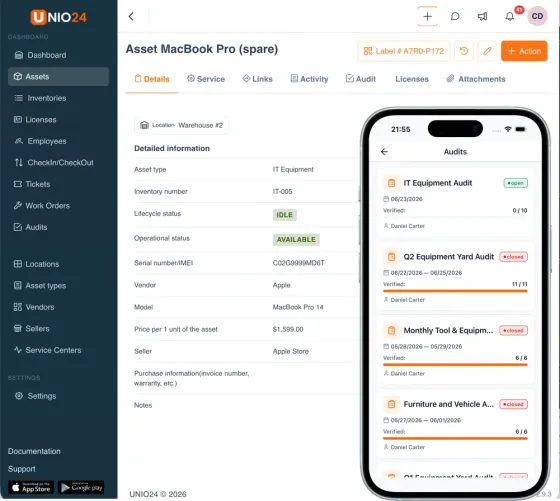
Cloud asset management software runs on the vendor's servers and reaches you through a browser and mobile apps — instead of software you install and maintain on your own hardware. You sign up, add your assets, and start tracking in minutes, with no server to buy, no database to configure, and no patches to apply.
Cloud asset management takes the operational load off your team. Hosting, security, updates, and backups are all handled for you, and the tool works from anywhere. The product keeps getting better in the background too: new features ship continuously, security is maintained for you, and your history is archived safely, so what you sign up for today is stronger a month from now without any work on your side.
UNIO24 is a cloud asset management platform: one live register of every asset — who has it, where it is, what it cost, and when it's next due — reachable from web or phone.
Nothing to install, nothing to host
On-premise and self-hosted tools start with a server, a database, and a maintenance calendar. Cloud-based asset management skips all of it. Create an account and your asset register is live — add assets by import, manual entry, or QR scan. No VPN to reach it, no patch window to schedule, no backup script to babysit. Try it on the free plan.
Know who has every asset
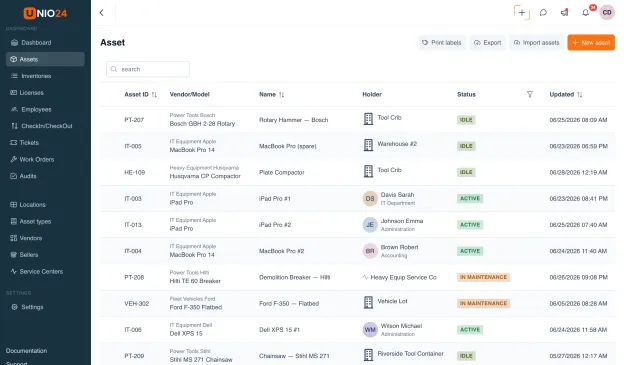
Check any asset out to a person, a team, or a location, and check it back in when it returns. Every hand-off is logged with who, where, and when, so "who has that laptop?" is one search away instead of a round of emails. Because the data lives in the cloud, the field and the office see the same record in real time, on web or native mobile.
Schedule maintenance and run work orders
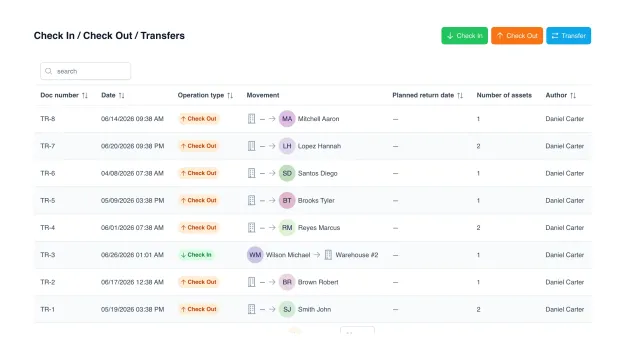
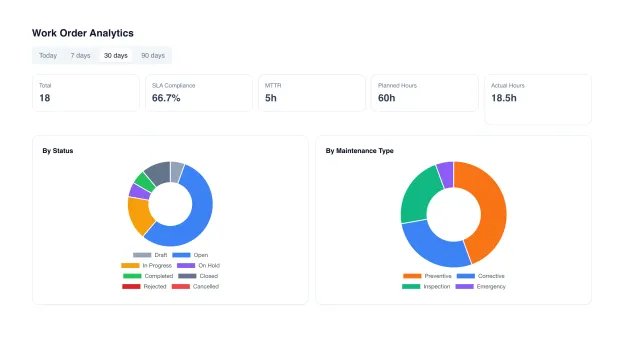
Set preventive maintenance schedules and let UNIO24 raise the jobs when they come due. Turn any issue into a work order with a checklist, parts pulled from inventory, and a photo on completion, tied to the asset it's about, so its full service history stays in one place.
See what your assets are doing
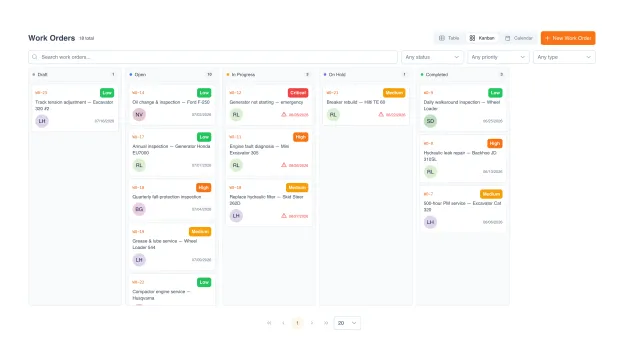
Pre-built dashboards for utilization, cost, and lifecycle across every asset. Spot idle equipment before buying more, and see which assets cost the most to keep. Drill from any chart straight into the asset record behind the number.
Here's why we built cloud UNIO24.
Asset management shouldn't need a server room. We got tired of tools that mean buying hardware, standing up a database, and booking a maintenance weekend before anyone can log a single asset. Cloud should be the default, not the upsell.
So we built UNIO24 as a cloud platform first: sign up, add your assets, and start tracking in minutes from any browser or phone. Hosting, security, and backups are ours to worry about, so they never become yours.

Your data. Your team. Your rules.
Security and data ownership aren't afterthoughts. They're how we operate.
Encrypted in transit (HTTPS) and at rest, with automatic daily backups
Role-based access control and a full audit log of every change
Export every asset, license, and log to CSV, JSON, or API any time
No vendor lock-in. If you leave, you take everything with you
Your data is never sold or used to train anything
Cloud, on-premise, or self-hosted?
Three ways to run asset management — and what each one costs you beyond the license.
| Capability | On-premise EAM | Self-hosted open source | Cloud UNIO24Free for 50 |
|---|---|---|---|
| Getting Started | |||
| Setup timeFrom sign-up to first tracked asset | Weeks | Hours + a server | 10 minutes |
| Server to run | Yes | Yes | No |
| Upfront cost | License + hardware | Server + admin time | Free for 50 |
| Daily Use | |||
| Access from anywhere | VPN only | Self-configure | Yes |
| Native mobile apps | Varies | Community only | Yes |
| Real-time multi-user | Yes | Yes | Yes |
| Operations | |||
| Automatic backups | DIY | DIY | Yes |
| Updates & securityWho keeps it patched | Your IT team | You | Managed |
| Data export any time | Yes | Yes | Yes |
Cloud asset management, answered
The questions buyers ask before moving off a server or a spreadsheet
Is cloud asset management software secure?
Reputable cloud platforms encrypt data in transit and at rest, run managed security patching, and keep automatic backups — which is often more than a small team can maintain on its own server. The practical security questions to ask any vendor: where is data hosted, is it encrypted, who can access it, and can you export it. UNIO24 supports role-based permissions so each person sees only what they should, and your data exports to CSV or JSON at any time.
Cloud vs on-premise asset management — which is better?
On-premise gives you full physical custody of the data and fits organizations with strict data-residency or air-gap requirements — at the cost of servers, IT staff, and upgrade cycles. Cloud removes that operational load and adds access-anywhere and native mobile, which suits the vast majority of small and mid-sized teams. If you don't have a specific regulatory reason to self-host, cloud is almost always the lower-total-cost choice.
Do I own and control my data on a cloud platform?
Yes — your asset records are yours. The test is whether you can get them out: with UNIO24 you can export everything to CSV or JSON whenever you want and move to another tool without a fight. Avoid any platform that makes leaving hard; a real cloud vendor is confident enough to let your data walk.
What happens if the internet goes down?
The web app needs a connection, but the native mobile apps work offline — scan tags, check items in and out, and run audits with no signal, and everything syncs the moment you reconnect. For field and warehouse work, that offline-first mobile layer is usually what matters more than constant browser access.
Isn't self-hosting cheaper than a paid plan?
Usually not, once you add up the real cost. Self-hosted and on-premise look cheap on license, but you still pay for the server (rented or bought), the hours to install and configure it, and the time to patch, back up, and troubleshoot it every month. For most teams, even a paid UNIO24 plan comes in under the server rental plus that ongoing admin time — and updates, security, and backups are handled for you on top.
Is there a free cloud asset management option?
UNIO24 is free for your first 50 assets — the full cloud platform, unlimited users, native mobile apps, no credit card and no expiring trial. Self-hosted open-source tools are also free on license but you run the server yourself. If you want free without the hosting work, a cloud free tier is the shortcut.
