CLOUD · REAL-TIME
Inventory management software, finally on autopilot.
Cloud-based inventory tracking that streams receipts, issues, transfers and counts to one timeline your whole team sees from any browser or phone. Low-stock alerts before you run out, auto-drafted POs in one click.
✓No credit card needed
You've probably seen this before.
'We're out of X.' Again.
The call comes in at the worst moment: production halted, tech on site, customer waiting. Nobody saw it coming because nothing was watching.
Buying 200 of something you already have 180 of
Stockroom inventory lives in one spreadsheet, procurement lives in another, and they talk once a quarter. Duplicate POs slip through weekly.
Expired chemicals discovered at audit
Shelf-life only matters when regulators show up. By then the bin is full and the waste invoice is not small.
'Only Mike knows what's in the stockroom'
Mike takes a vacation, procurement grinds to a halt. The knowledge lives in one head and walks out the door when he does.
Every part, every detail, one view.
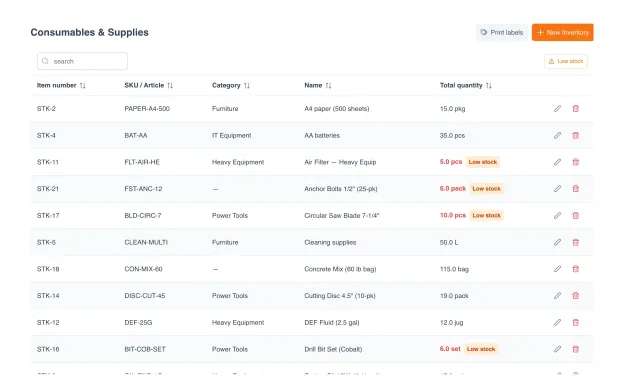
Open any part in UNIO24 and you see everything: current stock per warehouse, min/max thresholds, preferred supplier with lead time, consumption trend, attached specs and MSDS. No switching between the stockroom spreadsheet, the ERP, and email threads.
One click to the full part card
Stock levels per warehouse, zone, or bin
Min/max thresholds and reorder rules
Supplier, price, lead time, MOQ. All attached
What teams typically see.
Multi-warehouse visibility
Stock per warehouse, zone, bin, live across web and mobile. No more "check with the other site" calls.
Stockout rate
Down from a typical 5–10%, driven by min/max thresholds and live consumption tracking.
Forward demand visibility
Consumption trends per SKU forecast next month. Order before stockout, not after.
Carrying-cost cut
Right-sized safety stock plus duplicate-order prevention.
Every warehouse. Every shelf. Live stock levels.
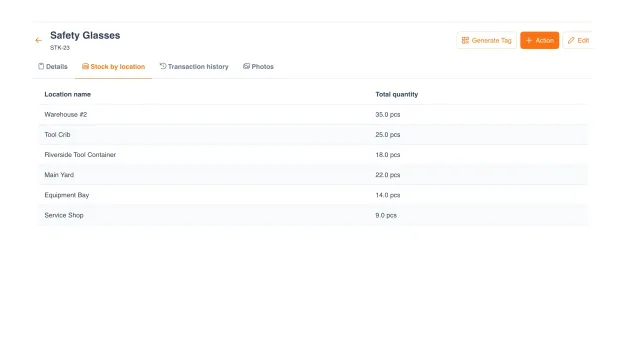
This is stock management software crews actually use: organize stock by warehouse, zone, bin, as deep as you need. When someone scans out a part from Warehouse B, the count updates across the system in real time. Mobile scanning means field crews check stock without calling the stockroom.
Multi-level hierarchy: warehouse → zone → bin
Scan QR to consume or receive in under 5 seconds
Live sync across web and mobile
Low-stock highlighted per location, not just total
Never hear 'we're out' again.
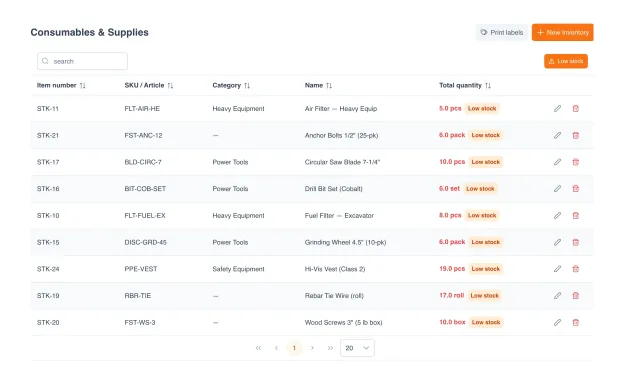
Set min/max per part, and UNIO24 watches consumption. When stock drops below the reorder level, the right person gets notified and a draft PO is ready. One click to send to your preferred supplier.
Min/max thresholds configurable per SKU
Email, push, and in-app alerts to the responsible user
Auto-drafted purchase orders to preferred supplier
Safety-stock rules for lead-time-sensitive parts
Vendors and manufacturers, linked to every item.
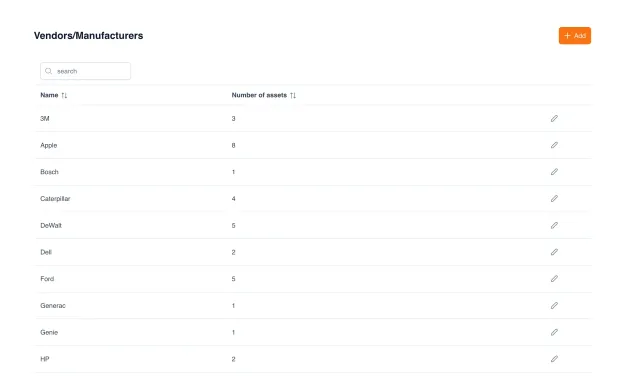
Keep every vendor and manufacturer in one directory, with each part and asset linked back to who made and supplied it. See at a glance how much you source from each vendor, and filter your whole inventory by supplier.
Vendor and manufacturer directory in one place
Every item linked to its vendor and manufacturer
See how many items each vendor supplies
Filter and report inventory by vendor
Consumption history. Demand forecasting.
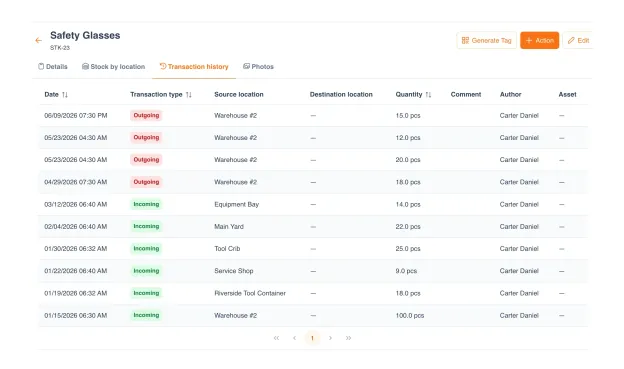
Every issue, transfer, and receipt is logged automatically. Over time UNIO24 builds a consumption pattern per SKU: what runs out fast, what sits on the shelf, what spikes seasonally. Forecasts help you right-size orders instead of guessing.
Full movement history for every part
Consumption trends per week, month, quarter
Demand forecast with lead-time overlay
Slow-mover and dead-stock identification
Designed for how your team actually works.
One missing bolt size shuts the site down.
- Track fasteners, consumables, and safety gear across sites
- Multi-site stock visibility. No more emergency runs
- Auto-replenish high-consumption parts
Lab supplies vanish right before exams.
- Track chemicals, lab consumables, and shared supplies
- Expiry alerts for time-sensitive reagents
- Department-level stock visibility
We just bought chargers we already had.
- Track cables, chargers, batteries, and office consumables
- Prevent duplicate orders with real-time stock
- Per-office stock with inter-office transfers
Receipt rolls run out at the worst moment.
- Per-store stock for consumables and supplies
- Auto-reorder triggered by sales velocity
- Central procurement with per-store delivery
One missing pallet-jack part = $800/hr in delays.
- Track MRO parts, consumables, and warehouse spares
- Preventive replenishment based on equipment hours
- Supplier performance tracking for critical parts
UNIO24 is a platform. Parts Inventory is one module.
Explore what else your team gets: all included, all with unlimited users.


Why UNIO24 exists.
Parts inventory shouldn't be a project. We got tired of bulky systems where configuring takes more time than counting stock. We got tired of per-user pricing that punishes teams for inviting the people closest to the stock. We got tired of spreadsheets that break the moment two people open them.
So we built UNIO24 like a modern phone: switch it on, start using it. No setup wizards, no consultant calls. Connected modules (assets, audits, work orders, licenses) turned on as you grow.

Your stock data stays yours.
Security and exit are first-class, not afterthoughts.
Encrypted in transit (HTTPS) and at rest. Automatic daily backups
Role-based access control, full audit log of every change
No vendor lock-in: if you leave, you take all your data with you
Questions, answered straight.
What's the difference between Inventory and Asset Management?
Assets are things you own long-term: laptops, machines, tools. Inventory is parts and consumables: bolts, filters, reagents, chargers. Asset Management tracks who has what; Parts Inventory tracks how much you have. Most teams need both, and UNIO24 includes both on every plan.
Can I track shelf-life / expiry dates?
Yes. Set expiry dates per lot or per SKU. UNIO24 alerts you 30 days out (configurable), and expired items are flagged in the count to prevent issue by mistake.
Can I add custom fields to parts?
Yes. Add fields of any type: text, number, date, dropdown, checkbox. Apply them globally or per part type. Common uses: lot numbers, batch IDs, hazard class, MSDS references, supplier cross-references.
What integrations are available?
Excel / CSV import and export. REST API and webhooks for ERP, accounting, or supplier integrations. Native barcode and QR scanning on iOS and Android. If you need a specific integration, tell us.
Is there free or open-source inventory management software?
Yes. UNIO24's free plan includes the full inventory module with unlimited items, unlimited users, and native mobile scanning, no credit card. Self-hosted open-source inventory tools are free on license too, but you run and maintain the server yourself. If you want free stock management without the hosting work, a cloud free tier is the faster route.
How do low-stock alerts work?
Set min and reorder thresholds per SKU. When stock drops below the threshold, UNIO24 notifies the responsible person by email, push, or in-app, and drafts a purchase order ready to send to the preferred supplier.
Does it work across multiple warehouses?
Yes. Multi-level hierarchy: warehouse → zone → bin. Each location has its own stock counts, transfer workflows between locations, and per-location alerting. No extra charge for multiple warehouses.
How does Parts Inventory connect with Work Orders?
When a technician records parts used on a work order, stock updates live across web and mobile. The transaction lands on both the work order (with cost) and the part's consumption history. No double entry. Parts Inventory and Work Orders share the same source of truth.
How does UNIO24 help cut inventory costs and waste?
Three workflows do the heavy lifting. Min/max thresholds keep safety stock right-sized. Low-stock alerts prevent emergency orders at premium prices. Shelf-life and consumption tracking surface dead stock and expiring items before they become write-offs.
Go deeper.
Practitioner guides on parts inventory, procurement, and stock management.

Asset Tagging Best Practices: A Practitioner's Guide
Label types, placement strategies, numbering schemes. Applies to parts and bins too.
Read more: Asset Tagging Best Practices: A Practitioner's Guide
Asset Tracking System Selection Guide
How to evaluate asset + inventory systems: features, total cost, team fit, vendor risk.
Read more: Asset Tracking System Selection Guide
Data Migration and Cleansing for Asset Tracking
From messy Excel to clean registry, a step-by-step playbook for the migration nobody teaches you.
Read more: Data Migration and Cleansing for Asset Tracking