COUNT · RECONCILE · PROVE
Inventory audits, end-to-end.
Scope the session, scan with mobile QR, and UNIO24 auto-classifies every asset as verified, misplaced, surplus, or missing. Multi-participant scanning with a permanent audit trail attached to each asset.
What changes when audits become a real workflow.
Ways to participate
Internal staff use the UNIO24 mobile app or web; external contractors and vendors get an email link and audit on their own. No registration, no app install. Mix both in one session.
Assets scanned per hour
Mobile QR scanning vs paper sign-off sheets. Most teams audit a school, store, or warehouse in a single shift.
Variance categories surfaced
Missing, surplus, misplaced: each item with its last known location, owner, and status. Decide per item.
Audit history preserved
Every completed audit becomes a snapshot attached to each asset. Multi-year audit trail becomes searchable.
Self-Service Audit: anyone counts, no login needed.
Remote employees and contractors confirm the equipment they were issued is still with them, without registering, filling out a spreadsheet, or installing an app. UNIO24 sends each person a one-time email link, they open their asset list on phone or browser, and mark each item: in-place, missing, or damaged. The whole confirmation takes minutes, not hours.
One-time link delivered by email. No account required
Browser-based: phone, tablet, or desktop, no app install
Mark each asset: in-place / missing / damaged
Free-text notes per item (damage description, observed location)
Built for distributed teams: remote employees, contractors, vendors, branch staff, partners
All participant submissions consolidate into one audit session for the manager
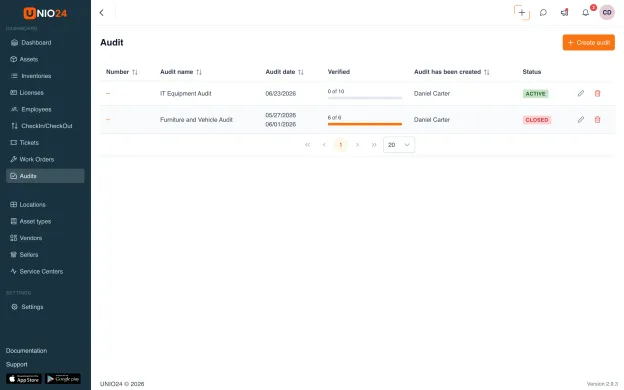
See exactly what doesn't match.
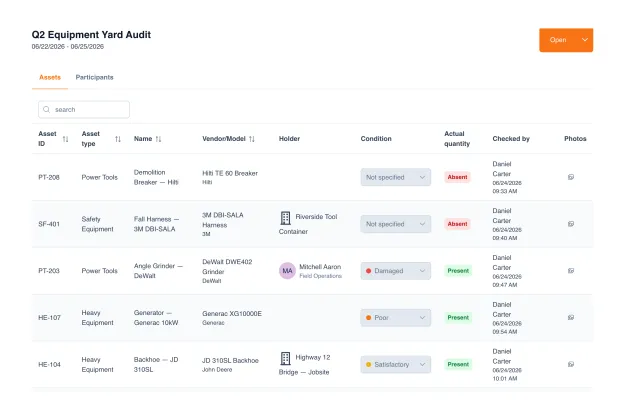
As participants count, UNIO24 compares reality against the system line by line. Each asset is confirmed present or flagged absent, and its condition is graded on the spot. The discrepancies (what's missing, what's damaged, what needs a closer look) stand out immediately, each line carrying the name and timestamp of whoever checked it.
Each asset marked present or absent against the count
Condition graded per asset: good, satisfactory, poor, damaged
A recorded condition syncs straight back to the asset record
Every line stamped with who checked it and when
Color-coded status and condition. Discrepancies stand out at a glance
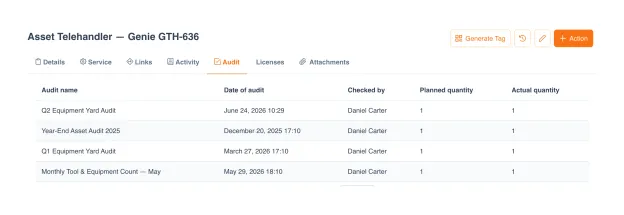
Every audit, attached to every asset.
Each completed audit becomes a permanent snapshot, and it lives on the asset, not just in the audit. Open any asset, switch to its Audit tab, and see every cycle it appeared in: the session, the date, who checked it, planned versus actual quantity. Years of counts become a continuous custody chain instead of a stack of forgotten spreadsheets in a shared drive.
Per-asset audit history on the asset's own Audit tab
Every cycle the asset appeared in: session, date, result
Who checked it and planned vs actual quantity, every time
Multi-cycle view. Spot patterns across quarters and years
Audits, beyond compliance.
Most teams treat audit as a yearly compliance task. Run it quarterly or monthly and the data starts to talk: which categories of assets vanish most, which locations have the highest loss rates, which equipment is doing the work that drives growth. Regular audits become a strategic tool: they cut losses and inform what to invest in next.
Regular audits cut losses, and show which assets are doing the work that drives growth.
What separates a real audit tool from a spreadsheet.
Most asset audits today still run on Excel + paper sign-off sheets, even at companies with a proper ASM or CMMS in place. Here is what changes when audit becomes a first-class module.
| Capability | UNIO24 AuditRecommended | Spreadsheet + paper | Typical legacy ASM & CMMS |
|---|---|---|---|
| Participants | |||
| Self-Service Audit (no login)Contractors and branch staff count by email link | Yes | Manual paper collection | No |
| OTP-verified participantsEach participant verified before the asset list opens | Yes | Not applicable | No |
| Multi-participant parallel scanningSeveral people audit different subsets at the same time | Yes | Sequential or duplicate effort | Sometimes |
| Workflow | |||
| Mobile QR scanningPhone camera reads the tag; full asset card loads instantly | Yes | No | Rarely native |
| Real-time progress dashboardSee live who has counted what, in which scope | Yes | End-of-day reconciliation only | Sometimes |
| Variance auto-classificationMissing, surplus, misplaced separated automatically | Yes | Manual reconciliation | Partial |
| Pause and resume sessionsAudit can span days, devices, and shifts | Yes | Risk of lost work | Sometimes |
| History & exports | |||
| Per-asset audit historyOpen the asset card, see every audit it appeared in | Yes | Folder of files | Sometimes |
| Excel / CSV exportFull session including signatures and resolutions | Yes | Already in Excel | Yes |
| Pricing & access | |||
| Free tierRun real audits before you commit | Free for 50 assets | Free but unscalable | Rarely |
| Unlimited users on every planIncluding the free tier | Yes | Unlimited users on Excel | Per-seat or hidden upcharge |
UNIO24 is a platform. Audit is one module.
Explore what else your team gets: all included, all with unlimited users.


Common questions about audits in UNIO24
How does Self-Service Audit work without a login?
Each participant gets a one-time link by email. They verify with an OTP code, see only the asset list assigned to them, and mark each item present, missing, or damaged. No password, no account, no app install. The session expires when they submit or after a configurable timeout.Is Self-Service Audit secure?
The link expires after the session completes or after a configurable timeout. OTP codes are single-use. Participants only see assets in their assigned scope, not your full inventory. Every action (link sent, OTP verified, item marked) is logged to the audit trail with timestamp.Who uses Self-Service Audit in practice?
Remote employees with assigned equipment, contractors at remote sites, warehouse operators at satellite branches, store managers in multi-location chains, periodic-inventory crews, and any staff member or partner who counts assets but does not otherwise need a UNIO24 account.
Have a question we did not cover? Talk to us
