LICENSES IN CONTROL
Software licenses, renewed on time.
One register for every license and seat, tracked to the employee or device using it. Renewal alerts before expiry, reclaimed seats you stopped using, and a compliance report ready the moment an auditor asks.
Every license, every seat, one register.
Record each software license once: vendor, product, license key, number of seats, purchase date, expiry, cost, attached contracts and invoices. Subscriptions with multi-seat plans (50-seat Microsoft 365, Adobe Creative Cloud team plans) track each seat individually so reassignment is one click.
Per-license card: vendor, product, key, seats, cost, expiry, contract
Multi-seat subscription support. Each seat addressable individually
License type taxonomy configurable per organization
Custom fields per license (PO number, cost center, business owner)
Attached contracts, invoices, and renewal terms
Seat-level assignment to employees or device assets
Renewal alerts before the auditor arrives.
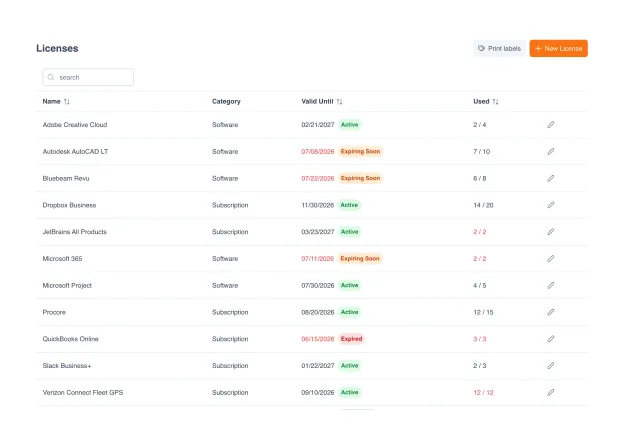
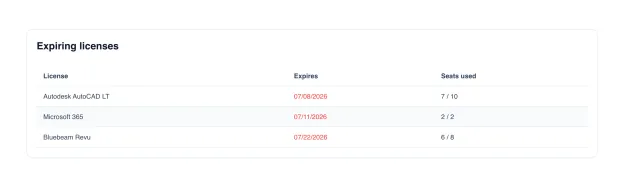
An Expiring Licenses widget sits on your dashboard and surfaces whatever is closest to lapsing: soonest first, expiry dates in red as the deadline approaches, seats-used right beside each one. Nothing gets quietly auto-renewed when nobody noticed, and nothing lapses on the day an auditor walks in. Across the register, every license carries an active, expiring-soon, or expired status so the picture is never more than a glance away.
Soonest-to-expire licenses surfaced on your dashboard
Expiry dates flagged in red as the deadline approaches
Seats-used shown beside each. Renew only what you actually use
Active / expiring-soon / expired status across the whole register
Per-seat assignment, reclaimed in a click.
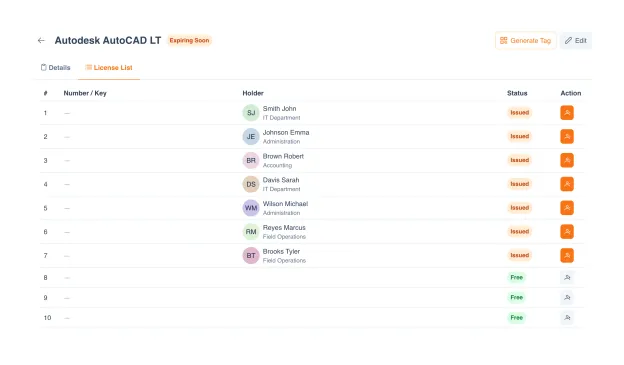
Each seat in a multi-seat subscription is its own line. Assign a seat to an employee, and the holder, their department, and an Issued badge appear against it; seats nobody is using sit there marked Free. When someone leaves or changes roles, reclaim the seat and hand it to the next person in a click. The header keeps the running count (seven of ten used) so over-buying is obvious before the next renewal.
Each seat in a multi-seat subscription is its own record
Issued seats show the holder and department; spare seats show Free
Reclaim and reassign in a click when people leave or change roles
Seat utilization rolls up to the register, e.g. 7 of 10 used
An audit-ready record for every license.
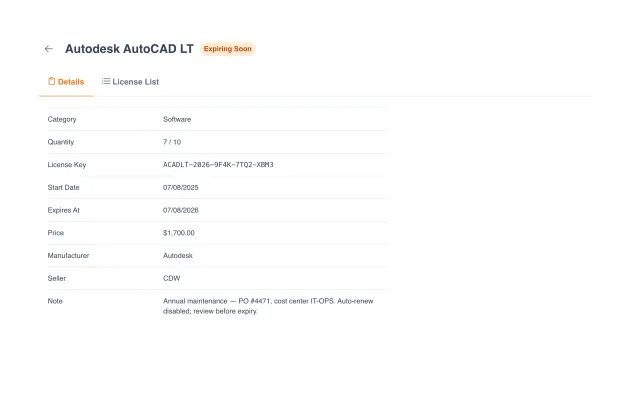
When internal audit, a vendor's license auditor, or your finance team asks for proof, every license already holds the answer: the vendor and reseller, the license key, seats used against seats owned, the start and expiry dates, the price, and a note carrying the PO number and cost center. No scramble through inboxes and shared drives. The defensible record was captured when the license was logged.
Complete record per license: vendor, reseller, key, dates, price
PO number and cost center captured right on the record
Seats used against seats owned: over-buying visible at a glance
Expiry date and status on every license, ready to show
What separates real license management from a shared spreadsheet.
Most teams still track software licenses in a spreadsheet that someone forgets to update. Here is what changes when license management becomes a first-class module connected to your asset and HR data.
| Capability | UNIO24 License ManagementRecommended | Shared spreadsheet | Generic ITAM tool |
|---|---|---|---|
| Register | |||
| Per-license card with key, seats, expiry, contractSingle record of truth per license | Yes | Cells in a spreadsheet | Yes |
| Multi-seat subscription supportEach seat addressable individually | Yes | Aggregate count only | Sometimes |
| Asset and employee linkageSeat tied to the device or person using it | Yes | Manual cross-reference | Often partial |
| Renewals & alerts | |||
| Timely renewal alerts before expiryEscalating notifications before expiry | Yes | Calendar reminder if you remember | Sometimes |
| Routing alerts to multiple stakeholdersSeat owner, procurement, budget holder | Yes | No | Limited |
| Expired-license dashboardActive flag until renewal or retirement | Yes | Buried in rows | Sometimes |
| Compliance & access | |||
| Over / under-licensing detectionFlag paying for unused seats; flag installs without seats | Yes | No | Often premium tier |
| Full assignment history per seatWho had the seat, when, why reclaimed | Yes | Lost in version history | Sometimes |
UNIO24 is a platform. License Management is one module.
Explore what else your team gets, all included, all with unlimited users.


Common questions about license management in UNIO24
How does UNIO24 model licenses, seats, and assignments?
Three layers. A License is the contract you bought (vendor, product, key, expiry, seat count, cost). Seats are the slots that license entitles you to (50-seat Microsoft 365 = 50 seats). An Assignment ties a seat to an employee (per-user license) or to a device asset (per-machine license). All three are addressable individually for accurate compliance and reassignment.What happens when an employee leaves or changes roles?
Reclaim the seat in two clicks. The assignment history stays attached to the license; the seat becomes available for the next person. The license-management dashboard shows reclaimed seats so procurement can decide: reassign immediately, or downsize the next renewal.Does UNIO24 handle perpetual licenses too, not just subscriptions?
Yes. Perpetual licenses (one-time purchase, no expiry) are tracked the same way as subscriptions. The difference is just no renewal date. Maintenance contracts on perpetual licenses can be tracked as separate dated records linked to the underlying license.
Have a question we did not cover? Talk to us
