Asset check-in / check-out that always knows who has what
Scan the tag, pick the person, set a due date — the asset is checked out and everyone can see it. Scan again on return. No sign-out sheet, no "I thought Mike had it".
Start free- Scan-to-checkout
- Overdue alerts
- Custody history
- Free for 50 assets
Why check-in / check-out?
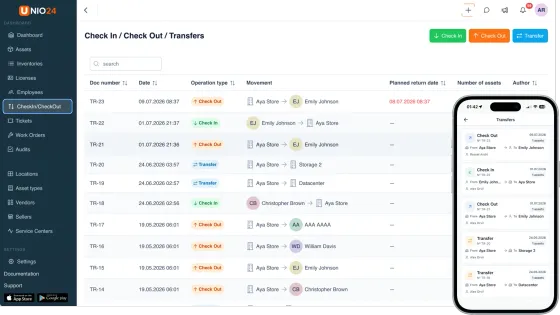
Shared equipment spends its life moving between hands, and every unrecorded hand-off becomes a search: the Monday-morning projector hunt, the drill that "walked off" the job site.
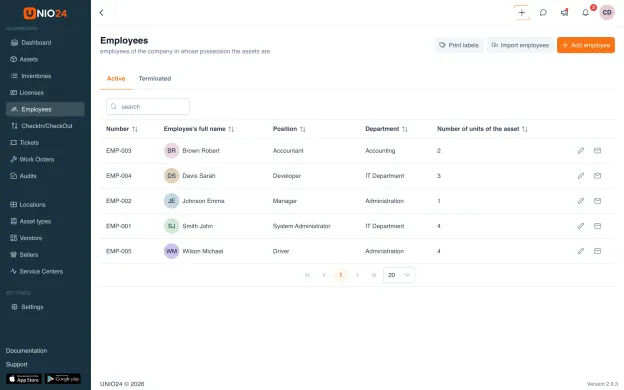
An asset check-in/check-out system closes that gap with two scans — one records who took the item and until when, the other confirms the return and its condition. In UNIO24 it's a core workflow of the asset management platform: every hand-off lands in the asset's history, and the employee list shows how many assets each person holds right now.
Scan a tag, assign the asset, done
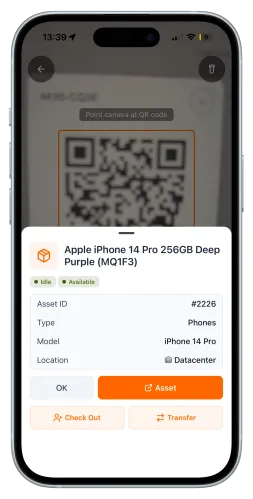
Checkout starts with the QR or barcode label on the asset itself. Scan it with the mobile app, choose the employee, team, or location taking it, add a due date and a note if needed — and the record is live. The whole exchange takes less time than writing a line on a clipboard, which is exactly the threshold at which people actually do it.
Due dates, availability, overdue alerts
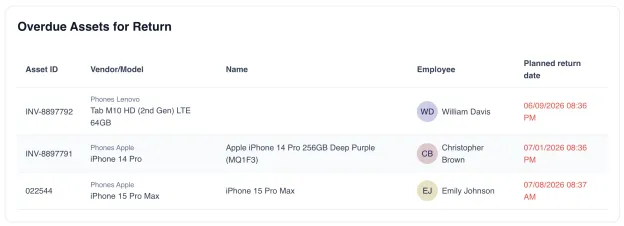
A checked-out asset shows its holder and return date to everyone, so "is the thermal camera free on Thursday?" is answered by the list, not by a group chat. When a due date passes, UNIO24 flags the asset overdue and sends a notification the same day, while the item is still findable. This is the part that quietly dies with paper sheets: nobody re-reads a clipboard.
Every hand-off in the asset's history
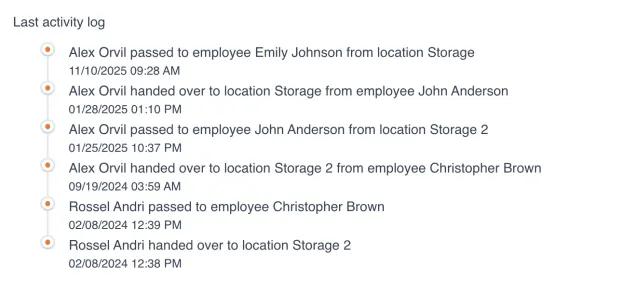
Each checkout and return is a permanent entry: who, when, how long, and the condition it came back in. When something returns damaged, the history shows whose hands it passed through. When an employee leaves, one filter lists everything still checked out to them — laptops, badges, tools — before the exit interview, not after. Equipment stops disappearing because the record exists — the people stay exactly the same.
Here's why we built check-in/check-out.
Every team we talked to tracked custody the same way: a sign-out sheet nobody filled in, or a spreadsheet one person updated from memory on Fridays. The equipment wasn't being stolen — it just never came back, because nothing asked for it back.
So we made the honest version take five seconds: scan, assign, due date. The system does the remembering — who has what, what's overdue, what came back broken — so no one has to be the office detective.

Sign-out sheet, spreadsheet, or software?
Three ways to track who has your equipment — and where each one breaks.
| Capability | Paper sign-out sheet | Spreadsheet | UNIO24Free for 50 |
|---|---|---|---|
| Recording | |||
| Time per checkout | A minute of handwriting | Open file, find row, type | Scan + two taps |
| Works at the shelf / job site | Yes | No | Yes |
| Condition notes with photos | No | No | Yes |
| While it's out | |||
| Who-has-what in one search | No | If the file is current | Yes |
| Due dates tracked | On paper only | Manual | Yes |
| Overdue alerts | No | No | Yes |
| Afterwards | |||
| Custody history per asset | Illegible after a month | Rows get overwritten | Yes |
| Ties into audits & maintenance | No | No | Yes |
Asset check-in/check-out, answered
What teams ask before replacing the sign-out sheet
What is an asset check-in/check-out system?
It's software that records who takes a shared asset, when, and until when — and confirms its return. Checking out assigns the asset to a person, team, or location; checking in releases it and logs the condition it came back in. The result is a live answer to "who has what" and a permanent custody history per asset. The glossary entry covers the workflow in detail.
What happens when someone doesn't return an item on time?
The asset stays checked out to that person — the record doesn't expire just because the date did. UNIO24 flags it overdue and sends a notification, so the follow-up starts immediately. That single change is where most of the equipment-loss reduction comes from: things come back when something asks for them.
Can't I just use a spreadsheet or a paper sign-out sheet?
You can start there — we even publish a free equipment checkout spreadsheet template. The honest limits: a spreadsheet doesn't scan tags, doesn't chase overdue items, and depends on one person keeping it current. Teams usually outgrow it at a few dozen shared assets — which is roughly where the free UNIO24 tier takes over.
Do employees need the app to check equipment out?
The fastest flow is the mobile app — scan the asset's QR tag, pick the person, confirm. But a manager or storeroom keeper can also run checkouts on others' behalf from the web app, which is how tool cribs and AV desks usually work: one person scans gear out to the whole crew.
Does it work without internet — on a job site or in a basement storeroom?
Yes. The mobile app works offline: scan tags, check assets in and out, and everything syncs when you're back in coverage. For construction crews and field teams, offline scanning is the difference between a system that gets used and one that gets skipped.
Is there a free check-in/check-out software option?
UNIO24 is free for your first 50 assets — the full platform, including check-in/check-out, QR labels, mobile apps, and unlimited users, with no expiring trial. Fifty assets covers a tool crib, an AV cart fleet, or a small office's shared hardware comfortably.
