WORK EXECUTION
Work orders that actually close.
Convert any ticket into a scheduled work order in one click. Every order links to its asset: subtasks, parts pulled from inventory, time logged, photos and signature on completion. Mobile-first, SLA-aware, nothing left open.
What changes when work orders become a real workflow.
Click to convert ticket → WO
Service request becomes scheduled work. Multiple work orders per ticket; ticket auto-closes when all are completed.
Asset-linked traceability
Every work order ties to the asset it services. Lifetime maintenance cost rolls up automatically; recurring failures surface across cycles.
Completion artifacts tracked
Parts consumed, time logged, photos attached, signatures captured. Every closed work order leaves a complete record.
Mobile + offline execution
Technicians complete work in the field via iOS or Android. Offline mode keeps the workflow running without signal; syncs when reconnected.
From request to closed loop. Nothing falls through.
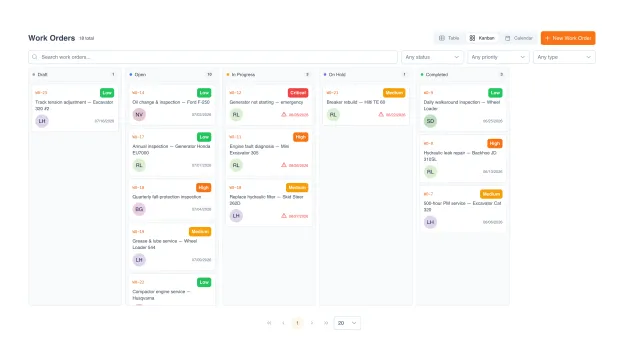
Every work order follows a clear path. Created (manually or auto-spawned from a ticket) → assigned to a technician or team → status updates as work progresses (with custom sub-statuses for downtime, blockers, and rejection reasons) → marked done with notes, photos, parts, and time. Notifications keep the requester and stakeholders informed at every stage.
Priority levels with auto-escalation when due dates approach
Multi-source: manual create, ticket conversion, or PM auto-generation
Auto-notifications to requester, assignee, and supervisors at each stage
Custom fields per work-order type: capture what matters to your workflow
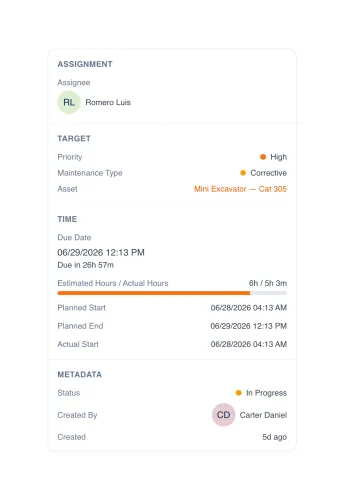
Linked to the asset it services.
A work order is never a floating task. Every order ties to the specific asset it services: the Cat 320 excavator, the rooftop AC, the office printer. Open the order and the full context travels with it: which asset, who is assigned, priority, maintenance type, the SLA clock, and planned-versus-actual time. The work stays in context, not buried in someone's inbox.
Every work order ties to the asset being serviced
Assignee, priority, and maintenance type on every order
SLA timer with response and resolution targets per order
Planned vs actual time: estimated hours tracked against logged hours
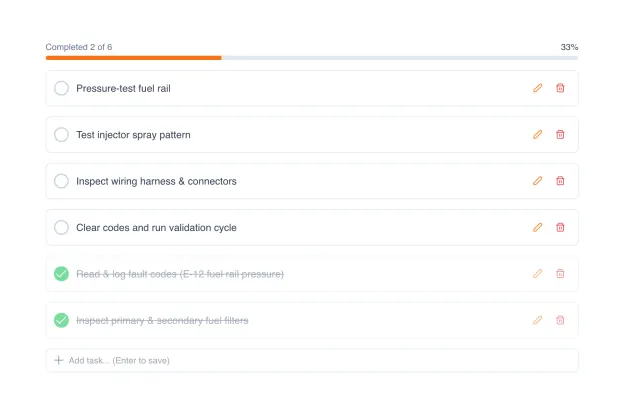
Subtasks, parts, time, evidence. All inside one record.
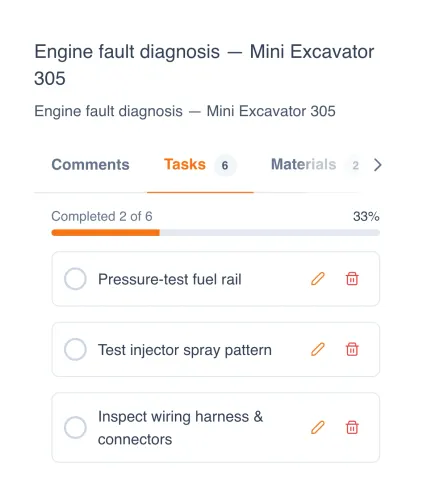
Most work orders are not single tasks. UNIO24 supports a checklist of subtasks inside the order, a simple list of steps the technician walks through, ticking each off as it is done. Parts consumed are pulled directly from the Parts Inventory module: stock auto-deducts on completion, the asset record absorbs the cost. Time entries, photos, and signature capture round out the closed record.
Subtask checklist per work order: list of steps the technician ticks off as work progresses
Parts consumed pulled from Parts Inventory. Stock auto-deducts on close
Time log per technician per task
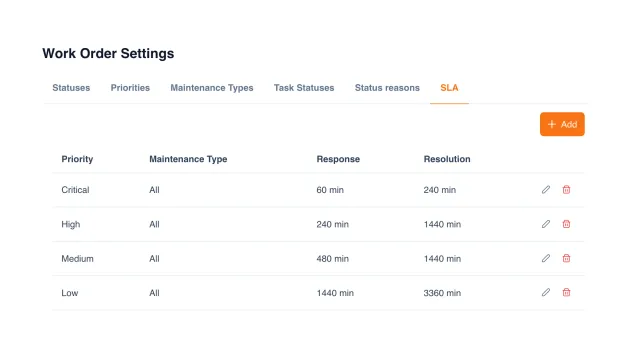
SLA policies that respect business hours.
Define response and resolution targets per priority: a critical breakdown gets a 60-minute response window; a low-priority job has room to breathe. The clock respects your working hours: it pauses overnight, on weekends, and on holidays, so an order opened at 5 PM Friday is not "breached" by Monday morning. Every order shows its live SLA countdown, and breaches surface before they become escalations.
SLA targets per priority: response and resolution, in minutes
Scope policies by maintenance type: preventive, corrective, inspection, emergency
Business-hour awareness. The clock pauses overnight, weekends, and holidays
Live SLA countdown on every order; breach surfaced before escalation
Field-ready on smartphone.
The same work order travels to the field. Technicians open their assignments on a phone, work through the subtask checklist, and tick steps off as they go. The progress bar updates in real time. Scan a QR code on the asset to pull its record, log parts as they consume them, and attach photos at each step. Offline mode keeps the workflow running without signal and syncs when the device reconnects.
QR / NFC / barcode scan to open the asset and pull its history
Subtask checklist with progress bar
Offline mode: full workflow works without internet, syncs on reconnect
What separates a real work-order tool from email + spreadsheet.
Most teams still run service work through email threads and a shared spreadsheet, with no asset context, no parts integration, and no SLA. Here is what changes when work orders become a first-class module.
| Capability | UNIO24 Work OrdersRecommended | Email + spreadsheet | Generic ticket tracker |
|---|---|---|---|
| Workflow | |||
| One-click ticket → work orderService request becomes scheduled work in one step | Yes | Manual copy-paste | Sometimes |
| Custom status sub-statesTrack downtime reasons, blockers, rejections | Yes | Free-text in cell | Limited |
| Subtask checklists per orderList of steps the technician ticks off in sequence | Yes | Manual numbered list | Sometimes |
| Auto-routing by rulesBy location, asset type, priority | Yes | Manual assignment | Sometimes |
| Asset & parts | |||
| Linked to the asset being servicedEvery work order in context of the asset history | Yes | Manual cross-reference | Rarely |
| Lifetime maintenance cost per assetRolls up from all completed work orders | Yes | Pivot table reconstruction | Rarely |
| Parts consumed deduct from inventoryStock updates automatically on close | Yes | Manual stock adjustment | Separate inventory tool |
| Recurring-failure detectionSame fault, same asset, multiple cycles | Yes | Hidden in the data | Sometimes |
| Field execution | |||
| Mobile completion (iOS + Android)Native apps with full workflow | Yes | Email reply | Often webview |
| Offline-first mobile modeFull workflow without signal, syncs on reconnect | Yes | No | Rarely |
| SLA & access | |||
| SLA with business hoursClock respects working hours, weekends, holidays | Yes | No | Sometimes |
| Free tierRun real work orders before you commit | Free for 50 assets | Free but unscalable | Rarely |
| Unlimited users on every planIncluding the free tier | Yes | Unlimited on Excel | Per-seat or hidden upcharge |
UNIO24 is a platform. Work Orders is one module.
Explore what else your team gets. All included, all with unlimited users.


Common questions about work orders in UNIO24
How does a work order go from created to closed?
Created (manually or auto-spawned from a ticket or PM schedule) → assigned to a technician or team → in-progress as the work happens, with custom sub-statuses for downtime or blockers → done when subtasks are complete, parts logged, photos and signatures captured. Notifications fire to the requester and supervisors at each stage.Can a single ticket spawn multiple work orders?
Yes. A complex service request can break into several scheduled jobs (parts ordered, repair completed, follow-up inspection). Each work order tracks separately; the originating ticket auto-closes when all linked work orders are marked done.Can I customize the status pipeline?
Yes. The base lifecycle (created / assigned / in-progress / done) is fixed for cross-team consistency, but each phase supports configurable sub-statuses (e.g. waiting-for-parts, on-hold-customer, escalated). Rejection reasons and downtime reasons are also configurable.
Have a question we did not cover? Talk to us
