IN CONTROL
Asset management software, finally on autopilot.
One cloud register for every asset you own: who has it, where it lives, what it cost, and when it is next due. Track, assign, and maintain thousands of assets from web or mobile — nothing to install.
What this looks like without a system.
Nobody knows who has the laptop
Employees change, equipment migrates, and your source of truth is a doc someone last edited six months ago.
Annual inventory eats a full week
Counting 200+ items by hand is a 2000s process. Numbers still don't match reality.
Maintenance gets remembered after the breakdown
Calendar reminders fail at scale. Somebody is on leave, somebody changes role, the reminder gets snoozed and forgotten.
Procurement keeps buying what you already own
Without a real registry, budget quietly funds duplicates of equipment sitting forgotten in the storage room.
Every asset, every detail, one view.
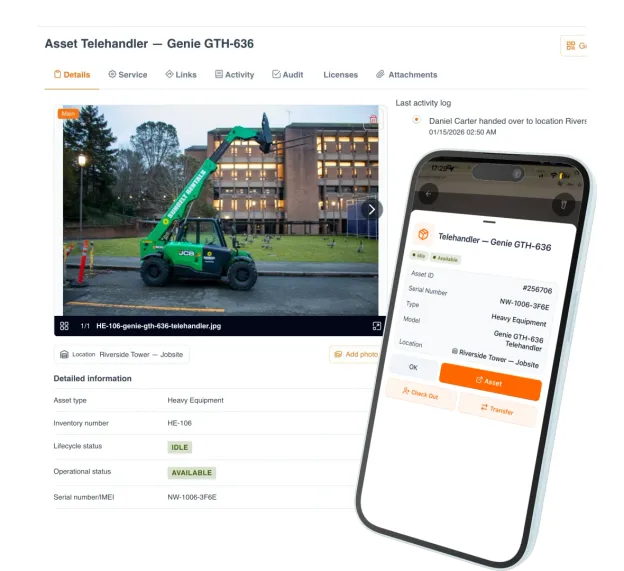
Open any asset in UNIO24 and you see everything: current owner, location, photos, documents, complete transaction history, custom fields, and attached work orders. No switching between tabs, spreadsheets, or email threads.
One click to the full asset card
Photos, documents, warranty, invoices, all attached
Transaction history on a timeline
Linked tickets, work orders, and maintenance events
What changes once you switch.
Minutes to first tag
From signup to first tagged asset. No consultants, no implementation partner.
Tagged and accounted for
By day 30, every active asset has a QR or NFC tag, an owner, and a location. No more 'where is it?' questions.
Full inventory time
Mobile QR scanning replaces clipboard counting. A multi-day cycle becomes a single shift.
Annual asset loss
Down from a typical 2–5%, driven by check-in/out logging and a designated owner on every asset.
One registry. Every asset. Every field.
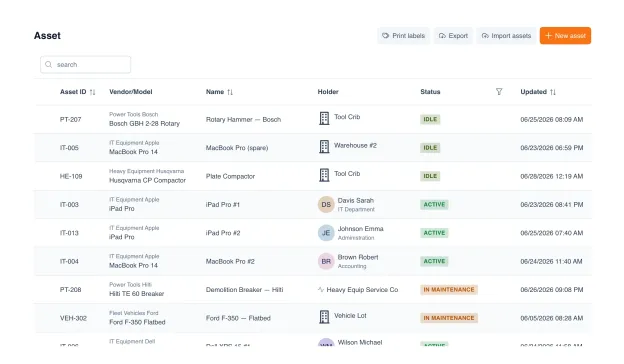
Laptops, machinery, vehicles, furniture, tools, all in one structured catalog. Custom fields adapt to your industry: serial numbers, calibration dates, compliance certificates, vendor warranties. Photos and documents attached to every record.
Bulk import from Excel or CSV: 1,000+ assets in under a minute
Custom fields for any specific attribute your team tracks
Filters and saved views: warehouse, finance, manager all see what they need
File attachments: warranty, invoice, manual, photo evidence
Know exactly who has what.
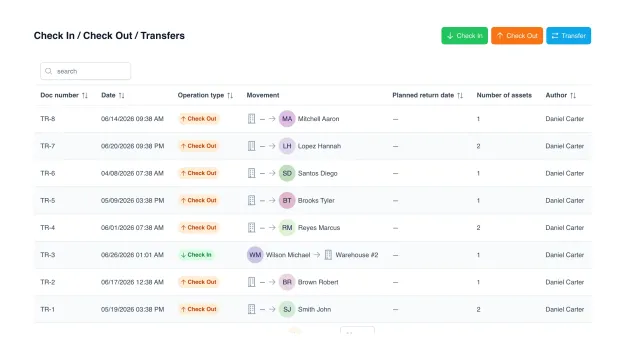
This is asset tracking software at its most literal: every asset handoff is logged automatically. When a laptop goes to an employee, UNIO24 knows. When it comes back, the log updates. No missed entries, no manual tracking, no finger-pointing during audits.
Assign assets to employees with MOL (financially responsible person)
Check-in / check-out workflow with signature capture on mobile
Automatic transaction log: every handoff, timestamped
Overdue notifications when assets aren't returned on schedule
Track locations. Log every move.
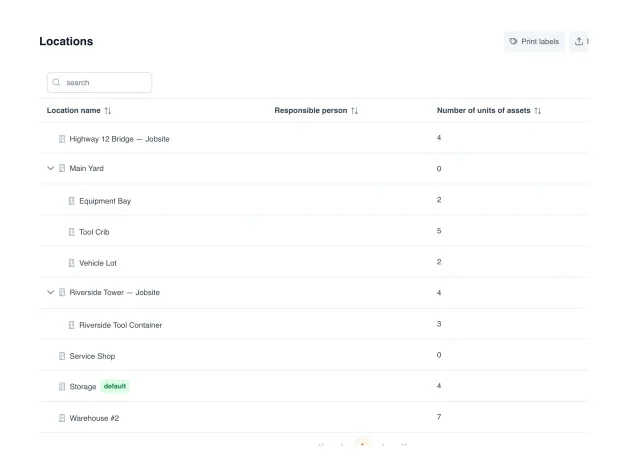
Organize assets by office, warehouse, floor, room. As deep as you need. When an asset moves between locations, the transfer is logged with date, user, reason. A real-time map view shows where everything is, right now.
Multi-level location hierarchy: office → floor → room → shelf
Transfer workflow between locations with audit trail
Real-time visibility: filter by location, see what's there
Bulk transfer when moving many assets between sites
Full history. From purchase to disposal.
Every event on an asset (acquisition, commissioning, transfers, maintenance, repairs, disposal) is recorded automatically. You always know when and by whom an asset was used, and how much has been spent on it over its lifetime.
Transparent timeline of every action on every asset
Maintenance cost tracking over the asset's lifetime
End-of-life planning based on real lifecycle history
Audit-ready records with zero extra effort

- PurchaseAcquisition & cost recorded
- CommissioningTagged, assigned, in service
- MovingTransfers & check-in/out logged
- Inventory and InspectionAudits & condition checks
- Maintenance and repairService history & costs captured
- Decommissioning and disposalEnd-of-life & write-off
Designed for how your team actually works.
Tools on job sites shouldn't be a lottery.
- Assign power tools and equipment to crews and sites
- Track transfers between jobs with photo evidence
- Flag missing tools before they become losses
Lab equipment should outlive graduation.
- Check-out gear to students and faculty with due dates
- Manage lab, AV, and sports equipment across buildings
- End-of-semester return reminders
Laptops shouldn't be a black hole after handoff.
- Assign laptops and accessories to employees
- Track warranty and lease expiry dates
- Recover equipment at offboarding automatically
Floor equipment, under control.
- Track POS terminals, refrigerators, display equipment across stores
- Transfer records when equipment moves between locations
- Service history per store location
Pallets shouldn't disappear when the office sleeps.
- Track forklifts, trailers, and handheld scanners across a fleet
- Mobile check-outs for field crews
- Location history for every piece of equipment
UNIO24 is a platform. Asset Management is one module.
Explore what else your team gets: all included, all with unlimited users.


Why UNIO24 exists.
Asset management shouldn't be this hard. We got tired of tools that require months, sometimes years, of implementation and a consultant to add one custom field. We got tired of per-user pricing that punishes teams for inviting the people who actually use the assets. We got tired of spreadsheets that break the moment two people open them.
So we built UNIO24, a modern asset platform that works on any phone, in any office, in any basement, on any jobsite. No unnecessary features. Connected modules (assets, maintenance, work orders, audits, licenses) that you switch on as you grow.
Your data. Your team. Your rules.
Security and data ownership aren't afterthoughts. They're how we operate.
Encrypted in transit (HTTPS) and at rest, with automatic daily backups
Role-based access control, full audit log of every change
Export to CSV, Excel, or API any time, without asking
No vendor lock-in. If you leave, you take everything with you
Your data is never sold or used to train anything
Questions, answered straight.
How long does setup take?
Ten minutes from signup to your first scanned asset. No implementation call required, no consultant required to start. If you want help setting up or rolling out to a larger team, our consultants are available, but it's never a prerequisite.
Can UNIO24 track fixed assets?
Yes. UNIO24 works as fixed asset tracking software: every record holds purchase date, cost, location, and custodian, plus the full maintenance spend over the asset's life. Finance can tie each fixed asset to its book value and see what it actually costs to keep, and export the register to CSV or the API whenever accounting needs it.
Is there a mobile app?
Yes. Full iOS and Android apps. Scan QR codes, check items in and out, update locations on the go.
Can we control who sees what?
Yes. Granular role-based permissions. Technicians see what they need, managers see more, finance gets reports. Every change is logged.
What if I outgrow the free plan?
Smooth upgrade, no data loss, no migration. Just switch to a higher plan.
Can I import from a spreadsheet?
Yes. CSV or XLSX, 1,000+ assets in 30 seconds. Column mapping is drag-and-drop. We've never seen a spreadsheet we couldn't read.
How does pricing work?
Flat plans based on how many assets you track. Unlimited users on every plan, from your office manager to the warehouse crew. Free for up to 50 assets, forever.
How secure is my data?
Encrypted at rest and in transit. Role-based permissions, full audit log, daily backups. You can export everything any time. Your data is yours. We never sell it.
What integrations are available?
Excel / CSV import and export. REST API and webhooks for custom integrations. Zapier in progress. If you need a specific integration, tell us. It may already be supported, or it is on our near-term roadmap.
Go deeper.
Practitioner guides that will make you better at this, whether you use UNIO24 or not.

Asset Tagging Best Practices: A Practitioner's Guide
Label types, placement strategies, numbering schemes. Everything we learned tagging thousands of assets.
Read more: Asset Tagging Best Practices: A Practitioner's Guide
Asset Tracking System Selection Guide
How to evaluate asset tracking systems: features, total cost, team fit, vendor risk.
Read more: Asset Tracking System Selection Guide
Data Migration and Cleansing for Asset Tracking
From messy Excel to clean registry, a step-by-step playbook for the migration nobody teaches you.
Read more: Data Migration and Cleansing for Asset Tracking