Free Asset Tracking Spreadsheet for Excel & Google Sheets
Ready-to-use asset tracking workbook for small teams — pre-built sheets, formulas, dropdowns, and examples. Works in Excel and Google Sheets.
What is an asset tracking spreadsheet?
An asset tracking spreadsheet is an Excel or Google Sheets file that records what you own, where each item is, and who has it. For a team with a few dozen laptops, tools, or machines it does the job without buying software, provided someone keeps it up to date.
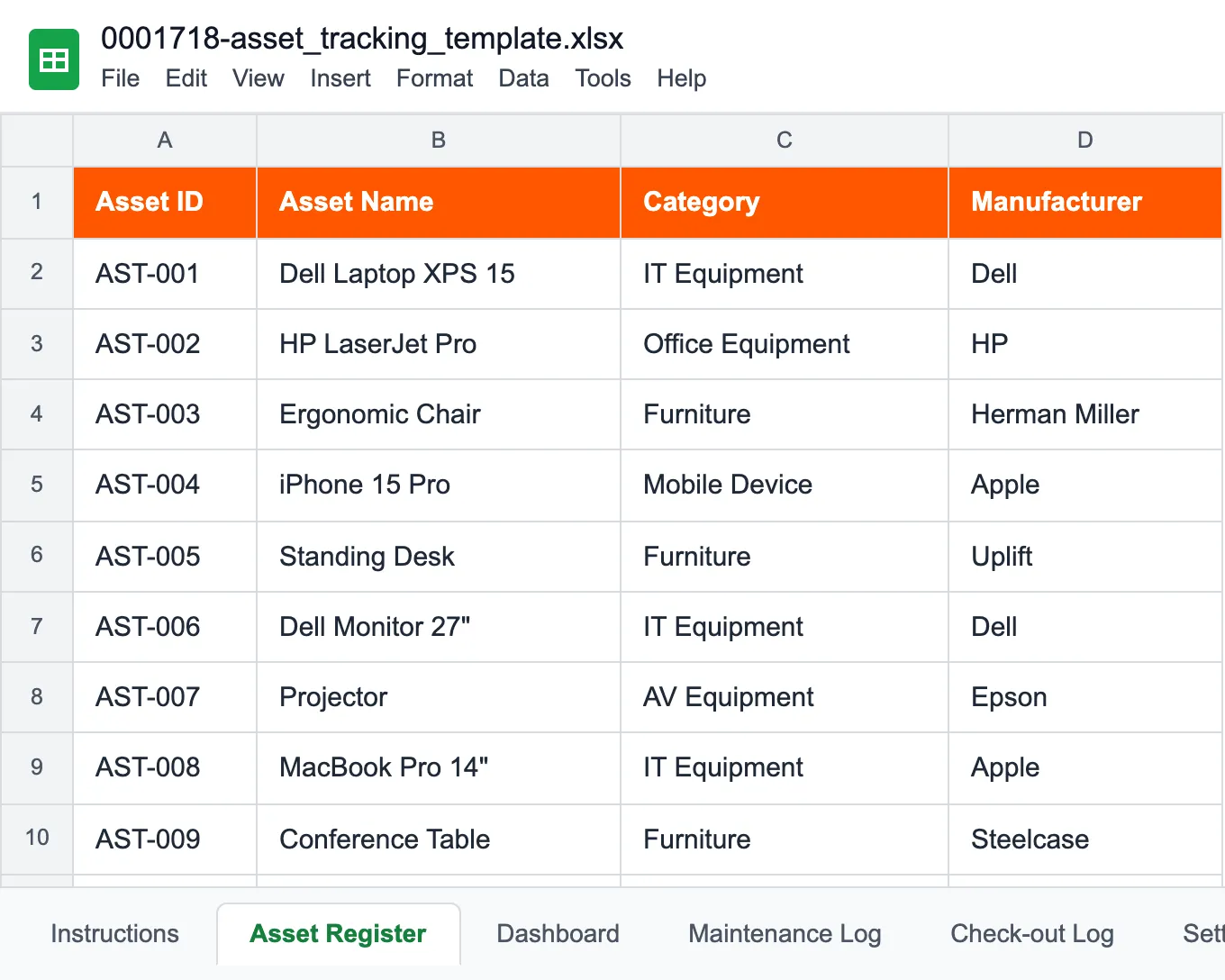
This one is a finished workbook rather than a blank grid: six sheets, dropdowns, and formulas already wired together, with sample rows you overwrite. It opens the same way in Excel (.xlsx) and Google Sheets.
If you only track one kind of thing, there are narrower versions of the same file: the tool inventory template for hand and power tools that move between crews, the equipment inventory template for machines and facility equipment, and the IT asset inventory template for laptops, licenses, and devices.
What's in the workbook, sheet by sheet
Asset Register is the master list, one row per asset: asset ID, serial number, purchase date and cost, warranty expiry, location, department, assignee, status, and condition. In the UK and Australia this list is simply called an asset register, which is also the sheet's name. Enter a useful life in years and the Current Value column writes each asset down in a straight line, a whole year at a time, until it reaches zero. That's enough to see roughly what the kit is worth. It isn't a fixed asset register for your statutory accounts, though: there's no residual value and no reducing-balance method, so leave that one to your accountant and their software.
Maintenance Log records every service and repair against the asset ID, with cost and a next-service date. Check-out Log records who borrowed what, when it's due back, and how many days it has been out. Together with the register they turn the file from a list into an asset management spreadsheet: purchase, assignment, service, and eventually retirement all sit in one place.
Dashboard totals the register by category, department, and status, and sets the purchase value against the current value. Settings holds the dropdown lists: rename a category, department, or location there and every sheet picks it up. Instructions is the first tab and explains the rest.
Most teams start by filling in the register and nothing else. The other sheets are there for when the questions change from "what do we have" to "when was this last serviced" and "who has it now".
Useful for small teams across industries
Built for teams up to 50 assets — swap in your industry and start tracking today.
Small IT teams
Track laptops, monitors, peripherals — know who has what at all times.
Schools & colleges
Student laptops, AV gear, lab equipment — with check-out logs per classroom.
Construction crews
Tools and equipment across job sites — transfers, returns, and audits.
Non-profits & churches
AV systems, vehicles, volunteer equipment — simple tracking for small budgets.
Property management
HVAC, elevators, building systems — service schedules and compliance logs.
Retail & small business
POS, fridges, cameras — asset location and maintenance across stores.
Spreadsheet or UNIO24 — what fits your team?
The template is a great start. Once your team grows, a cloud platform pays off.
| Capability | Free Template | UNIO24 FreeRecommended for 50+ |
|---|---|---|
| Daily tracking | ||
| Asset limitTemplate handles unlimited but slows past hundreds. UNIO24 free tier covers 50 assets with unlimited users. | Partial | Yes |
| Team collaborationShared file = one editor at a time. UNIO24 = real-time editing, unlimited users. | Partial | Yes |
| Mobile accessNative iOS and Android apps with offline mode | No | Yes |
| QR / barcode scanningScan from the mobile app | No | Yes |
| Maintenance & automation | ||
| Automated maintenance remindersNotifications for upcoming service dates | No | Yes |
| Check-in / check-out logsManual spreadsheet tab in the template. UNIO24 records check-outs automatically with full history. | Partial | Yes |
| Alerts (low stock, overdue)Automatic notifications when items are overdue or stock drops | No | Yes |
| Data & reliability | ||
| BackupsTemplate relies on you remembering to save. UNIO24 backs up automatically every day. | Partial | Yes |
| Audit trailFull change history per asset — who edited what, when | No | Yes |
| Works from anywhereWherever the spreadsheet file is for the template. UNIO24 runs from web, iOS, and Android. | Partial | Yes |
| Full support | 0/ 10 | 10/ 10 |
Frequently Asked Questions
Everything you need to know about our free asset tracking spreadsheet template
Is the asset tracking spreadsheet template really free?
The asset tracking spreadsheet template is free — no hidden costs, no subscriptions, no card required. Fill out the form and you get instant access.
Can I customize the template for my business?
The template is customizable — add or remove columns, modify formulas, change formatting, and adapt it to your specific workflow.
Will I receive marketing emails after downloading?
We will send you the template link and occasionally share helpful tips about asset management. You can unsubscribe at any time from any email we send.
Can multiple people use the spreadsheet at the same time?
In Google Sheets, multiple users can collaborate in real time. With Excel files, only one person can edit at a time unless you use Excel Online for shared workbooks.
Is this an asset tracker template, asset management template, or asset inventory template?
All three — this one template works for every use case. Call it an asset tracker template when you focus on location and assignment, an asset management template when you track the full lifecycle (acquisition, maintenance, disposal), or an asset inventory template when you run periodic counts. The sheets are the same; the emphasis depends on which columns you rely on most.
How does this compare to ConnectCode asset tracking spreadsheet?
ConnectCode and our template both give you an Excel-based asset tracking system without software installation. The main differences: our template includes a pre-built dashboard, maintenance log, and check-out log in one file; ConnectCode focuses more on barcode printing within Excel. Our template is free with no feature gates; ConnectCode has paid editions for advanced features. For most small teams, either works — choose based on whether barcode printing from Excel is a must-have.
How do I create an asset tracking spreadsheet in Excel from scratch?
Start with one sheet and one row per asset. First, add columns for a unique asset ID or tag, name, category, assignee, location, purchase date, cost, condition, and status. Second, turn Category, Status, and Condition into dropdowns with Data Validation so entries stay consistent. Third, add a Maintenance Log sheet and a Check-out Log sheet, each linked back to the asset ID with VLOOKUP or XLOOKUP. Fourth, build a small dashboard with COUNTIF and SUMIF totals by category and status. That is exactly the structure this template ships with, already built — download it if you would rather skip the formula work and start from a working file.
What format is the template in?
The template is provided as a Google Spreadsheet that you can copy to your own Google Drive. You can also download it as an Excel file (.xlsx) or use it with other spreadsheet applications.
How many assets can I track with this template?
The spreadsheet template can handle hundreds of assets. However, for larger inventories (50+ assets) or teams needing mobile access, we recommend upgrading to UNIO24 for better performance and features.
What if I need help using the template?
The template includes instructions and examples. If you need additional help, our support team is available to answer questions about using the template effectively.
What is the difference between this template and UNIO24?
The spreadsheet template is a good starting point for basic asset tracking. UNIO24 is a cloud platform with mobile apps, QR code scanning, automated workflows, and reporting on top. UNIO24 is also free for up to 50 assets.
Can I use this as an Excel asset tracker or asset management spreadsheet?
Yes. The template is a native Excel (.xlsx) file and also opens in Google Sheets with full formula support. Whether you call it an Excel asset tracker, an asset management spreadsheet, or an asset inventory tracker, it works the same way — the columns and formulas are built to handle all three use cases.
Can I use this for equipment inventory tracking or construction equipment?
Yes — this workbook handles any asset type. If you track mostly one kind, we also have dedicated workbooks with their own sheets and formulas: the tool inventory template for hand and power tools that move between crews and job sites, the equipment inventory template for machines and facility equipment with condition, loan payments and depreciation, and the IT asset inventory template for laptops, software licenses, and devices. Pick whichever matches what you track.
Go Deeper on Asset Tracking
While you explore the template, learn from teams who have done this before.

Asset Tagging Best Practices: A Practitioner's Guide
Label types, placement strategies, numbering schemes. Everything we learned tagging thousands of assets.
Read more: Asset Tagging Best Practices: A Practitioner's Guide
Physical Asset Inventory: A Step-by-Step Checklist
Confessions from someone who found a $4,000 projector in a coat closet — and what to do during your first count.
Read more: Physical Asset Inventory: A Step-by-Step Checklist
How to Choose the Right Asset Tracking System
Cloud vs on-premise, must-have features, ROI calculation, and the costly mistakes most companies make when picking software.
Read more: How to Choose the Right Asset Tracking System