SERVICE DESK
Service requests, organized end-to-end.
Every ticket linked to the asset it is about, every resolution logged to that asset history, every escalation visible end-to-end. Nothing lost in email or chat.
What teams typically see.
Untracked incidents
Multi-source intake (email, API, portal, manual) keeps every request in the same queue. Email threads no longer the source of truth.
SLA hit-rate visible per team
Open / overdue / breached / on-track at a glance. Breach alerts fire before deadlines, not after.
Downtime trend per asset
Every ticket logs the asset and downtime. Per-asset trends across 30 / 90 / 365 days surface replacement candidates before failure.
Auto-routing dimensions
Category, priority, type, location, asset, source. Combine any of them in routing rules. Manufacturing-line tickets to on-shift team; after-hours IT to on-call.
One workflow. Every request. Clear ownership.
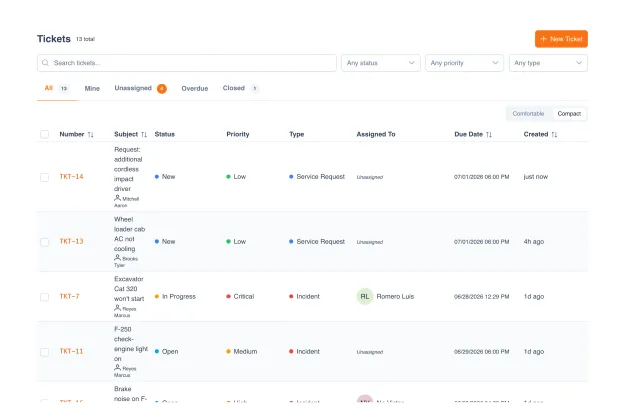
No more requests buried in email threads or chat. Every ticket lives in a sortable, filterable, assignable list: status, priority, category, assignee, asset, and SLA timers all visible at a glance.
Sortable list with status, priority, assignee, asset, SLA timer
Filter by category, assignee, location, asset type, overdue, breached
Custom statuses per organization, grouped under fixed categories
Full context on every request.
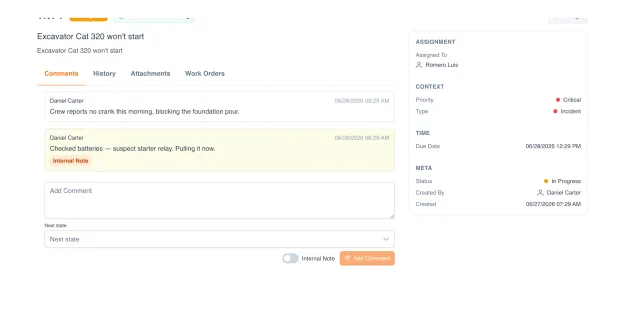
Open any ticket and everything is in one place: the conversation with the requester, internal notes only your team sees, the live SLA timer, the assignee, and the status flow from New to Resolved. No more digging through email threads to reconstruct what happened.
Threaded comments, with internal-only notes for your team
Live SLA timer: time remaining or breach, at a glance
Clear status flow: New → In progress → Resolved → Closed
Assignee, priority, and type visible the moment you open it
SLA, routing, and business hours that work.
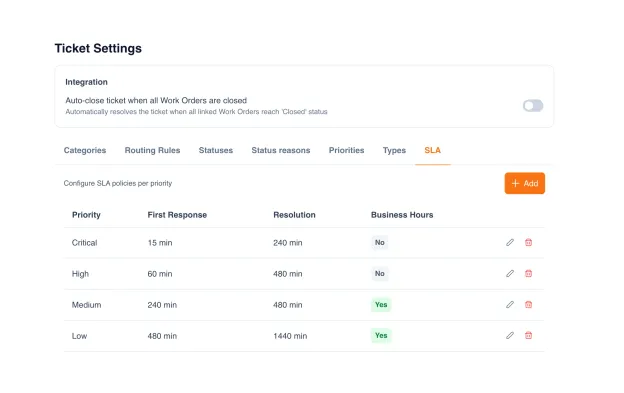
Define rules: high-priority tickets in the manufacturing line route to the on-shift maintenance team; HVAC issues at after-hours go to the on-call; software-license requests go to IT-procurement. SLA policies set response and resolution targets per priority, with the clock pausing overnight and on holidays, so weekend tickets do not breach deadlines while the office is closed.
Auto-routing rules: by category, priority, type, location, asset, source
SLA policies with response and resolution targets per priority
Business-hour awareness, clock respects working hours, weekends, holidays
Background SLA monitor: warnings before deadline + breach alerts at breach
On-hold reasons configurable per organization (waiting-customer, waiting-vendor)
Resolution codes for analytics, categorize how tickets get closed
One click: promote a ticket into a work order.
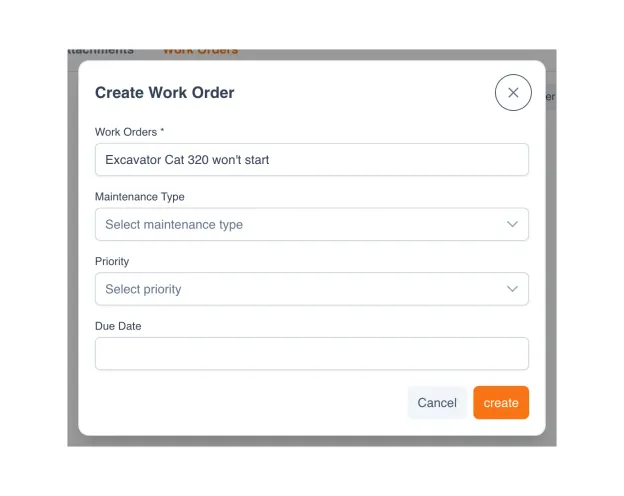
Some service requests are answered in a comment. Others need real work: a technician dispatched, parts pulled, time logged. Click "Create Work Order" on the ticket and a new work order starts pre-filled with the request, ready for you to set maintenance type, priority, and due date. Run several work orders off one ticket; it auto-closes when they all complete.
Create a work order straight from the ticket, title pre-filled
Set maintenance type, priority, and due date in one step
Multiple work orders per ticket, split complex requests into stages
Auto-close: the ticket resolves when all linked work orders close
What separates real ticketing software from email + chat.
Most teams still run service requests through email threads, shared mailboxes, and Slack channels. Here is what changes when tickets become a first-class module with asset context.
| Capability | UNIO24 TicketsRecommended | Email + chat | Generic helpdesk |
|---|---|---|---|
| Intake & workflow | |||
| Sortable list with filtersStatus, priority, assignee, asset, SLA timer | Yes | Buried in inbox / chat | Yes |
| Multi-source intakeManual, email-to-ticket, REST API, self-service portal | Yes | Email only | Sometimes |
| Hierarchical categories + custom statusesTree-structured for clean reporting per organization | Yes | Free-text labels | Limited |
| Asset context | |||
| Linked to the asset and locationEvery ticket in context of the asset history | Yes | Manual cross-reference | Rarely native |
| Asset history visible from the ticketPrevious repairs, owner, warranty, related tickets | Yes | Look up separately | Rarely |
| Repeat-failure detection per assetSame asset, similar issue, multiple cycles surface automatically | Yes | Hidden in threads | Sometimes |
| SLA & routing | |||
| SLA with business hours and holidaysClock respects working hours; weekends do not burn deadlines | Yes | No | Sometimes |
| Auto-routing by rulesCategory, priority, location, asset, source | Yes | Manual reassignment | Often premium |
| Workflow | |||
| One-click convert to work orderWhen a request needs real scheduled work | Yes | Manual copy-paste | Rarely native |
| Auto-close when work orders completeTicket closes when all linked work orders are done | Yes | Manual close | Sometimes |
UNIO24 is a platform. Tickets is one module.
Explore what else your team gets. All included, all with unlimited users.


Common questions about tickets in UNIO24
Where can tickets come from?
Four sources, all landing in the same system: manual creation by staff, email-to-ticket (forwarding to a dedicated mailbox), REST API for integration with other systems, and a self-service portal where requesters file directly. The source is recorded on every ticket so analytics can compare resolution time and volume across channels.Can we use our own statuses and categories?
Yes. UNIO24 ships fixed status categories (open / in-work / paused / done / closed / cancelled) for cross-team consistency, but each category supports configurable sub-statuses (e.g. "Acknowledged", "Investigating", "Awaiting User"). Categories are tree-structured: you can build "Hardware → Laptop → Display" depth that matches your taxonomy.Does this work for non-IT service requests too?
Yes. Tickets cover any service request: IT (laptop swap, password reset), facilities (HVAC issue, cleaning request), maintenance (broken equipment), procurement (license request), HR (access change). The asset link, workflow, and SLA work the same regardless of category. Most teams use one tickets module across departments, with category-based routing.
Have a question we did not cover? Talk to us
