If you only need to label a few dozen things, a printer may be the wrong purchase entirely. A label print shop will run a small batch to your artwork and ship it for less than any printer here costs, and for a handful of labels a sheet of pre-cut Avery stock through the office laser gets you there the same afternoon.
Once you're printing often enough that ordering batches stops making sense, the question becomes which printer to buy. Let's go through the ten models people actually buy across five brands, weigh up what each one does well and badly, and look at the printing technologies behind them.
Printing technologies, and what actually changes
Four printing technologies cover everything on the market, and the choice between them does more for how long a label survives than the brand on the case.
Thermal transfer
A ribbon runs between the print head and the label, and the head melts ink off it onto the surface. What that ink is made of, not what the printer costs, decides how long the print lasts.
Ribbons come in three grades and the name on the box is most of the spec. Wax is the cheapest and the softest: it prints cleanly but smears under a fingernail. Wax-resin hardens that up for labels that get handled, rubbed, or splashed. Full resin is the durable end, the one that holds through sunlight, solvents, and steam cleaning. Same printer, same labels, three different lifespans depending on which roll is loaded. Wax is also the cheapest per meter of the three, which is why nobody simply loads resin for everything and stops thinking about it.
Pros: the only technology that survives sunlight, solvents, and abrasion, because nothing on the label stays heat-sensitive after printing. Prints on paper and synthetics alike, and durability is tunable after the fact: same printer, different ribbon.
Cons: two consumables instead of one, and they have to suit each other as well as the job. Ribbon is waste by design, a spent roll per roll of labels, and the rolls themselves vary wildly in length between printers, which is where the real running cost hides. At 300 dpi most desktops also drop a couple of ips against their 203 dpi versions.
Label stock: wax ribbon goes on paper labels handled lightly, indoors. Wax-resin goes on coated paper and polypropylene that gets picked up, moved, and rubbed. Full resin belongs on polyester or polypropylene and nothing else, which is the combination that goes outdoors. A wax ribbon on polyester won't bond at all and flakes within days, and a resin ribbon on plain paper prints beautifully while the paper itself falls apart.
Direct thermal
No ribbon. The label stock is coated with a chemical that darkens under heat from the print head, so the paper is both the medium and the ink.
Pros: one consumable, nothing to thread, nothing to run out of halfway through a run. Cheapest per label, and it's what carriers assume for 4×6 shipping labels, so the whole supply chain is built around it.
Cons: the coating never stops reacting. Heat, sunlight, friction, and the plasticizers in soft PVC all darken or bleach it, so a label in a hot van or direct sun can fade within weeks, and indoors it starts losing contrast after a year or two. Never feed it through a laser printer either: the fuser blackens the whole sheet.
Label stock: direct-thermal paper for anything read once and binned. Top-coated direct thermal if labels get rubbed, wiped, or splashed, since the coating adds abrasion and moisture resistance for a few cents more. Direct-thermal synthetics exist for cold, wet rooms, but no direct-thermal stock, coated or not, belongs in daylight.
Thermal transfer vs direct thermal
These two cover almost every label printer sold, and picking between them settles the running cost and the lifespan in one decision.
| Thermal transfer | Direct thermal | |
|---|---|---|
| Consumables | ribbon and labels | labels only |
| Cost per label | higher, and the ribbon runs out too | the cheapest there is |
| Lasts | years, outdoors with a resin ribbon | months indoors, weeks in sun or heat |
| Killed by | the wrong ribbon on the wrong stock | heat, UV, friction, soft-PVC plasticizers |
| Made for | equipment tags, rack labels, anything outdoors | shipping labels, pick tickets, receipts |
The rule that decides it: if the label has to outlive the season, print it thermal transfer. If it gets read once and binned, direct thermal is cheaper, simpler, and no worse for the job. Printers that do both, which is eight of the ten below, let you switch by loading a ribbon rather than by buying a second machine.
Laser
Toner fused onto the label surface by heat, on sheets rather than a roll. The office printer you already own is the printer.
Pros: toner doesn't dissolve in water and doesn't fade under ambient light, so it beats direct thermal on durability without any new hardware. A sheet holds dozens of labels, which makes a batch of thirty cheap and immediate.
Cons: sheets only, so past a hundred labels at a sitting you're hand-feeding paper while a label printer would spool through a roll. Partly used sheets are a gamble on the second pass, since exposed adhesive can lift and jam in the fuser. And the fuser heat rules out anything not sold as laser-safe.
Label stock: laser-rated matte paper sheets indoors, laser-rated polyester or vinyl for anything damp or outdoors. Check the box says laser: inkjet-coated sheets and untested synthetics can soften or melt against the fuser, and direct-thermal stock turns black on the way through.
Inkjet
Ink sprayed onto the sheet, and the only one of the four that prints color cheaply.
Pros: color for coded labels or a logo, no consumable beyond a cartridge, and a printer most offices already have. Fine for a prototype label or a one-off batch on a sheet of pre-cut stock.
Cons: dye-based ink runs when it gets wet or handled with damp gloves, which rules out most warehouse and outdoor work. On uncoated paper the ink spreads into the fibers, and that bleed is what closes the gaps between QR modules on a small code, so it fails at exactly the sizes asset labels use.
Label stock: inkjet-coated matte sheets, never plain paper, since the coating is what stops the bleed. Inkjet-rated polypropylene or polyester for anything that might get wet. If the printer takes pigment ink rather than dye, use it: pigment sits on the surface and holds up to water far better.
Why 203 dpi isn't always enough for a small QR code
It's a resolution problem specific to size, not a blanket rule. A 300 dpi printer resolves about 12 dots per millimeter; 203 dpi resolves about 8. A typical QR code holding a short URL at error correction level Q runs around 29 modules per side. Printed at 1.5 cm, a common size for a tag or a shelf label, each module works out to roughly 0.5 mm wide: about 4 dots at 203 dpi, about 6 at 300 dpi. Four dots per module is close to where a thermal print head starts merging adjacent modules into one smeared block, especially as a ribbon wears; six dots keeps the edges distinct. That's also why the same 203 dpi engine rarely struggles with a 1D barcode at the same physical width. A barcode's narrowest bar is usually wider than a small QR module to begin with, so it never gets that close to the dot floor.
Which printer do you actually need?
Two questions decide this, and they're independent, not steps in one ordered list: how long the label has to survive, and where you'll be standing when you print it.
How long does the label need to survive?
- Outdoors long-term, or exposed to heat, moisture, chemicals, or abrasion → needs a thermal-transfer label with a resin or wax-resin ribbon. See durable outdoor below for the printer, whether it's printed at a desk or in the field.
- Indoors, or short-lived anywhere (a same-day tag, replaced within a season) → direct thermal is fine.
If you'd rather answer that by what you're labeling, it usually lands in the same place:
- Shipping labels, pick tickets, packing slips → read once, then binned → direct thermal, which is what carrier 4×6 labels assume anyway.
- Bin, shelf, and rack labels, the backbone of inventory management in a warehouse → indoors, but expected to stay legible for years of counts and picks → thermal transfer with a wax or wax-resin ribbon. Direct thermal is cheaper and holds indoors for a year or two before it starts losing contrast.
- Equipment and asset tags → the environment decides, not the category. A tag in a server room and a tag on a skid steer are different problems.
- Product and packaging labels → depends where the product ends up: a carton shipping this week is short-lived, a rating plate on outdoor equipment is not.
Where will you print it, and how much?
- Thousands of labels per run, printed near-continuously → industrial volume, regardless of durability.
- At a desk, indoors, low-to-moderate volume, regularly → office indoors.
- In the field (job sites, delivery routes, a warehouse floor away from a workstation), and the label is short-lived → portable for field crews.
- In the field, but the label needs to survive outdoors long-term → print it on a durable-outdoor printer at a desk in advance and carry the finished label out; a mobile direct-thermal printer isn't built for that durability no matter where it's used.
- A one-time or occasional handful of labels, no interest in owning a printer → skip the purchase and run a sheet of pre-cut labels through the office laser.
The best models for the money
These ten are a shortlist, not a catalog. I went through what the market actually sells and kept the model that makes the strongest case for its money in each class, from a $240 office printer to a $1,730 industrial one.
Prices are approximate US street prices from live reseller listings in early August 2026. A thermal-transfer desktop can span a few hundred dollars under one model name, because dpi and connectivity are configurable options rather than fixed specs.
The monthly volumes are my own estimates, not manufacturer figures: unlike office printers, label printers rarely ship with a published duty cycle, so treat them as the point where a printer stops being comfortable rather than the point where it breaks. Push past it and you get more jams, more head wear, and a printer that spends its life warm.
Brother QL-820NWB
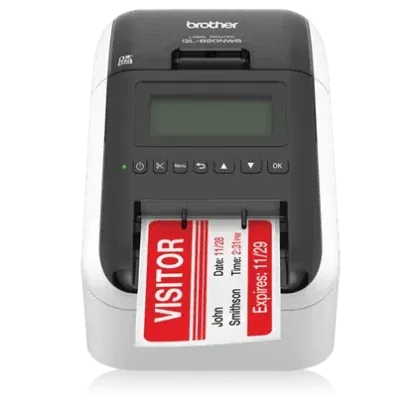 Office indoors · direct thermal only · 300 dpi · DK rolls 12–62 mm wide · a few thousand labels a month · around $240. Image: Brother.
The odd one out in this lineup: a label printer rather than a barcode printer, built around Brother's own DK roll consumables instead of standard label stock and ribbon. Indoors the fading weakness of direct-thermal media never gets triggered at full strength, though it still loses contrast over a couple of years, so a label meant to outlive the equipment it's stuck to belongs on a thermal-transfer printer instead.
Pros: 300 dpi as standard, which is more than most desk-side printers at this price offer, and up to 110 labels a minute. Prints standalone from its LCD without a computer attached, and takes USB, Ethernet, Wi-Fi and Bluetooth, so a shared office printer doesn't end up tethered to one desk. Black-and-red printing on DK-2251 media if a label needs a second color.
Cons: the consumables are proprietary DK rolls, so you're buying labels from Brother rather than shopping the market, and the widest of them is 62 mm rather than the 4 inches every other printer here handles. Direct thermal only, so nothing it prints belongs outdoors.
Common snags: adhesive builds up around the label outlet and throws a cutter error, which a wipe with a damp cloth clears. The printer also asks for a new DK roll with one already loaded, usually a dusty or misread roll sensor rather than a dead printer.
Zebra ZQ511
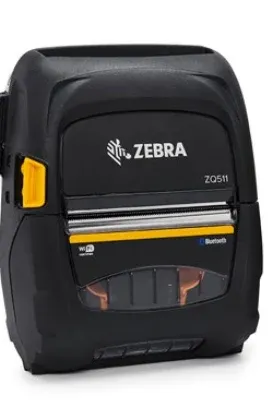 Portable, field crews · direct thermal only · 203 dpi · media 35–80 mm · a thousand or two a month, limited by shifts rather than the printer · $525–$600. Image: Zebra.
A 3-inch mobile printer built to be carried, dropped, and rained on rather than sat on a desk. Bluetooth pairs it to a phone or handheld scanner running your asset tracking app, so labels get printed where the work is. If a label has to survive outdoors long-term, print it at a desk in advance on a thermal-transfer printer and carry the finished one out.
Pros: rated to MIL-STD 810G for drop and shock, 1300 tumbles from 1 m, and IP54 out of the box without a case (IP65 with the optional exoskeleton). 0.63 kg with the standard battery, so it rides on a belt without becoming the reason nobody labels anything. Prints up to 5 ips, pairs over Bluetooth, and carries 256 MB RAM / 512 MB flash for stored formats.
Cons: 203 dpi only, which is the resolution that struggles first on a QR code under 2 cm. Direct thermal, so field-printed labels are short-lived by design. The 3-inch width rules out 4-inch shipping labels, and the price is desktop-printer money for a 203 dpi engine, because you're paying for the ruggedness.
TSC TE210
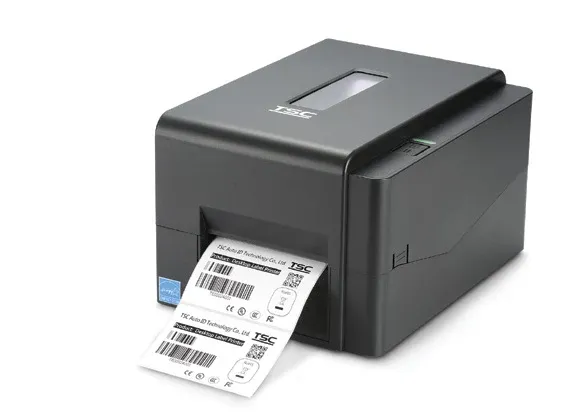 Durable outdoor · thermal transfer and direct thermal · 203 dpi · media 20–112 mm · up to roughly 10,000 labels a month · $360–$525. The TE210, TE300 and TE310 share this chassis. Image: TSC.
The 203 dpi, better-connected member of TSC's TE series, and the fastest of the group on paper.
Pros: 6 ips at 203 dpi, 108 mm print width, and a full set of interfaces in the box: Ethernet, RS-232, USB 2.0 and a USB host port for a scanner or keyboard. 64 MB SDRAM / 128 MB flash holds real label templates, and it takes a 300 m ribbon roll, which is four times the media-to-ribbon ratio of the 74–110 m rolls smaller printers use.
Cons: 203 dpi, so small codes need the sizing check from the dpi section above. ABS plastic housing and a one-button, one-LED front panel: nothing to configure at the printer itself, everything through the driver or the web page.
Common snags: gap-sensor calibration, and it applies to the whole TE series. Change label pitch or media type without recalibrating and the printer feeds blanks or stops mid-roll. The routine takes seconds once you know it exists, which is why half the support material for these printers is about it.
TSC TE300
Durable outdoor · thermal transfer and direct thermal · 300 dpi · media 20–112 mm · up to roughly 10,000 labels a month · $430. Chassis pictured above.
Same body as the TE210 with a 300 dpi head, and a noticeably thinner spec sheet everywhere else.
Pros: 300 dpi at desktop-printer money, 5 ips, 105.7 mm print width, same 300 m ribbon capacity as the rest of the series.
Cons: USB 2.0 is the only interface (Bluetooth is a factory option, Ethernet isn't available at all), so it can't sit on the network. 16 MB SDRAM / 8 MB flash is a fraction of the TE310's memory, and maximum print length drops to 40 inches. At $430 it's more expensive than the 300 dpi PC42E-T, which has Ethernet built in.
TSC TE310
Durable outdoor · thermal transfer and direct thermal · 300 dpi · media 20–112 mm · up to roughly 10,000 labels a month · around $460. Chassis pictured above.
The TE300's specification gap closed: same 300 dpi engine, the TE210's electronics.
Pros: Ethernet, RS-232 and USB host alongside USB 2.0, 64 MB SDRAM / 128 MB flash, and maximum print length up from 40 to 450 inches. If you want 300 dpi from TSC and the printer has to be on the network, this is the model, not the TE300.
Cons: at around $460 it lands close enough to the TE300 that resellers regularly confuse the two, and several of them hide the figure behind TSC's minimum-advertised-price policy, so it pays to ask for a quote rather than trust a listing. Still 5 ips and still a plastic-bodied desktop.
From my own use: one of two printers on this page I've run myself rather than read about. On the projects I used it for, it turned into the boring daily workhorse you want from this category. Load a roll, print, stop thinking about it.
Godex GE330
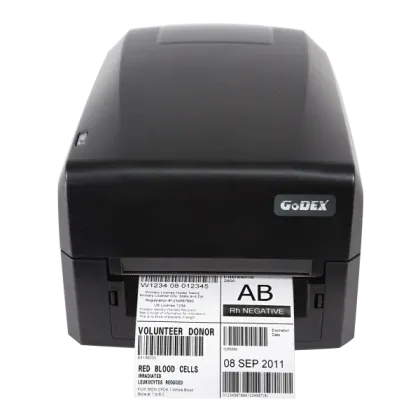 Durable outdoor · thermal transfer and direct thermal · 300 dpi · media 25–118 mm · up to roughly 8,000 labels a month, ribbon changes permitting · $445–$495. Image: GoDEX.
Godex's 300 dpi desktop, and the value pick if the three-year warranty matters more to you than throughput.
Pros: 300 dpi with Ethernet, RS-232 and USB all standard, and a three-year parts-and-labor depot warranty, which is longer than anything else in this group ships with.
Cons: the ribbon is the catch. 110 m on a 0.5-inch core, against 300 m for the TSC, Zebra and Honeywell desktops, so an operator changes ribbon roughly three times as often for the same output. 4 ips is the slowest of the 300 dpi group, memory is 16 MB SDRAM / 8 MB flash, and maximum print length is 30 inches. Note the naming: the older G330 still appears in reseller listings, but Godex's current catalog lists the GE300/GE330, so buy by the GE part number.
Common snags: it ships set to thermal transfer, so the first direct-thermal job without a ribbon fitted throws a media error until you change the mode. Driver trouble usually traces back to an old GoLabel install rather than to the printer.
Zebra ZD421t
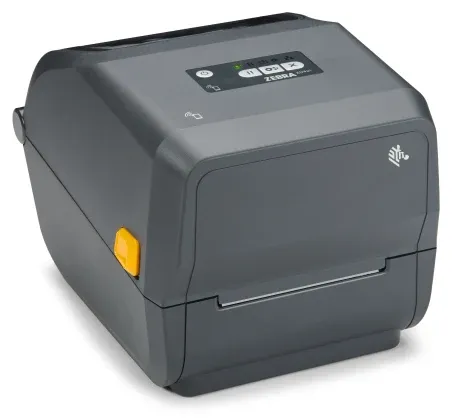 Durable outdoor · thermal transfer and direct thermal · 203 or 300 dpi · media 15–112 mm · 15,000–20,000 labels a month · $595–$810. Image: Zebra.
The mid-range choice, and the one with the widest software and driver support of the group: if a warehouse or ERP system speaks to a label printer at all, it speaks ZPL.
Pros: available at 203 dpi (up to 6 ips) or 300 dpi (up to 4 ips), 256 MB SDRAM / 512 MB flash, media up to 112 mm wide, and a choice between a 300 m ribbon roll and a drop-in ribbon cartridge that removes the fiddliest part of loading.
Cons: Ethernet and Wi-Fi are field-installable options, not standard, so the entry price buys a USB printer. The cartridge convenience costs media: cartridges hold 74 m at a 1:1 media-to-ribbon ratio against 4:1 for the 300 m roll, so a cartridge printer burns ribbon four times faster per label.
From my own use: the other one I've run myself, on different projects to the TE310, and an easy printer to recommend for everyday work. Undemanding about what you feed it, no ritual required to keep it going, and it simply hasn't let me down.
Honeywell PC42E-T
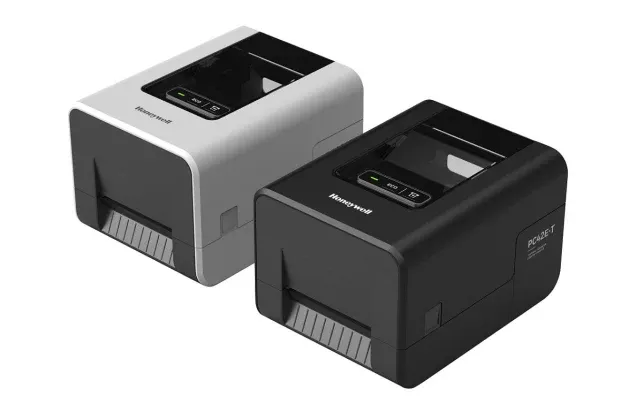 Durable outdoor · thermal transfer and direct thermal · 203 or 300 dpi · media 25–114 mm · up to roughly 10,000 labels a month · $296 (203 dpi) / $311 (300 dpi). Image: Honeywell.
The cheapest printer here that does both thermal transfer and direct thermal, and one of the cheapest anywhere that covers both properly rather than as an afterthought. That combination is what makes it the sensible office machine for modest volumes: durable tags on a resin ribbon this morning, a stack of throwaway direct-thermal labels this afternoon, one printer on the desk and no second purchase to justify.
Pros: $296 for 203 dpi and $311 for 300 dpi, which makes it the cheapest way into 300 dpi anywhere in this lineup, and 300 dpi is what holds detail on a code under 2 cm where 203 dpi starts to blur. Both versions have Ethernet and a USB host port built in, up to 6 ips at either resolution, and 128 MB flash / 128 MB SDRAM. Takes both 0.5-inch and 1-inch ribbon cores, so it runs the cheap 300 m rolls without an adapter, and handles media up to 114 mm. 2.04 kg, so it doesn't dominate a desk.
Cons: the front panel is one feed button, one eco button and an LED, so everything happens through the driver or the web interface. Rated for 5–40 °C operation, which is a narrower window than the industrial models, and the light plastic body is built for a desk rather than a loading dock.
Common snags: the ribbon loads ink-side out. Fit it the other way round and you get an out-of-ribbon error with a full roll in the printer, which is a standing support question across the PC42 family.
Honeywell PC45t
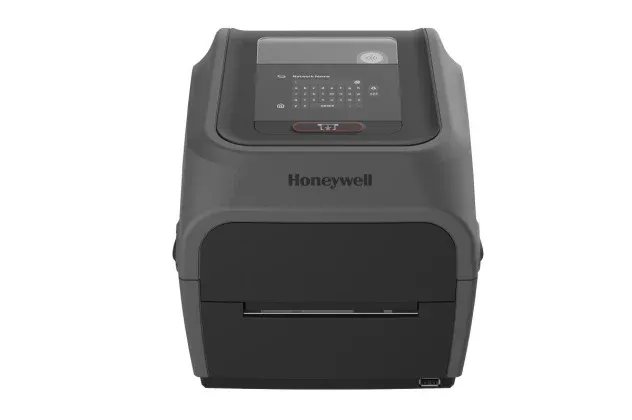 Durable outdoor · thermal transfer and direct thermal · 203 or 300 dpi · media up to 118 mm · 20,000 labels a month and up · $975–$1,110. Image: Honeywell.
The top of the desktop range, priced like a small industrial printer and specified accordingly. This is the one to buy when the printer lives on a shop floor and gets run by whoever is on shift, rather than sitting at a manager's desk.
Pros: a 3.5-inch 320×240 color touchscreen, so an operator configures the printer at the printer. Up to 8 ips at 203 dpi (6 ips at 300 dpi), the fastest desktop here. Wi-Fi 6, Bluetooth 5.2, Ethernet, RS-232 and USB all standard, 256 MB RAM / 512 MB flash, media up to 118 mm, and a 0–45 °C operating range that covers an unheated warehouse in winter.
Cons: roughly 3.3 times the price of the PC42E-T for the same print technology. If nobody stands at the printer and nobody prints in the cold, most of what you're paying for goes unused.
Zebra ZT411
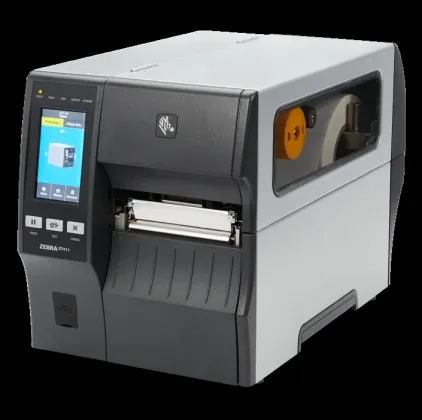 Industrial volume · thermal transfer and direct thermal · 203, 300 or 600 dpi · media 25–114 mm · tens of thousands a month without the printer being the limit · from $1,730. Image: Zebra.
The step out of desktop hardware entirely: a 22 kg metal-chassis printer built to run most of a shift.
Pros: 450 m ribbon capacity, so an operator reloads once a shift rather than once an hour. A 4.3-inch color touch display, 256 MB RAM / 512 MB flash, tool-less printhead and platen replacement, and an applicator interface for a labeling line. 600 dpi is available if you're printing codes small enough to need it, which almost nobody labeling assets is.
Cons: 22 kg and a footprint to match, so it needs a dedicated spot, not a corner of a desk. Above 203 dpi the printhead is a factory option rather than a field swap, and at 600 dpi maximum print length drops to 39 inches. At $1,730 before options, it only makes sense once duty cycle is the actual constraint.
Common snags: ribbon wrinkle, enough of a classic that Zebra gives it its own troubleshooting section. The causes are tension, print speed, and alignment rather than a faulty machine, so slowing the print or re-seating the ribbon usually settles it.
All ten side by side
| Model | dpi | Speed | Media | Ribbon | Price |
|---|---|---|---|---|---|
| Brother QL-820NWB | 300 | 110/min | DK 12–62 mm | none | $240 |
| Zebra ZQ511 | 203 | 5 ips | 35–80 mm | none | $525–600 |
| TSC TE210 | 203 | 6 ips | 20–112 mm | 300 m | $360–525 |
| TSC TE300 | 300 | 5 ips | 20–112 mm | 300 m | $430 |
| TSC TE310 | 300 | 5 ips | 20–112 mm | 300 m | $460 |
| Godex GE330 | 300 | 4 ips | 25–118 mm | 110 m | $445–495 |
| Zebra ZD421t | 203/300 | 6/4 ips | 15–112 mm | 300/74 m | $595–810 |
| Honeywell PC42E-T | 203/300 | 6 ips | 25–114 mm | 300 m | $296/$311 |
| Honeywell PC45t | 203/300 | 8/6 ips | to 118 mm | n/a | $975–1,110 |
| Zebra ZT411 | 203/300/600 | 14/10/4 ips | 25–114 mm | 450 m | from $1,730 |
Label material
The printer decides how sharp a label starts. What it's printed on decides how long it stays that way, and that's a bigger factor than which printer you end up buying. A $1,100 printer on the wrong material still fails outdoors, and a $300 one on the right material can outlast it. Material selection by environment, adhesive types and sizing are a topic of their own, and Asset Tagging Best Practices covers all three. It's framed around equipment tags, but a shelf label or a carton label meets the same adhesives and the same surfaces.
Printer questions, answered
The questions that come up once you're actually buying a printer or loading media into one.
Will an ordinary office laser printer do?
For low volume indoors, yes, provided you print onto pre-cut synthetic label sheets (the same kind sold for weatherproof mailing labels) rather than plain paper. Toner resists moisture and light far better than a direct-thermal print. What a laser printer can't do is roll-fed labels, so past a hundred or so at a sitting you're feeding sheets by hand instead of letting a label printer spool through a roll. For outdoor or industrial durability, no laser toner matches a resin ribbon on polyester.Why do two resellers quote different prices for the same printer?
Three reasons, and only one of them is a discount. First, the model name isn't the configuration: dpi and connectivity are options on most thermal-transfer desktops, so a PC42E-T at 203 dpi and the same printer at 300 dpi are different part numbers at different prices. Second, several manufacturers enforce a minimum advertised price, so resellers who sell below it hide the number until you add the printer to a cart, which is why some listings show no price at all. Third, close siblings get mixed up in catalogues: the TSC TE300 and TE310 sit within about $30 of each other and regularly appear under each other's specs. Buy by part number, and ask for a quote when the page won't show one.Do I need a ribbon, and which type?
Check what's actually loaded before assuming: most thermal-transfer printers show the ribbon type in the driver or a front-panel status screen, and if that's not available, a fingernail scratch on a printed label tells you fast: wax smears or lifts easily, resin barely marks. Running the wrong ribbon has a real cost, not just a cosmetic one: wax on a synthetic label often fails to bond at all and flakes off within days, while resin on plain paper prints fine but pays for durability the paper itself can't hold onto. One rule holds regardless of type: ribbon width should equal or slightly exceed the label width. Narrower ribbon leaves bare strips at the label edges and can wrinkle mid-print, so when sizing a replacement, round up rather than down.
Tagging assets at scale? Talk to sales