Fleet management for the vehicles you already track
A fleet needs more attention than the rest of your assets. UNIO24 keeps all of it in one place: vehicles, maintenance, drivers, bookings, fuel, fines and more.
Start free- Vehicles and drivers
- Fuel and fuel cards
- Fines and incidents
- Cost per mile
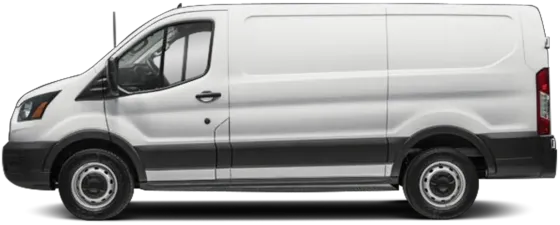
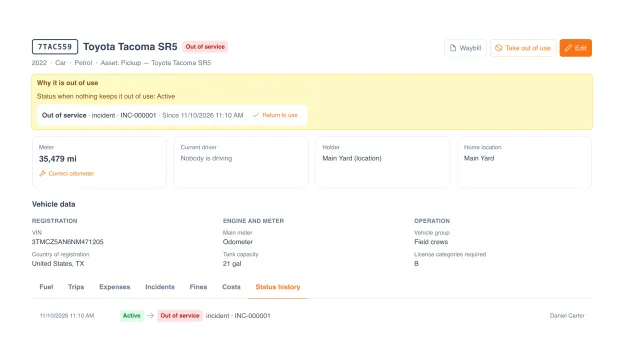
The status changes when the work does
A vehicle in UNIO24 is an asset with a vehicle profile on top: plate, VIN, tank size, the license class it needs. Its check-outs, maintenance, inspections and documents were already on the asset. Nothing gets copied into a second system.
Every status change is logged with its reason, from the day the vehicle is bought to the day it's sold.
Nobody has to set that status by hand. Start a work order or send the truck for repair, and it shows "In the shop". A critical defect found at inspection, or an incident that leaves it undrivable, takes it out of service, with the reason written on the card. It returns to active when the last of those is closed, not when someone remembers to flip a switch.
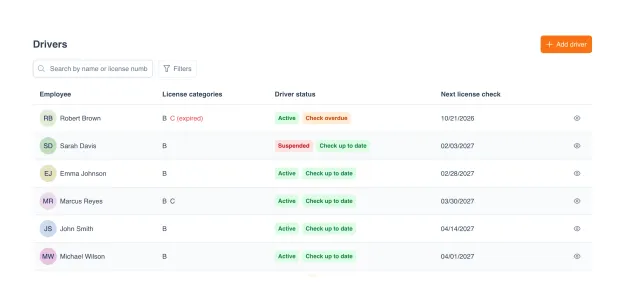
Only a cleared driver gets the keys
A driver is an employee with a driver profile: license number, categories with expiry dates, and a recurring license check that reminds you when it's due.
The profile does its job at hand-over. Check a vehicle out to someone who's suspended, or whose category for that truck expired last month, and UNIO24 lists every reason at once. You choose whether that's a warning or a hard stop.
With bookings switched on, people reserve a pool vehicle for a time slot instead of asking around the office. A vehicle you've taken out of use is blocked in the calendar.
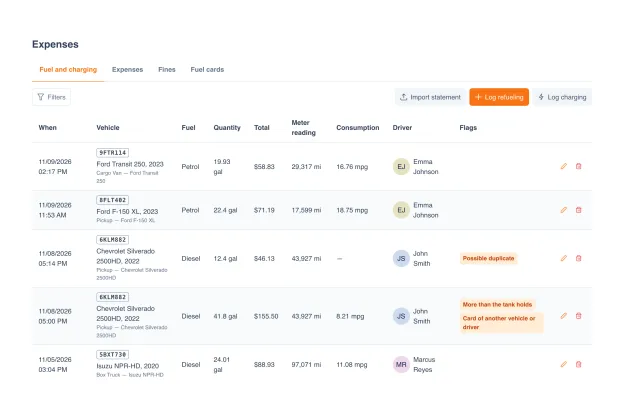
Fuel entries that flag themselves
Drivers log fill-ups and charging sessions, or you import the fuel card statement as a spreadsheet. UNIO24 remembers the column mapping after the first file, shows a preview before anything is saved, and merges a statement line with the entry a driver already typed in, so one fill-up isn't counted twice.
Consumption is worked out between full tanks, in mpg or L/100 km. Six checks run on every entry:
More fuel than the tank holds
A second fill-up within 30 minutes
A fill-up outside working hours
A card that belongs to another vehicle or driver
Consumption above the vehicle's norm
An odometer reading that doesn't add up
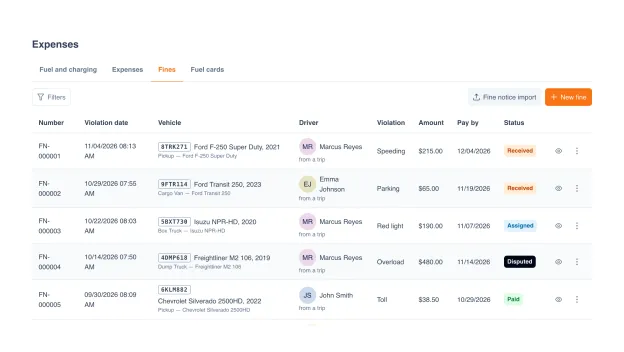
A fine finds its driver
Enter the notice, or import a batch of them, and UNIO24 suggests who was driving at that minute. It looks at the trip log first, then bookings, then check-outs. The fine then moves through its statuses: assigned, disputed, paid, charged back to the driver. A reminder goes out before the pay-by date, and drivers see their own unpaid fines.
Incidents work the same way. A driver reports one with photos; if the vehicle can't be driven, it stays out of service until the incident is closed. From the incident card you open a work order or a repair, and print a PDF for the insurer.
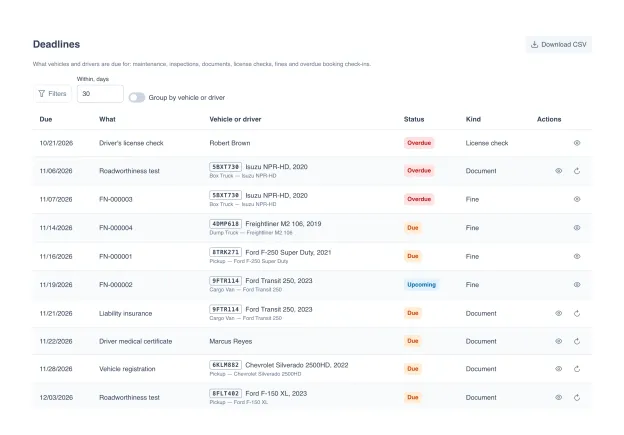
Every date in one list
Maintenance, inspections, registration, insurance, driver's licenses, medical certificates, license checks, unpaid fines and overdue returns land in one list sorted by date. Each line is overdue, due or upcoming. Filter it, group it by vehicle or driver, export it to CSV, or pin the next 30 days to your dashboard.
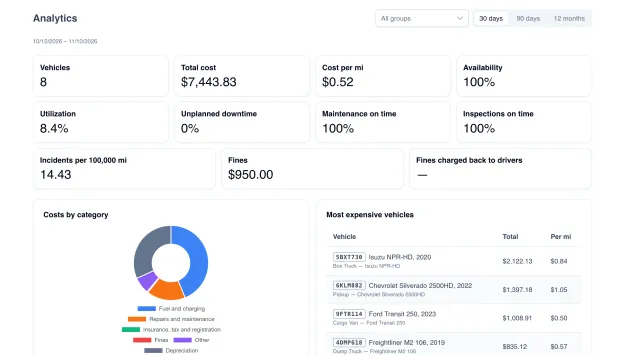
What each vehicle costs per mile
Fuel, repairs, insurance, registration, fines and depreciation add up on every vehicle. Divide by the distance from its odometer and you get one number per vehicle: cost per mile, or per kilometer where that's the unit.
Fleet analytics puts those numbers side by side for 30 days, 90 days or 12 months: the most expensive vehicles, the ones that sit unused, the ones that keep breaking down, and the candidates for replacement. It also shows availability, utilization and whether maintenance and inspections happen on time.
Trips feed the same numbers. A driver opens a trip with the odometer reading and closes it on return. The log exports to CSV, and the trip sheet PDF compares the fuel a vehicle should have used with what it did.
One fleet, four jobs
Each person opens the same vehicle and sees their part of it.
Fleet manager
The whole fleet on one screen: what's active, what's down and why, what's due this month, and which vehicle costs the most per mile.
Dispatcher
Which vehicles are free today, which are in the shop, and who's cleared to drive the box truck. No walk to the yard.
Driver
Opens and closes trips, logs fill-ups, reports an incident with photos, sees their own fines. The rest of the fleet stays out of view.
Finance
Fuel, repairs, insurance, fines and depreciation added up per vehicle, without collecting receipts from five people.
Fleet runs on the rest of UNIO24
It reads what the other modules already know about a vehicle.


Fleet module, answered
What people ask before switching it on
Does UNIO24 track vehicles by GPS?
No. There's no telematics and no live map in the fleet module. Mileage comes from odometer readings on trips and fill-ups. If you need to see where a truck is right now, you need a GPS tracker next to UNIO24. What the module covers is the paperwork side: who drove, what it cost, what's due.
Is fleet available in the mobile app?
Fleet works in the web app today, on a phone browser too. The mobile app already shows fleet widgets on its dashboard, and fleet screens for the app are in development.
What does a driver see?
Their own vehicles, trips, fill-ups and fines, and nothing else, unless you give them more. Fleet has its own set of permissions, so the person who logs fuel doesn't have to see what the fleet costs.
How do I switch the fleet module on?
Open Settings → Modules and turn on Fleet. Mark which asset types are vehicles, then add a vehicle profile to the assets you already have. Their history stays where it is. If you also use inspections, two vehicle inspection forms are added for you.
Which fuel card statements can I import?
Any statement you can export as XLSX or CSV. You map its columns once, UNIO24 remembers the mapping for the next file, and a preview shows what will be created before you confirm. A bad import can be rolled back as a whole. There's no direct connection to card providers.
Miles or kilometers? Gallons or liters?
Units follow your company's country, or you pick metric, US or UK in the fleet settings. Equipment that counts engine hours instead of miles is tracked by hours. Companies in the US and Canada also get an IFTA report with distance and fuel by state and province.
