How to Choose the Right Asset Tracking System (2026)
Learn how to choose the right asset tracking system for your business. Compare cloud vs on-premise solutions, evaluate must-have features, calculate ROI, and avoid costly mistakes.

You've convinced management that tracking assets in spreadsheets was a stopgap, not a strategy. Now comes the harder problem: figuring out which actual system to buy.
There are a lot of options. Cloud platforms promising "asset tracking in minutes". Enterprise suites with enough features to require a PhD to operate. Free open-source projects that look promising until you spend three months configuring them. Somewhere in the noise is the system that actually fits your business. And you only get one real shot at this.
After watching teams make this decision dozens of times, I've seen the same two failure modes again and again. They either buy enterprise software for a problem a $200/month cloud tool would solve, or they buy a $200/month tool when they actually need proper depreciation rules and ERP integration. Six months later both failures look identical: a system nobody uses, and a team quietly back in spreadsheets.
This guide walks you through the decisions that actually matter, the ones I wish someone had walked me through when I was on your side of the conversation. It's Phase 2 of the complete asset tracking implementation process. Read it, then go choose well.
Quick comparison: three approaches at a glance
Before the deep-dive, here's how the three main asset tracking approaches stack up for common decision criteria:
| Criterion | Cloud SaaS (QR/NFC) | On-Premise EAM | RFID/GPS-First |
|---|---|---|---|
| Typical cost | $20–$300/month | $30K–$250K+ | $50K–$500K+ |
| Time to first scan | Same day | 3–9 months | 2–6 months |
| IT involvement | Minimal | Significant | Moderate–High |
| Best asset count | 50–10 000 | 5 000+ | 500–100 000 |
| Mobile scanning | Native (any phone) | Custom app | Dedicated scanner |
| Hardware needed | None (printed labels) | Servers + scanners | RFID readers / GPS units |
| Best for | SMBs, field teams, IT | Regulated enterprises, finance-driven orgs | High-volume logistics, vehicles, hospitals |
| Typical vendor | UNIO24, Asset Panda | IBM Maximo, SAP EAM | Zebra RFID, Samsara |
Use this table as a filter, not a final answer. The sections below explain how to choose within your chosen category, how to evaluate specific vendors, and what hidden costs to watch. Weighing two tools directly? See UNIO24 vs Asset Panda for a side-by-side on pricing, mobile, and features.
Cloud, on-premise, or RFID/GPS-first: which one do you actually need?
This decision sets everything else: cost, implementation time, IT burden, and whether the project is a smooth rollout or a six-month nightmare.
Cloud-based: the modern default
The system lives in the cloud. You access it through a browser or mobile app. No servers to buy, no infrastructure to maintain. You pay monthly or yearly, usually per user or per asset.
Cloud makes sense when you have under 5,000 assets, want to start within days rather than months, have a small or overloaded IT team, run multiple locations needing remote access, want predictable monthly costs over big upfront capex, and don't have unusual customisation requirements. That covers about 80% of companies.
The technology has matured. Security concerns that were valid in 2015 are mostly solved if you pick a reputable vendor with proper encryption, SOC 2 / ISO 27001 certifications, and routine penetration testing. Honestly, your data is probably safer in AWS or Azure than on an on-premise server nobody's patched in three years.
The trade-offs: you depend on internet connectivity (modern systems have offline mobile modes that cover the gap), you have less control over the product roadmap, and if you have truly unusual requirements, cloud platforms might not bend to accommodate them.
On-premise: the enterprise workhorse
You buy licenses, install on your own servers, your IT team manages everything. Big upfront cost, then smaller annual maintenance fees.
On-premise is justified when you have 10,000+ assets with complex tracking requirements, you're in a highly regulated industry with strict data residency rules, you need deep integration with existing enterprise systems (ERP, CMMS), you have a strong IT team capable of managing servers and databases, you have specific customisation needs the cloud can't meet, or your locations have unreliable or no internet connectivity.
But: the upfront cost runs from $20,000 to $100,000+ for software licenses alone. Implementation takes months, not days. You need IT staff to manage servers, backups, security patches, and troubleshooting. Upgrades are painful events rather than automatic background updates. Most companies don't have either the budget or the team to make on-premise pay off.
Hybrid: a complicated middle ground
Some vendors offer both deployment models, or systems where some data lives in the cloud and some stays on your servers. The pitch is "best of both worlds". The reality is usually "complexity of both worlds": you carry the cost of on-premise infrastructure plus ongoing cloud subscriptions, plus server maintenance plus cloud vendor uptime dependency.
Hybrid works for very large enterprises with sophisticated IT teams. For everyone else, commit to one approach.
Must-have features vs. nice-to-have nonsense
Every vendor demo is packed with features. Dashboards with 47 charts. AI-powered analytics. (Mercifully, blockchain has mostly stopped showing up in pitches.) Most of it has nothing to do with your actual asset tracking system requirements. Here's how to separate signal from noise.
Non-negotiables: keep looking if any of these are missing
Mobile scanning that actually works. Not "technically possible if you squint and have good lighting". Pull out your phone, scan a QR code or barcode, immediately see or update the asset record. Bonus if it works offline and syncs when you're back online. If your team has to walk back to a desktop every time they want to check out equipment, they stop using the system within a week.
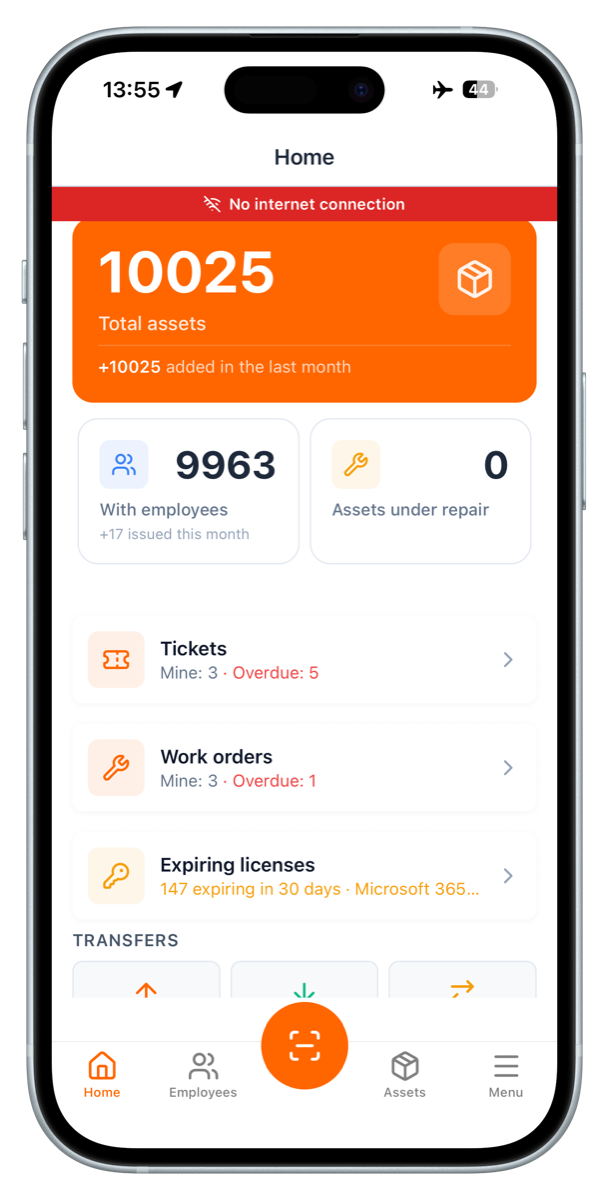
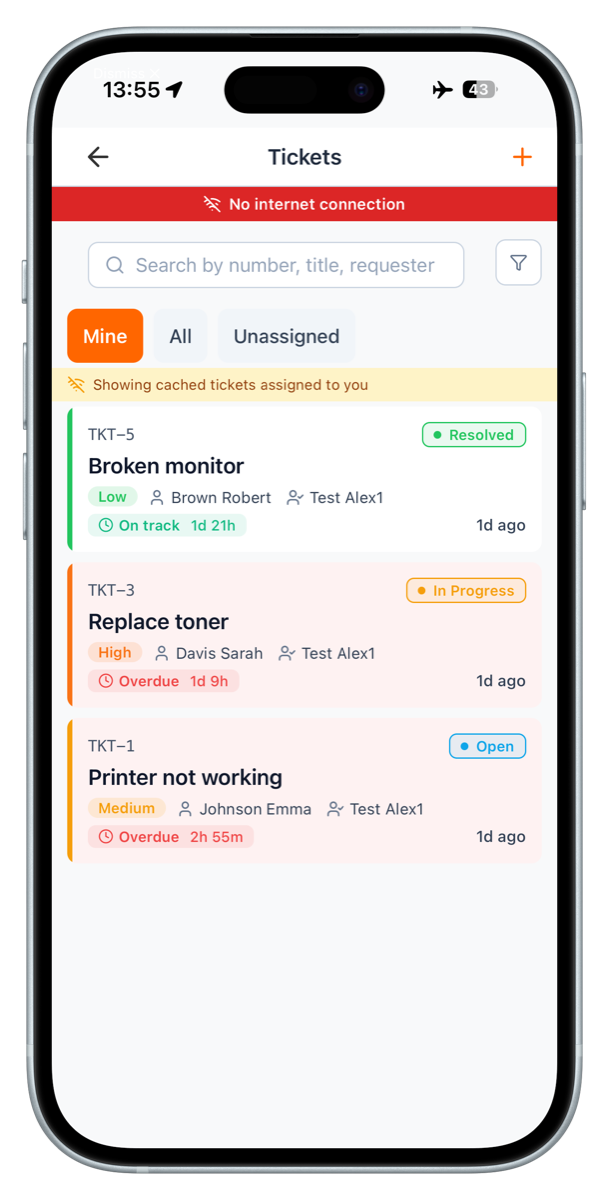
Example from UNIO24 mobile in airplane mode. The red banner stays visible, everything else keeps working: home counts from the last sync (left), tickets served from local cache with a clear "Showing cached tickets" notice (right). Filters, search, and read access continue. New actions queue and sync the moment the device sees signal again. This is what "works offline" needs to mean. Ask any vendor to demonstrate it live, not in a recording.
Custom fields you can actually customise. Every business tracks different things. A hospital needs biomedical certification dates. A construction company needs rental vs. owned status. An IT team needs warranty expiration and license keys. The system should let you add fields without calling the vendor or hiring a developer, and those fields should appear in reports, exports, and the mobile app. I've seen systems where you can add custom fields but can't search by them. That's not customisation, that's a data graveyard.
Check-in / check-out capability. Assets move. Equipment gets loaned. Tools go to job sites and come back. You need to record who has what, when they got it, and when it's due back. Some "asset tracking" systems only record static locations, not temporary custody. That's a fancy inventory list, not tracking.
Real reporting and export. You will need to get data out: for audits, finance, compliance, your own analysis. The system needs pre-built reports for common scenarios (assets by location, by owner, by category), custom reports built without SQL knowledge, and export to Excel/CSV/PDF without jumping through hoops. If the demo glosses over reporting, that's a red flag they're hoping you won't catch until you've signed.
Role-based permissions. Not everyone needs full access. Staff responsible for assets should check items in and out but not delete assets or see purchase prices. Department managers see their own assets. Finance sees cost data. Admins see everything. A system with only "Admin" and "User" roles will cause headaches as you grow. Look for granular controls.
Actually useful (not just marketing)
Maintenance tracking. If you maintain equipment, scheduling and tracking maintenance in the same system is genuinely helpful. When was this forklift last serviced? When's the next inspection due? Who did the work? Otherwise you end up tracking assets in one system and maintenance in spreadsheets, and they go out of sync the first week.
Depreciation calculation. Finance needs asset values for accounting. A system that calculates depreciation automatically (straight-line, declining balance, or whichever method you use) saves accounting hours every quarter.
Audit workflows. Regular audits are how data quality stays alive. A system with built-in audit support (create an audit, assign locations, track completion, auto-generate discrepancy reports) makes this so much easier. Without it, you're exporting to spreadsheets, manually tracking what's been audited, and reconciling by hand. Painful. For a comprehensive guide on building one, see the asset tracking audit strategy playbook.
Document attachments. Purchase receipts, manuals, warranty documents, photos, service records attached directly to an asset record sound trivial. They aren't. When the printer breaks and you need the service contract PDF, finding it attached to the asset beats hunting through shared drives.
Integration capabilities. API access, webhooks, or built-in integrations with popular tools matter as you grow.
Probably not needed (especially at first)
AI and machine learning anything. Unless you have tens of thousands of assets and years of historical data, AI features are premature. Get basic tracking right first.
IoT sensor integration. Sensors on every asset reporting location and status automatically. Cool in theory, expensive and high-maintenance in practice. For 95% of organisations, periodic QR scanning is adequate.
Predictive maintenance. Requires sophisticated algorithms, lots of historical failure data, and usually IoT sensors. You don't have the data foundation for it yet.
These features aren't useless. They're advanced capabilities for after you've mastered basics, not requirements for initial selection.
Matching the system to your company size
A 30-person startup and a 5,000-person manufacturer need different solutions. The best tracking software for one isn't the best for the other.
Small business (1–50 employees, under 500 assets)
You want simple, fast, affordable. No time for three-month implementations, no budget for enterprise licensing.
Look for a cloud platform under $100/month to start, setup you can complete yourself in a few days, mobile apps for iOS and Android, simple but adequate reporting, and good support (because you don't have a dedicated IT person). Skip complex customisation, enterprise integrations, advanced workflows, dedicated account managers.
Red flags to avoid: vendors who insist on "needs assessment calls" that smell like upsell, platforms with minimum commitments of 100 users or $5,000/year, "contact us for pricing" instead of transparent rate cards.
Mid-sized business (50–500 employees, 500–5,000 assets)
More robust features, better reporting, likely some customisation, but still reasonable implementation time and cost.
Look for cloud or hybrid (depending on your IT capabilities), pricing in the $200–$2,000/month range depending on users and assets, custom fields and workflows, API access for basic integrations, audit capabilities, multi-location support, and proper data migration tools because you likely have existing data to import. You may want accounting integration, AD/SSO for user authentication, advanced reporting, and mobile app customisation.
Red flags: systems that feel too simple (you'll outgrow them quickly), vendors who can't provide clear implementation timelines, platforms without proper audit trails or change history.
Enterprise (500+ employees, 5,000+ assets)
Enterprise-grade reliability, security, customisation, integration, support.
Look for on-premise or scale-designed cloud, budget $10,000–$100,000+ annually, deep ERP integration (SAP, Oracle, etc.), advanced workflows and approval processes, multi-currency and multi-language, comprehensive API and integration, dedicated support and account management, SLAs and uptime guarantees, and compliance certifications relevant to your industry. You'll also need professional implementation services, structured training, change management support, and ongoing vendor partnership.
Red flags: vendors with no track record at your scale, systems without proven enterprise security, platforms that can't demonstrate successful deployments in your industry, vendors who won't connect you with reference customers you can actually call.
Industry-specific considerations
Some industries have requirements that change the selection calculus.
Healthcare. Strict access controls (HIPAA compliance), biomedical certification tracking, patient safety recalls, and often integration with existing hospital systems. Look for vendors with healthcare experience and compliance certifications. The system should handle medical device tracking specifically: FDA registration fields, sterilisation tracking, clinical engineering workflows.
Education. Schools and universities need check-out systems for students and faculty, integration with student information systems, and usually very limited budgets. Look for educational pricing, easy-to-use interfaces (students will be using this), and good temporary-custody support (textbook and equipment lending).
Construction. Mobile-first systems (sites rarely have decent office setups), rental vs. owned tracking, job-site transfer workflows, and rugged label options that survive outdoor conditions. Strong offline mobile capabilities and simple transfer flows that field workers will actually use.
IT/Technology. Software license tracking, warranty and support-contract management, integration with the help desk, and detailed specs (RAM, CPU, storage). Look for IT-specific features like license compliance reporting, refresh-cycle planning, and integration with Active Directory or Azure AD.
Manufacturing. Maintenance scheduling, integration with CMMS or ERP, potentially RFID for high-volume tracking, robust reporting for regulatory compliance. Industrial-environment design with strong preventive-maintenance capabilities.
The ERP integration question
Many mid-to-large companies already run an ERP (SAP, Oracle, NetSuite, Microsoft Dynamics). Should your asset tracking system integrate? Replace the ERP's asset module? Run separately?
Integrate when the ERP is the source of truth for financial data, finance needs automatic depreciation sync, you want purchase orders to auto-create asset records, or you need single sign-on.
Keep separate when the ERP's asset module is weak (often the case), integration cost is unreasonable (also often the case), you need flexibility the ERP can't provide, or integration would delay the project by months.
The honest answer most teams don't want to hear: integration is rarely as seamless as the sales deck promises. It breaks with vendor updates, needs ongoing maintenance, and the "automatic data flow" usually comes with caveats. A simple weekly export/import for financial data is often the better choice. Don't assume integration is automatically better. Evaluate the actual business value against the cost and complexity.
Calculating real ROI (not vendor fantasy numbers)
Every vendor will show you 300% returns and 3.7-month payback. Most are nonsense. Calculate honestly. There's also a ROI calculator if you want to plug in your specifics.
What asset tracking actually saves:
- Reduced search time. If your team spends 30 minutes/day looking for stuff: hours wasted × hourly cost × workdays. A team of 10 at $30/hour wasting 30 minutes daily is $39,000/year.
- Prevented duplicate purchases. Equipment bought because nobody could find what already exists. Be honest about how often and what it costs.
- Faster audits. If annual audits take two weeks of multiple people's time and proper tracking cuts it to three days, that's countable savings.
- Reduced loss and theft. Conservative numbers. Don't assume you'll eliminate 100% of losses.
- Better purchasing decisions. Utilisation data drives smarter buying. Hard to quantify but real.
- Insurance premium reductions. Some insurers discount proper tracking. Ask your broker.
- Avoided compliance penalties. Regulated industries especially.
What it actually costs:
- Software costs. Subscription or upfront license + annual maintenance.
- Implementation. Your time or consultant fees for setup, data migration, training.
- Labels and hardware. QR labels, barcode scanners, and mobile devices if you need them.
- Ongoing operational costs. Maintaining the system, conducting audits, training new users. The full asset tracking system cost is all these, not just the licence line.
An illustrative ROI scenario
Numbers averaged from mid-sized companies. Your figures will differ; this is a framework, not a promise.
Company: 150 employees, 1,200 assets, currently on spreadsheets.
Costs
- Cloud platform: $400/month = $4,800/year
- Implementation time: 80 hours @ $50/hour = $4,000 (one-time)
- Labels and supplies: $500 (one-time)
- Training time: 20 hours @ $50/hour = $1,000 (one-time)
- Ongoing maintenance: 3 hours/month @ $50/hour = $1,800/year
Year 1 total: $12,100. Ongoing annual: $6,600.
Savings
- Reduced search time: 5 people × 20 min/day × 250 days × $30/hour = $12,500/year
- Prevented duplicate purchases: $8,000/year
- Faster annual audit: 60 hours saved × $40/hour = $2,400/year
- Reduced equipment loss: $5,000/year
Total annual savings: $27,900.
Year 1 ROI: ($27,900 − $12,100) / $12,100 = 130%Ongoing annual ROI: ($27,900 − $6,600) / $6,600 = 323%
These numbers are more conservative than vendor calculators. That's deliberate: better to underestimate and be pleasantly surprised than overestimate and face disappointed stakeholders.
Vendor evaluation: the questions that actually reveal things
Sales demos are choreographed. Any comparison based only on demos will mislead you. The questions below cut through marketing.
About the software
"Can I see the mobile app working offline right now?" Not a demo video. Live demo where they disconnect from WiFi, scan assets, check items out, update records, then reconnect and show the sync. If they hesitate or schedule a "technical demo later", the offline mode probably doesn't work well.
"Show me how to create a custom report." Skip the pre-built reports. Make them build something specific: "Show me all laptops purchased before 2020 that are assigned to the Sales department, sorted by value." How easy is it? Can you do it yourself or do you need support every time?
"How do you handle bulk imports and exports?" Upload a sample CSV with intentional errors and format issues. See what happens. Good systems flag issues, help you correct them, and make import straightforward. Since data migration is often the hardest part of implementation, this matters.
"What happens if we need to make changes after go-live?" Adding locations, custom fields, or categories: do you do it yourself or does every change need vendor support?
"How does audit work?" Live demo: create an audit, scan assets, generate a discrepancy report. If this isn't smooth, your audit process will be painful.
About implementation and support
"What's your typical implementation timeline for a company our size?" Then ask for references at that size. Call them. Ask how long it actually took.
"What support is included vs. extra?" Some vendors include email support but charge for phone, or limit ticket counts. Know what you're getting.
"Who will be our main point of contact?" Dedicated account manager or general queue?
"What's your average response time for support tickets?" Ask for actual data, not "we respond quickly".
"Do you provide training, and what does it cost?" Some include it. Others charge $2,000 per session.
About costs (the sneaky stuff)
"What's in the base price and what costs extra?" Mobile access, number of users, number of assets, storage limits, API access, integrations, support level. Know exactly where the upcharges start.
"Are there one-time fees?" Implementation, data migration, training, setup.
"What are your price-increase policies?" Some vendors lock pricing for 3 years. Others increase 10% annually.
"What happens if we grow?" 500 to 2,000 assets: how does pricing change? Adding locations or users?
"What's your cancellation policy?" Monthly cancel? Annual lock? Cancellation fee?
The reveal question
"Can I speak with three current customers, including at least one who's been using the system for 2+ years?"
Good vendors connect you happily. Sketchy ones make excuses, hand you curated references, or claim customers won't talk to prospects.
Call those references and ask: what surprised them post-go-live (good and bad), what support is actually like when something goes wrong, would they choose this vendor again knowing what they know now, what features they wish existed, how often the system goes down.
The trial period: what to actually test
Most vendors offer a free trial. Don't waste it. Lots of people sign up, poke around for 10 minutes, think "looks good", and move on, then discover limitations after paying that proper testing would have surfaced.
Week 1: setup and configuration. Don't just create a couple of test assets. Do real work: import actual data from your current system (even 50–100 records), create your real location hierarchy, set up user accounts with appropriate permissions, configure custom fields for your use cases, create your asset categories. This reveals whether the system can handle your data and structure, or whether it'll fight you at every step.
Week 2: mobile testing. Hand mobile access to the actual users (staff responsible for assets, field technicians, whoever will use this daily). Scan QR codes in real work environments. Test check-in/check-out. Update records on mobile. Test offline mode by actually going offline. See if they can figure out the app without extensive training. If the person managing your assets can't figure out the mobile app in five minutes, the rollout will fail.
Week 3: reporting and integration. Build the reports you'll actually need: asset list by department, high-value assets above a threshold, assets assigned to a specific person, assets needing maintenance soon, whatever your stakeholders want. Try exporting. Test integration capabilities (or at least confirm export/import workflows are reasonable).
Week 4: support testing. Contact support with a real question. How long does a response take? Is the answer helpful? Do they understand your question? This tells you more about working with the vendor than any sales pitch.
Common selection mistakes
A few patterns I see repeatedly. They're worth knowing in advance.
Choosing by feature checklist instead of actual needs. You build a massive spreadsheet comparing 15 vendors across 47 features, and the most-checkmarks vendor wins. Features you'll never use add complexity, not value, while the system might be terrible at the three things you actually need. Pick your top five must-have capabilities and evaluate vendors on those.
Letting IT choose without ops or user input. IT picks the technically excellent system. Front-line staff hate the mobile app. The best technical solution isn't always the most usable. Include actual end-users in evaluation: the person scanning assets daily gets veto power over mobile app selection.
Overestimating customisation needs. "We're unique, we need custom everything." You pick a highly customisable platform, spend months configuring it, end up with something complex that only one person understands, and every upgrade risks breaking the customisations. Start with out-of-the-box functionality; add customisation only when proven necessary. Many "unique" requirements turn out to be standard once you compare notes with peer companies.
Choosing the cheapest option. $29/month or free open-source looks perfect. Six months later you're dealing with terrible support, missing features, and considering migration. Calculate total cost of ownership: your time for setup and maintenance, support quality, the likelihood you'll need to migrate again soon.
Skipping the trial or rushing through it. Demos show the happy path with clean data. Real use reveals edge cases and friction. Block calendar time for genuine testing with real data and real users. A week of thorough testing saves months of regret.
Forgetting about data migration. You focus on features and miss that importing your existing 2,000-asset spreadsheet will be a nightmare. If you can't get existing data in cleanly, you're starting from scratch. Acceptable for 50 assets, not 5,000. Test actual data import during the trial, including custom-field mapping.
The selection checklist
Use this to evaluate vendors systematically.
Basic requirements
- Mobile app (iOS and Android)
- QR code or barcode scanning
- Check-in/check-out capability
- Location tracking
- User assignment
- Custom fields (at least 10)
- Role-based permissions
- Basic reporting
- Export to Excel/CSV
Deployment and pricing
- Deployment type matches your needs (cloud / on-premise / hybrid)
- Pricing is clear and transparent
- Total cost fits your budget (including hidden fees)
- No concerning contract terms
- Reasonable cancellation policy
Usability
- Mobile app is intuitive (tested by actual users)
- Web interface is clean and easy to navigate
- Common tasks require minimal clicks
- System is responsive and fast
- Search works well
Implementation and support
- Implementation timeline is realistic
- Support level meets your needs
- Response times are acceptable
- Training is included or affordable
- Documentation is comprehensive
Advanced needs (if applicable)
- Maintenance tracking
- Audit workflows
- Integration with existing systems
- Multi-location support
- Depreciation calculation
- Document attachments
- Offline mobile capability
Vendor evaluation
- Customer reviews from real users
- Clear product roadmap
- Regular updates and improvements
Making the final decision
You've researched, trialed, asked questions, checked references. Time to choose. A weighted scorecard helps: assign importance to each criterion, score each vendor, calculate totals.
In practice, most decisions come down to four questions: Does it solve our top three problems well? Will our team actually use it? Can we afford it comfortably? Do we trust the vendor? If the answer to all four is yes, you've probably found your system.
Get stakeholder alignment before signing. IT, finance, operations, and executive leadership all on board. The worst scenario is buying and then having finance complain about cost or IT refuse to support.
Start small if possible. Some vendors let you pilot with one department or location before company-wide rollout. This de-risks the decision. And that's what the pilot program playbook is for.
What happens after you choose
Choosing the system is just the beginning. You still need to clean and migrate your existing data, tag all your physical assets, train your team, and build sustainable audit processes to keep data quality alive after go-live.
The system enables this, but doesn't do it automatically. Plan for implementation time, budget for labels and equipment, allocate staff time. Use the implementation checklist to make sure nothing critical falls through the cracks.
Companies that choose well but implement poorly end up in the same place as companies that chose poorly. Choose wisely, then implement thoughtfully.
Frequently asked questions
How do I choose asset tracking software for a small business?
Start with asset count and use case. Under 500 assets and no specialised compliance needs, a cloud SaaS solution ($20–$300/month) with QR-code labels is almost always the right choice. Avoid on-premise EAM until you hit 5,000+ assets or heavy regulatory requirements.
What are the must-have features of an asset tracking system?
The non-negotiables: asset register with custom fields, mobile scanning (QR/barcode), check-in/check-out workflows, maintenance scheduling, user permissions, audit trail. Anything beyond depends on your industry: add GPS for fleet, RFID for high-volume, ERP integration if finance insists.
How much does asset tracking software cost?
Cloud SaaS typically runs $20–$300/month for small-to-mid teams, often with a free tier for 50 assets or fewer. On-premise EAM platforms start at $30,000 and scale past $250,000 with implementation. RFID and GPS deployments add $5–$50 per asset for hardware plus $50–$300/month per reader or device.
Cloud vs on-premise asset tracking: which is better?
Cloud wins for 90% of companies: lower cost, faster deployment, works from any device, automatic updates. On-premise is only justified when regulatory constraints or data-residency requirements force it, or when you have massive customisation needs no SaaS platform can meet.
How long does it take to implement an asset tracking system?
Cloud SaaS: one day to two weeks from signup to full use, depending on how much historical data you migrate. On-premise EAM: 3–9 months including server setup, configuration, data migration, integration, and training. RFID/GPS deployments add 2–6 months for hardware deployment.
How do I calculate ROI on asset tracking software?
Add annual savings: recovered lost assets × replacement cost, labour hours saved × loaded hourly rate, avoided duplicate purchases, insurance premium reductions, compliance fine avoidance. Divide by total cost of ownership (subscription + hardware + implementation + training). Most teams see 3–10× ROI within 18 months.
What's the biggest mistake when choosing asset tracking software?
Buying for features you might need someday rather than problems you have today. Every "enterprise-grade" line item in a comparison sheet should solve a real current pain, or it's just inflating the proposal. Second-biggest: skipping the trial and committing based on demo videos.
The bottom line
There's no universally "best" system. There's only the best system for your size, your industry, your budget, your technical capabilities, your users.
Don't be swayed by features you'll never use. Don't buy enterprise software for a small-business problem. Don't choose on price alone. Don't skip the trial.
Do focus on solving your actual problems. Do involve the people who'll use the system daily. Do test thoroughly before committing. Do call references.
The right system should make tracking easier, not harder. If you're evaluating a platform and thinking "this seems complicated", it probably is. Keep looking.
Where UNIO24 fits
I'm the founder of UNIO24. We built it specifically around the patterns I've described in this playbook, the ones that quietly break asset tracking projects after the first thirty days.
A mobile app that works offline by default, because too many rollouts die the first time the warehouse WiFi goes down. Custom fields that show up in reports and search, because what I called a "data graveyard" above is exactly what we refused to ship. Audit workflows built in, because exporting to spreadsheets every quarter is what teams pay us to escape. Transparent pricing with the first 50 assets free, no card, no expiring trial, because the only honest way to evaluate software is to run a trial without a sales rep on your calendar.
UNIO24 fits small teams running a few hundred assets and enterprises running tens of thousands. The question of whether we fit isn't about your size. It's about whether the things we built match what you actually need. So run the questions from this playbook against us. Run them against two other vendors too. Start a free pilot and put us through the mobile test, the report test, the offline test. If it solves your problem, we'll be here. If something else fits better, use it.
Just don't pick by feature count.