Free Inventory Tracking Spreadsheet with Count Sheet
Items with reorder points, receipts and issues with on-hand calculated, a stock card per item, and a printable count sheet with variance and value. An item reads REORDER at its reorder point and OUT OF STOCK at zero. Works in Microsoft Excel and Google Sheets.
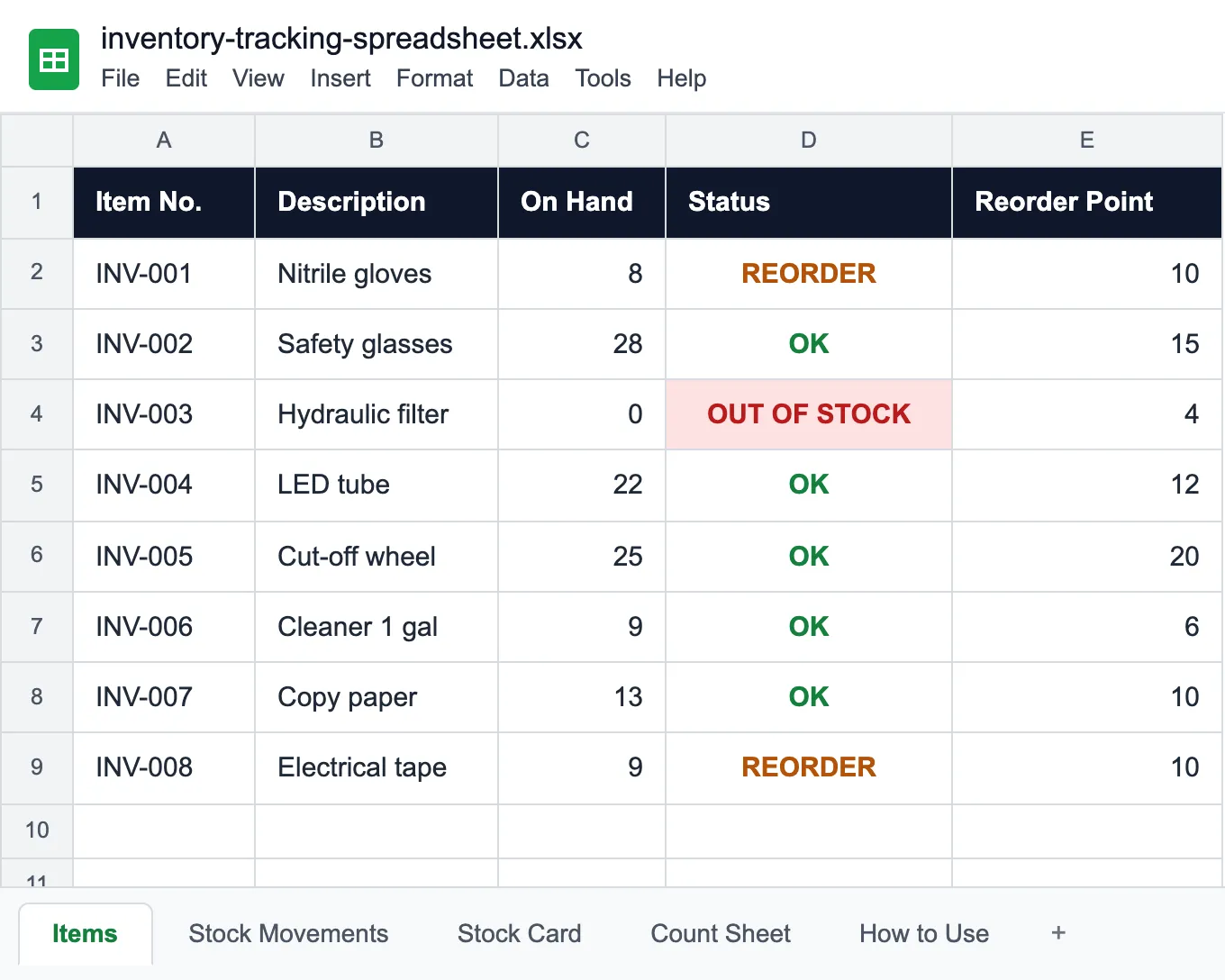
What the inventory tracking spreadsheet does
Inventory slips in two ways: an issue nobody wrote down, and a reorder point nobody looked at until the shelf was empty. This spreadsheet keeps what you type apart from what it works out, so the on-hand quantity never depends on someone remembering to change a number.
The file has four working sheets:
- Items. One row per stock item, with item number, unit, reorder point, bin, supplier, unit cost and reorder quantity. The grey columns fill themselves: on hand, status, total in, total out, stock value and the date of the last movement. Status reads REORDER once on hand reaches the reorder point and OUT OF STOCK at zero.
- Stock Movements. One row per receipt (purchase order, return), issue (requisition, work order) or adjustment, with the reference and who it went to. Balance After shows what is left of that item after every row.
- Stock Card. Pick an item number and every movement of that item lines up in date order with in, out and balance, the bin card that used to hang on the shelf, without copying anything by hand.
- Count Sheet. A printable inventory count sheet: book quantity, a column for the counted quantity, the variance, unit cost and counted value, with the total at the top. For a blind count, hide the book column before you print, so whoever counts writes down what is on the shelf rather than confirming the expected number.
The opening balance goes in as the first receipt of each item. To count a few items at a time instead of the whole stockroom once a year, see cycle counting. Tools that go out and come back belong in the tool inventory template, and machines and devices in the equipment inventory template.
Who uses this inventory tracking spreadsheet
Wherever stock is used every day and someone answers for the count.
Maintenance stockrooms
Filters, belts, lubricants and fasteners issued on work orders.
Contractors and job sites
Consumables for the crew: cut-off wheels, bits, PPE and fasteners.
Manufacturing
Production supplies and packaging, with a reorder point so the line never stops.
Facilities teams
Janitorial supplies, lamps and office stock across several buildings.
Restaurants and kitchens
Disposables and cleaning supplies reordered every week.
Small businesses
Quantities of products by item number, with a warning before they run out.
Before you fill it in
The sheet says 8 boxes. The shelf has two.
Try UNIO24 to automate inventory tracking.
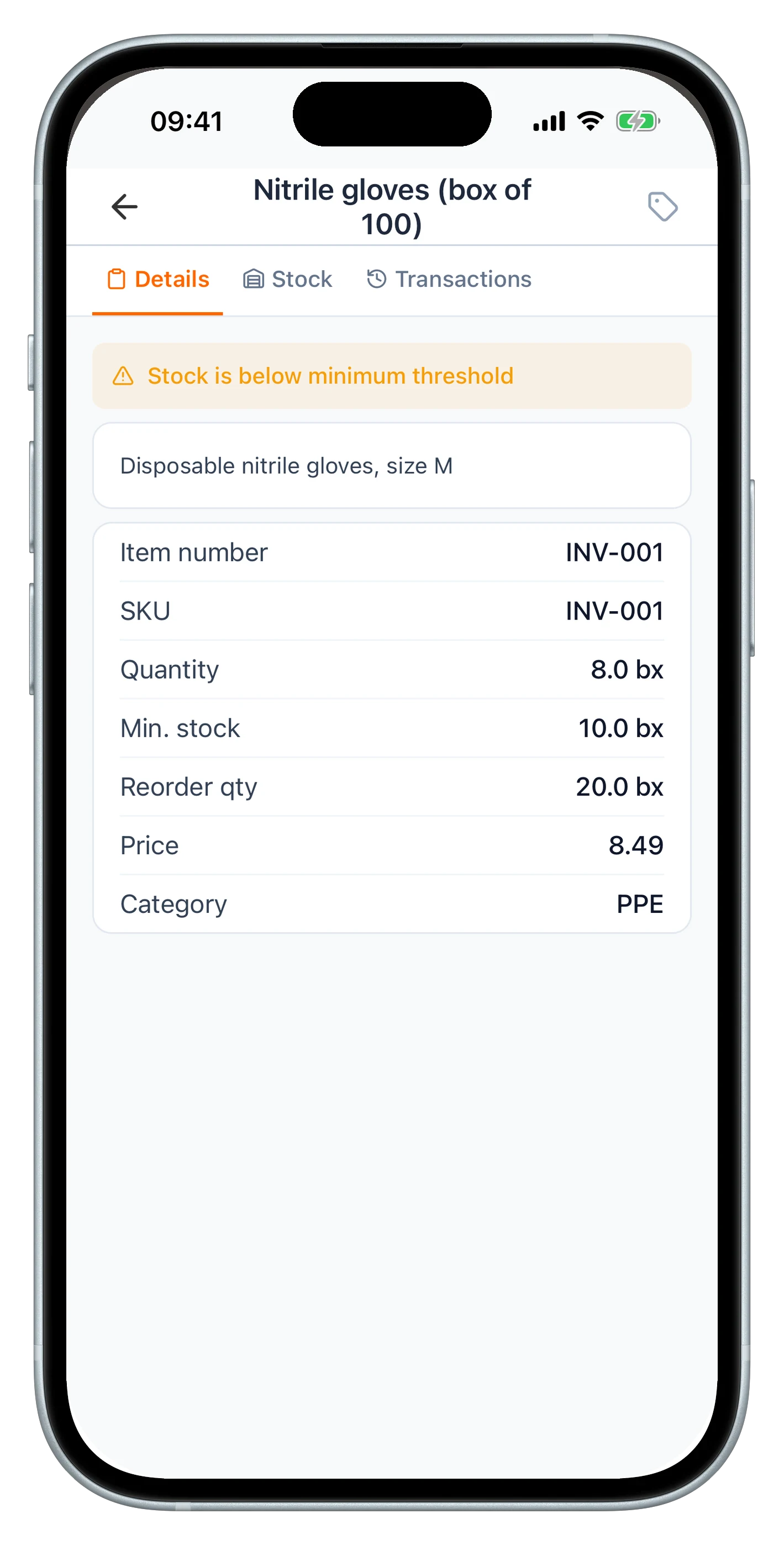
Try UNIO24 FreeA spreadsheet goes out of date within days, and keeping it current takes someone's time every week. UNIO24 automates that work: every receipt, issue and adjustment updates the item's balance as it happens.
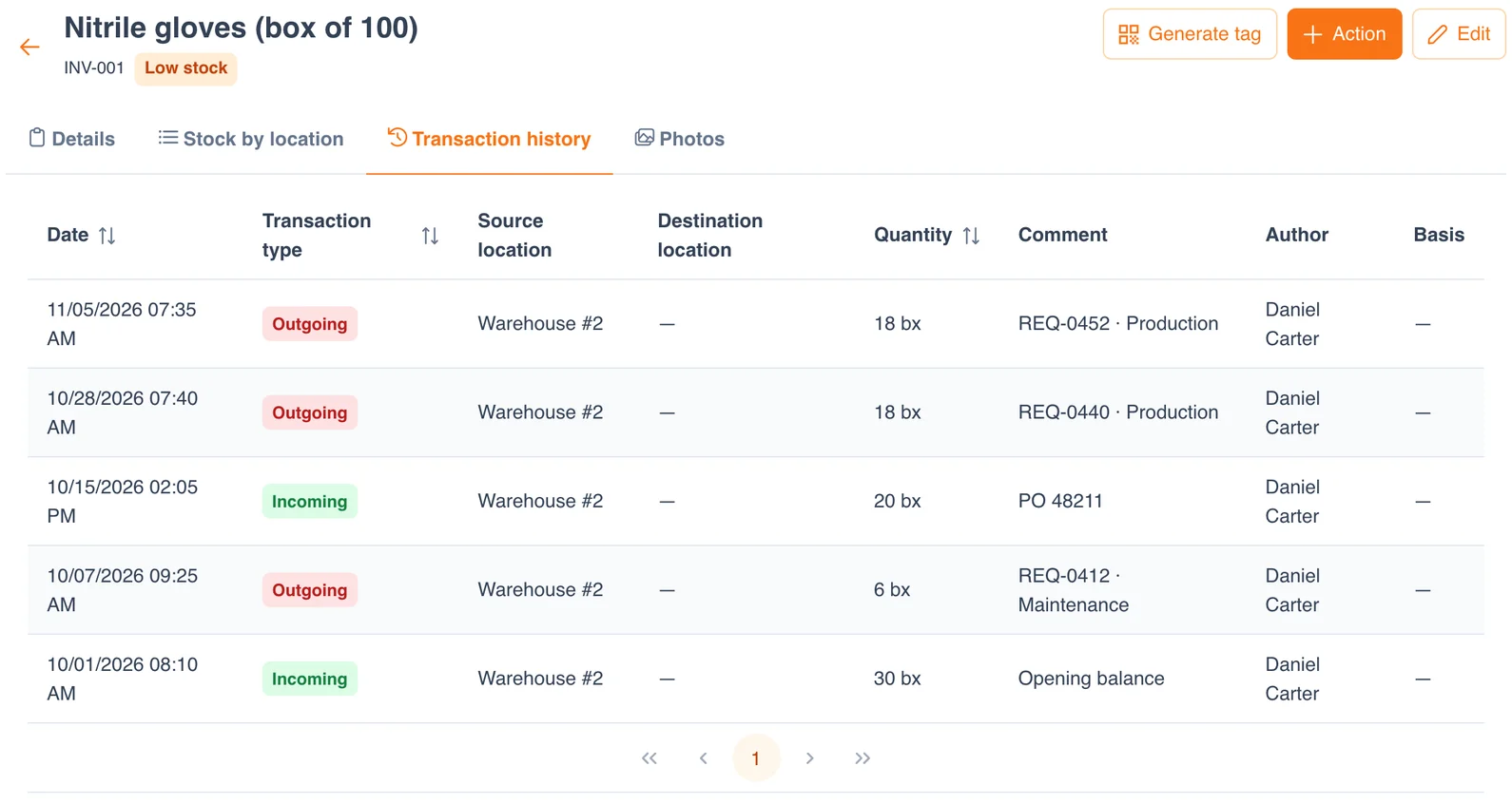
| Capability | Free Template | UNIO24 FreeRecommended for more than one stockroom |
|---|---|---|
| Stock levels | ||
| On hand worked out from movementsBoth calculate it. UNIO24 also splits the balance by location. | Partial | Yes |
| Reorder point warningThe template shows REORDER on the row. UNIO24 flags the item on the phone and the desktop. | Partial | Yes |
| Parts used on work ordersThe issue is tied to the work order and the machine it went into. | No | Yes |
| History | ||
| Stock card per itemReceipts and issues in order, with the balance | Yes | Yes |
| Data & reliability | ||
| Several people entering stock at onceA shared file gets overwritten. UNIO24 handles the whole team. | Partial | Yes |
| Who entered each movementEvery receipt and issue with name, date and time | Partial | Yes |
| Full support | 1/ 6 | 6/ 6 |
Frequently Asked Questions
About tracking and counting stock with the template
Is the inventory tracking spreadsheet free?
Yes. No cost, no subscription, no card. Enter your name and email and the Excel file downloads instantly.
What should an inventory count sheet include?
Item number, description, bin, unit, the counted quantity, the date and who counted. For year-end figures add unit cost and counted value. Whether the book quantity goes on the printed sheet is a choice: leave it on to spot variances while you count, or hide it for a blind count, which keeps counters from simply confirming the expected number.
Can I track stock in more than one location?
The template holds one bin per item. For several stockrooms the cleanest option is a file per stockroom, because each balance has to add up on its own. When stock moves between sites often, UNIO24 keeps a balance per location and records the transfer.
How do I set a reorder point?
Add up what goes out during the supplier's lead time, then add a safety margin. If the crew uses 3 boxes of gloves a week and the supplier takes two weeks to deliver, 6 boxes go out while the order is on its way; with a margin of 4, the reorder point is 10. Change the number when usage or lead time changes. More on the margin in safety stock.
What do I do with count variances?
Enter each one as an adjustment on Stock Movements, signed, with the reason: damaged, expired, entered wrong, or taken without a requisition. Never overwrite the on-hand number. If the same item comes up short at every count, it is usually being taken without paperwork.
Is this a retail inventory spreadsheet?
It tracks quantities, reorder points and the value of each product, which a small shop needs too. Selling price, margin and sales are left out: that is the job of a point-of-sale system. Many shops use a spreadsheet like this for the back room and the POS at the counter.
More free templates
For the things that do not get used up.
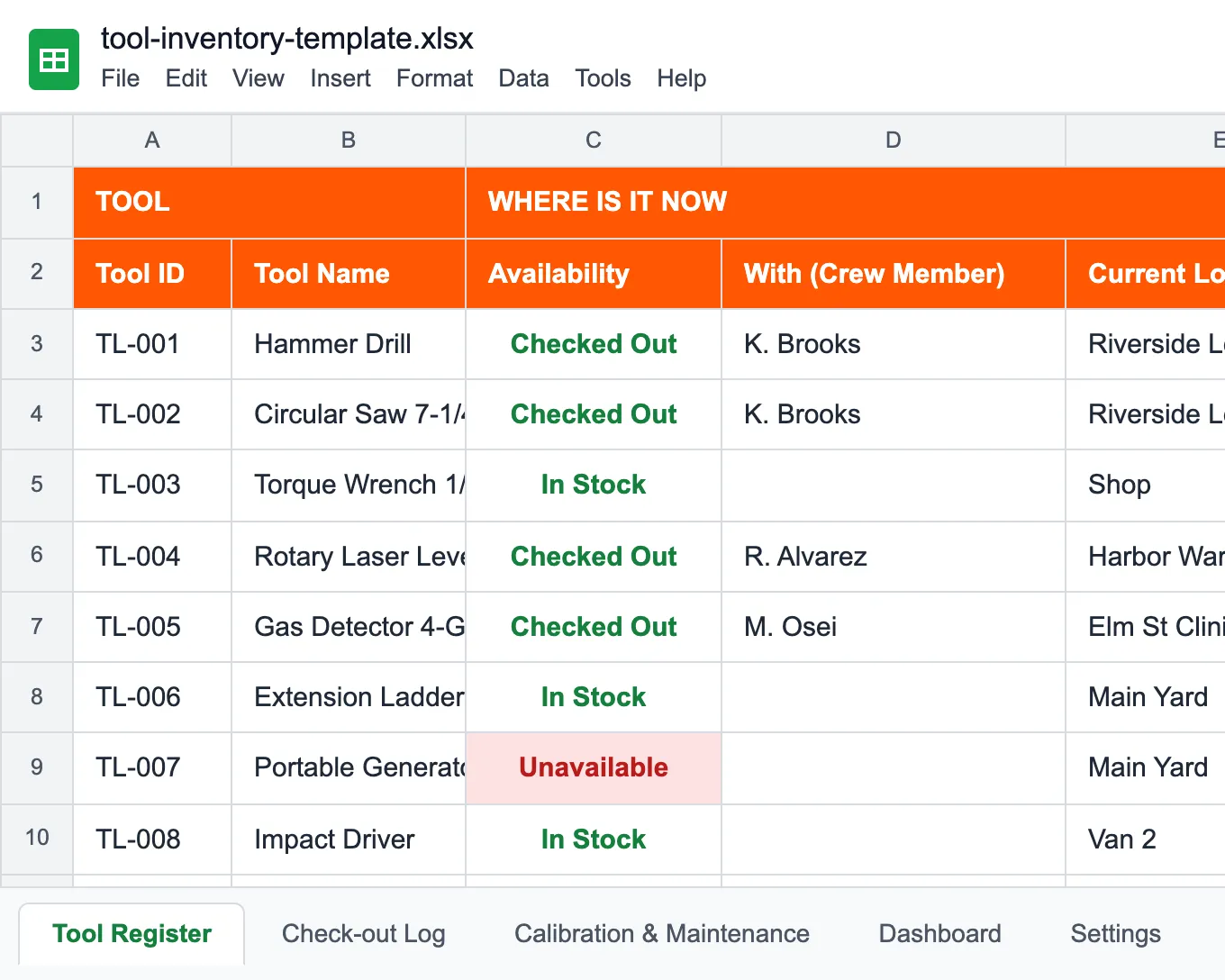
Tool Inventory Template
Tools between crews and job sites, with check-outs and calibration dates.
Read more: Tool Inventory Template
Equipment Inventory Template
Every machine and device with location, condition, cost and depreciation.
Read more: Equipment Inventory Template
Work Order Template
A printable work order with parts used, labor and sign-off.
Read more: Work Order Template