Free Equipment Sign-Out Sheet Template for Excel
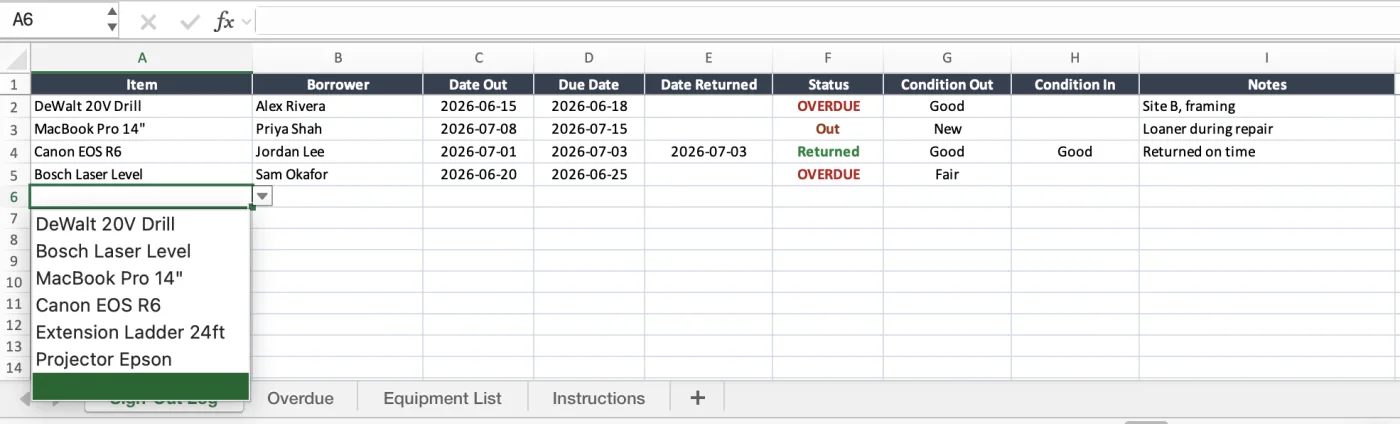
A ready-to-use equipment sign-out sheet for teams that share tools and devices — record who took what, when it went out, and when it is due back, with an overdue flag and a return log. Works in Microsoft Excel.
What is an equipment sign-out sheet?
An equipment sign-out sheet is a simple log for shared gear: each time someone takes a tool, laptop, camera, or piece of equipment, they record their name, the item, the date and time out, and the date it is due back — and they sign it in again on return. It answers the question that eats a surprising amount of everyone's week: who has it right now, and when is it coming back?
This free template gives you a working sign-out log with the columns already built, a dropdown list of your equipment, and a formula that flags anything overdue. Use it as a tool sign-out sheet on a job site, an employee device sign-out at the IT desk, or a shared-equipment log for a school, studio, or clinic. It opens in Microsoft Excel (.xlsx) and prints cleanly if you'd rather keep a clipboard by the door.
An equipment sign-out sheet is the check-out half of asset tracking. If you also need a full record of everything you own — condition, location, service history — pair it with the equipment inventory template or, for hand and power tools, the tool inventory template.
Who uses an equipment sign-out sheet
Anywhere gear is shared and needs to come back — set it up and start today.
Construction & trades
Tools and equipment moving between crew and job sites — know who took the mixer and when it is due.
IT & office teams
Loaner laptops, monitors, and adapters — sign gear out to staff and get it back at offboarding.
Schools & universities
Student laptops, lab kit, and AV gear checked out per class or per room.
Studios, events & AV rental
Cameras, lenses, and staging equipment out on a shoot or a job — logged and accounted for.
Facilities & maintenance
The tool crib: hand tools and ladders signed out per work order and returned to the board.
Clinics & labs
Shared instruments and devices — a clear record of who used what, and when it came back.
Spreadsheet or UNIO24 — what fits your team?
A sheet is a great start. Once check-outs happen all day, on the move, an app pays off.
| Capability | Free Sheet | UNIO24 FreeRecommended for busy teams |
|---|---|---|
| Daily check-out | ||
| Sign gear out and inThe sheet does this manually. UNIO24 records each check-out and return with a tap, timestamped. | Partial | Yes |
| Mobile check-out on siteScan a QR or barcode to sign an item out from a phone, no laptop needed. | No | Yes |
| Multiple people at onceA shared sheet is one editor at a time in Excel. UNIO24 handles the whole team live. | Partial | Yes |
| Staying on top of returns | ||
| Overdue flaggingThe sheet flags overdue rows. UNIO24 also notifies the holder and the manager automatically. | Partial | Yes |
| Automatic return remindersA message before and after the due date so gear actually comes back | No | Yes |
| Full check-out history per itemEvery past holder and date for an item, kept automatically | No | Yes |
| Data & reliability | ||
| BackupsA sheet relies on you saving it. UNIO24 backs up automatically every day. | Partial | Yes |
| Works from anywhereWeb, iOS, and Android — not just wherever the file lives | Partial | Yes |
| Full support | 0/ 8 | 8/ 8 |
Frequently Asked Questions
Everything you need to know about the free equipment sign-out sheet
Is the equipment sign-out sheet really free?
Yes — no hidden costs, no subscription, no card required. Fill out the form and you get instant access to the Excel file.
How do I make a sign-out sheet in Excel?
Start with one row per check-out. Add columns for item, borrower, date out, due date, and returned date. Turn the item column into a dropdown with Data Validation so names stay consistent, then add a small formula (an IF comparing today's date to the due date) to flag overdue rows. That is exactly what this template already has built, so you can skip the setup and just start logging.
Can I use it as a key register or key sign-out sheet?
Yes. List each key or key set on the Equipment List sheet with its own ID, for example K-014 for the plant room or K-022 for van 3, and every hand-out then becomes a row with the holder, the date out, and the date it is due back. A key still out past its due date shows OVERDUE in the Status column, and the Overdue sheet counts how many there are. For master keys, add the key number to the Notes column so a lost one can be traced back to the locks it opens.
When should I move from a sign-out sheet to software?
Usually when check-outs happen faster than anyone updates the file, when gear moves in the field and the file is on a desktop, or when a shared sheet keeps getting overwritten. Past that you feel the missing pieces most: no mobile scan-to-check-out, no automatic return reminders, no reliable history of who lost what. That is when teams move to a tool like check-in / check-out in UNIO24.
What should an equipment sign-out sheet include?
At minimum: the item or asset ID, the borrower's name, the date and time out, the expected return date, and a signed-in / actual-return date. Useful extras are the condition at check-out and return, a purpose or job-site note, and a signature column if you need accountability on record. This template ships with all of the essentials pre-built and the extras easy to add.
Can I use it as a tool sign-out sheet?
Yes. The sheet works for any shared item — hand and power tools, laptops, cameras, lab instruments, AV gear. Call it a tool sign-out sheet on a job site or an equipment sign-out sheet at the office; the columns are the same. For a fuller tool record with categories and calibration dates, pair it with the tool inventory template.
What''s the difference between a sign-out sheet and an inventory template?
A sign-out sheet tracks movement — who has an item right now and when it is due back. An inventory template tracks the assets themselves — everything you own, its condition, location, and value. They work together: the inventory is the master list, and the sign-out sheet logs what leaves and returns. Small teams often start with just the sign-out sheet and add the inventory later.
Go deeper on check-in / check-out
While you set up the sheet, see how teams keep gear accounted for at scale.
How to Build an Equipment Check-Out System in Spreadsheets
Turn a simple sign-out sheet into a real check-out system — formulas, overdue flags, and QR codes.
Read more: How to Build an Equipment Check-Out System in Spreadsheets
Asset Tagging Best Practices: A Practitioner's Guide
Label types, placement, and numbering — so scanning an item to sign it out actually works.
Read more: Asset Tagging Best Practices: A Practitioner's Guide
How to Choose the Right Asset Tracking System
Cloud vs on-premise, must-have features, and the costly mistakes teams make when picking software.
Read more: How to Choose the Right Asset Tracking System