Asset Tracking Pilot Program: How to Test Before Full Rollout
Learn how to run a successful asset tracking pilot program. Reduce implementation risk, refine processes, and gather user feedback before company-wide rollout.

You've picked your asset tracking system. You've planned the rollout. Next Monday you flip the switch for everyone: five locations, 500 people.
Don't.
I built UNIO24 because I kept watching this exact thing play out. Teams pick a tool, plan the rollout, and skip the pilot because "we don't have time". Then they spend the next six months patching the system in production while users quietly go back to clipboards. The teams that run a two-week pilot mostly ship clean. The pattern is brutally consistent.
I'll show you how to run a pilot that catches the real problems: the WiFi that doesn't reach where the equipment actually lives, the labels that fade in two weeks, the workflow that takes 5 minutes when it should take 30 seconds. Test small, find them while they're cheap, then roll out with the system already de-risked.
Why pilots aren't optional
Pilots feel like bureaucracy. They're risk mitigation pretending to be process.
A good pilot does five things. It surfaces technical problems before they become disasters: whether the warehouse WiFi actually reaches the back corner, whether the server handles 50 simultaneous scans, whether your tags survive their actual environment. It uncovers workflow issues you didn't anticipate, the ones that only surface when someone wearing gloves tries to scan, or when laptops need to be tracked while docked. It gives you a feedback loop while you can still switch systems, adjust your tagging strategy, or rework your data structure. After full rollout you're stuck. It creates champions, because pilot users who shaped the process become the people who defend it during rollout. And it proves ROI before the big check is written, which is what skeptical leadership needs to see.
Asset tracking implementation risk doesn't disappear if you ignore it; it just shows up later, in a worse form, with more witnesses. Understanding the total cost of ownership means counting that risk from the start.
Choosing your pilot: department, location, or both?
You can't pilot "a little bit of everything". That's a half-baked rollout, not a pilot. To properly test the software you need a scope that's representative enough to validate your assumptions but small enough to manage.
There are three usable shapes.
Single department, all locations. Track all IT equipment company-wide, nothing else. Works when your processes are standardized across sites and one asset category has unique requirements (IT, vehicles). The catch: you don't test how the system handles asset variety. Office furniture behaves differently than power tools.
Single location, all asset types. Roll out everything at headquarters, nowhere else. Works when locations differ a lot (office vs. warehouse vs. job site) and you want to test the full range. The catch: you miss location-specific problems like the warehouse WiFi dead zone.
Hybrid. Pick one representative location plus two or three asset categories that cover different use cases. Example: HQ + IT equipment + office furniture + tools. You get variety in asset types (expensive vs. cheap, mobile vs. stationary, frequently transferred vs. rarely moved) without overwhelming scope. This is the shape I'd pick for most organizations, whether you're managing church and non-profit assets or property management equipment.
What makes a good pilot location
Pick a location that's representative of your broader organization (not your easiest or hardest), accessible for hands-on troubleshooting, medium-sized (big enough to surface issues, small enough to manage), and willing to participate. Resistant pilot users doom the project.
Skip your smallest, simplest site. It won't reveal real-world complexity. Skip your most chaotic site too. You'll just create frustration. Avoid remote locations where you can't get hands-on. And don't pilot anywhere going through major disruption: moves, reorgs, leadership changes.
How many assets
My rule of thumb:
| Company Size | Pilot Asset Count | Pilot Users |
|---|---|---|
| <500 total assets | 50-100 assets | 5-10 users |
| 500-2,000 total assets | 100-300 assets | 10-20 users |
| 2,000-10,000 total assets | 300-500 assets | 20-40 users |
| >10,000 total assets | 500-1,000 assets | 40-80 users |
Floor: at least 50 assets and 5 active users. Anything smaller doesn't generate enough activity to test real workflows. Ceiling: no more than 10% of your total assets. Beyond that you're doing a full rollout with a different name.
Defining your pilot scope
"Let's try it and see what happens" isn't a plan. Vague scopes produce vague results. Define four things explicitly.
What you're testing. Asset categories included (laptops, monitors, desks, office chairs). Asset categories excluded. List them explicitly so nobody assumes. Location boundaries (Building A, floors 1–3, including the storage room but not the data center). User groups (office managers, IT, facilities, but not general employees).
What you're measuring. Set success criteria before you start: time to locate assets, asset accountability rate, user adoption, data entry error rate, time spent on asset-related tasks. More on numbers in the metrics section below.
What processes you're testing. Not just the software, the entire workflow. New asset intake, tagging, check-in/check-out, transfers, disposal, and yes, audit processes during the pilot itself.
What you're NOT testing yet. Integration with other systems (save for full rollout). Complex reporting (focus on core). Advanced features you won't use immediately. Customizations you're not sure you need. This last item is where scope creep kills pilots: "while we're at it, let's also.." If you're starting from scratch and currently using spreadsheets, see transitioning from spreadsheets to asset tracking software.
Timeline: how long should a pilot actually run?
Under two weeks, you catch the obvious technical issues but miss the workflow problems that emerge over time, and users don't build real habits. Over three months, momentum dies; people forget it's a pilot and treat it like permanent-but-broken.
Sweet spot for most organizations: four to eight weeks.
Weeks 1–2 are setup and initial use: configure the system, tag the pilot assets, import or enter initial data, train users, get them using it for real work. You're watching for technical issues, basic usability problems, "this button doesn't work" feedback.
Weeks 3–5 are real-world testing. The system is in daily use, users are running actual workflows, early process issues become apparent, you start seeing which features get used and which get ignored. You're watching for workflow friction, missing features, training gaps, data quality issues.
Weeks 6–8 are evaluation. Gather formal feedback, analyze usage data, test any adjustments you made, run a mini-audit to check data quality, make the go/no-go decision. You're watching for whether improvements stuck and whether the system solves the actual problem.
When you need to compress
Sometimes the calendar doesn't care about ideal timelines. Annual audit in six weeks, regulatory pressure, leadership impatience. A two-to-three-week compressed pilot can work, but only with dedicated resources, an experienced implementation lead, and simple requirements:
- Week 1: intensive setup, training, and initial testing.
- Week 2: full operational use with daily check-ins.
- Week 3: rapid feedback collection and decision.
Don't compress for complex environments. The pilot's job is to find problems. Cutting time means finding fewer of them.
Success metrics: measuring what actually matters
"Did the pilot work?" is a useless question. You need specific, measurable criteria set before the pilot starts. Here's what to track and what the numbers should look like.
Technical performance
The system needs to be reliable. Aim for 99%+ uptime during the pilot. If users regularly can't access it, you've already lost. Mobile scanning should complete in under three seconds from QR code to asset details. Slower than that, and people find excuses not to scan. Data sync reliability is the hidden killer: track whether offline scans actually sync when users return online. Lost scans mean lost data, and lost data means lost trust. Trust doesn't come back easily.
User adoption
You want 80%+ of pilot users actively using the system weekly. Track logins and transactions per user. If half your pilot users aren't engaging, your full rollout will crash on contact with normal humans.
Process compliance tells you whether the system fits the workflow. Compare what happens physically to what's logged in the system. If 90%+ of asset transfers aren't being recorded, people are working around the tool. Your process is broken, fix it now.
Time to competency is the user acceptance metric I care most about. Users should perform basic tasks independently within two days. If they still need hand-holding after week one, something is wrong with either the interface or the training.
Business impact
Time to locate assets should drop by at least 50%. Ask users to estimate before and after. If the system doesn't make finding things faster, what's the point.
Asset accountability: 95%+ of pilot assets should have a known location and custodian. Run an audit at the end of the pilot to verify. If you can't account for assets after the pilot, you won't after rollout either.
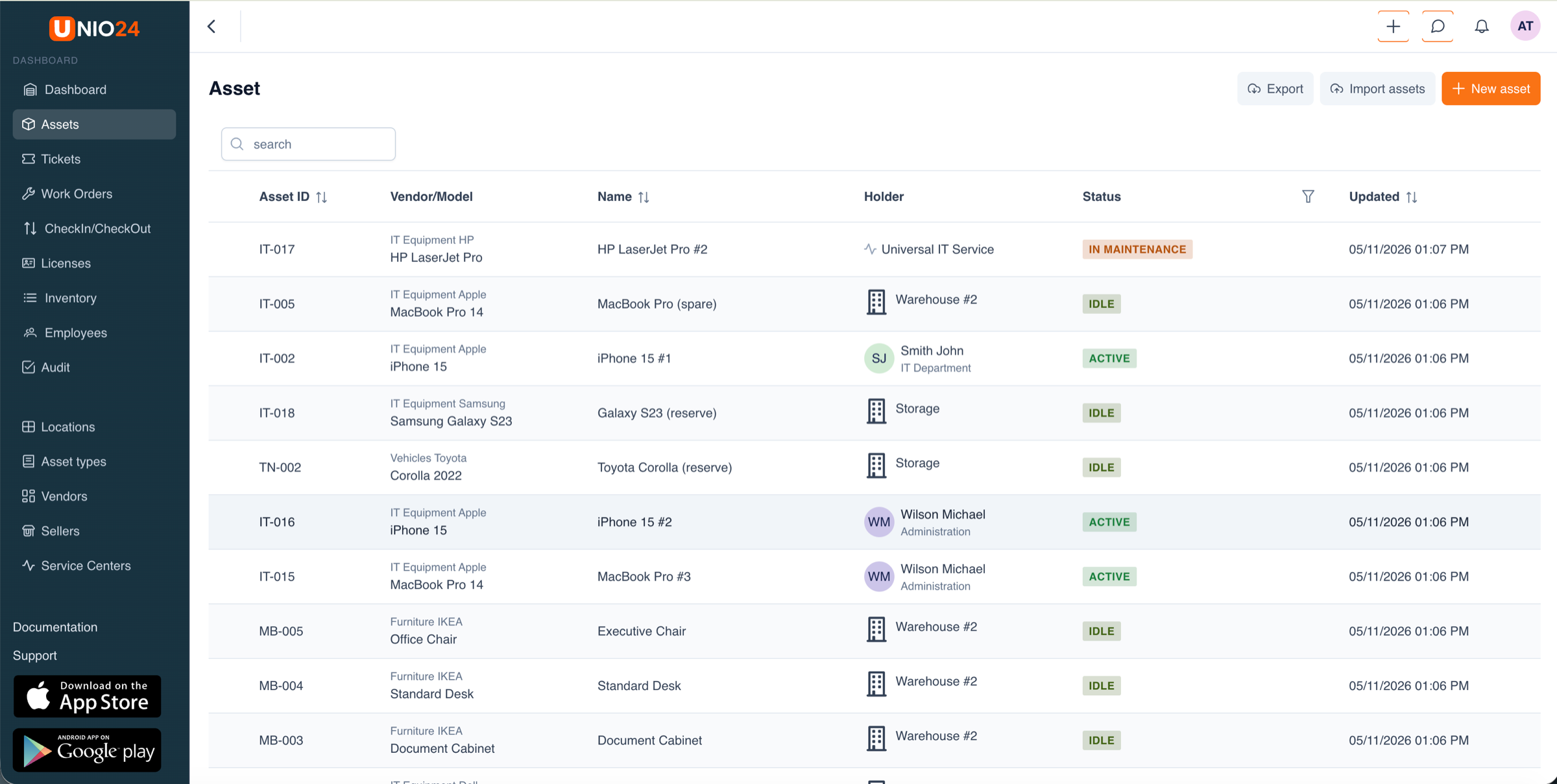 Example from UNIO24, a pilot register with ID prefixes by class (IT- for IT equipment, TN- for transport, MB- for furniture), every row carrying a holder (a location like Warehouse #2, a service vendor like Universal IT Service, or a person with their department), and statuses spread across idle, active, and in maintenance. This is what 95%+ accountability looks like: empty Holder cells, missing prefixes, or stale Updated dates are where to dig at the end of the pilot.
Data accuracy: 95%+. Location, status, and assignment match reality when you physically verify. Garbage data in pilot becomes garbage data in production. Also track found assets during the pilot. Discovering "missing" items pays for the pilot and sells the rollout.
User satisfaction
70%+ of pilot users should recommend rollout. If your enthusiastic early adopters don't recommend it, something is genuinely broken. Perceived ease of use should average 4+ out of 5 on surveys. And perceived value matters most: listen for "this helps me do my job better". If they see the system as busywork, no amount of training fixes that. It's a change management problem.
Gathering feedback: the right questions at the right time
Don't wait until the end to ask "how's it going?" By then, frustrated users have mentally checked out.
In the first week, do daily five-minute conversations or Slack check-ins. Ask what's confusing, where people are getting stuck, what's taking longer than it should, whether they're seeing errors. Daily feedback is essential here. A confusing button that wastes 30 seconds per scan will waste 500 minutes over the pilot. Fix it now. (This is one of the asset management mistakes I see most often: deferring fixes "until rollout".)
Weeks 2–3, switch to short weekly surveys: five questions max, two minutes to complete. Rate ease of use 1–5, which task took longest this week, what they'd change, what feature they wish existed, plus an open comment box for things you didn't think to ask. Weekly surveys let trends emerge. If three people independently ask for the same feature, it matters.
Weeks 4–6, run 15–30 minute one-on-one interviews with representative users. Walk through their typical workflow. Where does the system help, where does it get in the way, are they more or less productive, would they want to keep using it, what would make it excellent instead of just okay. Surveys give you data. Interviews give you understanding: why something is a problem, not just that it is.
At the end of the pilot, run a final survey plus a group debrief. Survey covers overall satisfaction (1–10), recommend rollout y/n, top three things that work, top three that need improvement, concerns about wider rollout. The debrief is where the real value lives. Gather pilot users together and let them talk to each other, not to you. The conversations they have (comparing experiences, debating solutions, building on each other's ideas) reveal things surveys never capture.
One question I'd add to every pilot: "If we rolled this out company-wide tomorrow, would you be excited or worried?" That cuts through politeness and reveals real sentiment. If your early adopters (the most favorable audience you'll ever have) are worried, you're not ready.
Common issues you'll find
Every pilot I've ever observed surfaces some version of the same handful of problems. Knowing them in advance doesn't prevent them, but it shortens the time you spend confused.
Wi-Fi doesn't reach where the assets live. Users can't scan in certain areas because there's no network. If scanning doesn't work where the equipment actually is, the system is useless. The fix is offline mode (modern apps have it), additional access points for important areas, or cellular-enabled devices for genuinely remote spots. Either way, test in the actual physical environment, not the office. WiFi heat maps lie.
Recording a transfer takes too long. When the digital workflow is slower than the old way, adoption fails. Identify which steps are slow. Don't assume. Cut unnecessary form fields (do you really need all 15 for a transfer?). Enable bulk actions so users can transfer ten items at once instead of one-by-one. Use scanning instead of typing whenever you can. Time every routine workflow with a stopwatch; if it takes more than three clicks and 30 seconds, simplify until it doesn't.
Labels peel, fade, or stop scanning. Tags don't survive their environment. If you can't scan the tag, you can't track the asset, and all the tagging effort was wasted. Test label durability in actual conditions during the pilot: stick one on a piece of equipment and see what it looks like in two weeks. Switch to polyester instead of paper, metal tags for harsh environments, protective laminate for outdoor or high-traffic items. NFC is worth considering for metal surfaces or chemical exposure where printed codes won't survive. The asset tagging best practices guide covers this in depth, and the QR vs NFC vs RFID breakdown helps you pick.
Users can't figure out the category. "Is a wireless keyboard IT Equipment or Office Supplies?" Inconsistent categorization destroys reporting and makes searching impossible. Create a simple decision tree ("If it plugs in → IT. If you sit on it → Furniture. If it has a motor → Equipment."). Reduce the total number of categories: ten is better than forty-seven. Provide examples for each category. Let users flag "I'm not sure" instead of forcing them to guess wrong. Your category structure makes perfect sense to you. It's confusing to everyone else.
Pilot users don't realize they're supposed to actually use it. Passive participation tests nothing. Set explicit expectations at kickoff. Make pilot participation part of users' actual job during the pilot period, not something they squeeze in. Designate a pilot coordinator who checks in regularly. And celebrate participation, not just results. People need to know engagement matters.
The data was wrong from day one. Import existing records without cleaning them first, and you start the pilot with garbage. Users immediately lose trust. Clean your data before the pilot launches. The data migration and cleansing guide walks through this. Verify a sample of records before importing everything. Run a mini-audit in week one to catch errors while they're still manageable. And be transparent with pilot users: "We know some records are wrong, help us find and fix them" builds collaboration where "this is the new system of truth" creates frustration.
What works at pilot scale that breaks at full scale
Here's the trap I've seen ruin pilots-that-succeeded: 20 engaged users with excellent data quality and glowing feedback, then 500 users at rollout and the whole thing falls apart. Small-scale and large-scale aren't the same game.
In pilot, when someone has a question they ask Bob (the implementation lead). At 500 users, Bob drowns. Response times go from five minutes to five days, users get frustrated, they give up. The fix is self-service support built before rollout: searchable documentation with screenshots, an FAQ based on actual pilot questions, video tutorials for common tasks (people watch videos when they won't read manuals), trained department champions for first-line questions, and a clear escalation path when champions get stuck.
Pilot users volunteered or were chosen. They're motivated. They forgive small issues. They provide unsolicited feedback. Rollout users didn't ask for this. They have their own work. They won't forgive friction. They'll just stop using the system. So address every significant pain point before rollout. Communicate the why, repeatedly, so people understand the value. Reduce every point of friction you can. Recognize good adoption publicly.
With 50 pilot assets you can manually verify data quality weekly. With 5,000 assets, manual verification is impossible. Errors accumulate, data quality decays. Build automated checks before rollout: flag assets with no location, duplicate serial numbers, suspiciously old "last seen" dates. Implement a sustainable audit strategy with cycle counting rather than hoping the annual audit catches everything. Make data quality someone's specific job responsibility: if it's everyone's job it's no one's job.
The implementation lead does everything at pilot scale: configures, trains, imports, fixes, answers questions. At scale, bottlenecks form everywhere. Document what the lead knows before rollout, while there's time. Train additional administrators so knowledge isn't concentrated in one person. Delegate clear roles to separate owners: training, data quality, technical support.
Adding a new asset takes five minutes in pilot. Fine. At full scale you're adding 50 new assets a week. That's four hours of work per week. Streamline data entry with fewer required fields and smart defaults. Enable bulk import so you can add 20 similar laptops at once. Integrate with procurement to auto-create assets from purchase orders.
Rule of thumb: multiply pilot effort by your scale factor. If something takes one hour per week in pilot, it'll take 25 hours at 25× scale. Plan accordingly.
The go/no-go decision
Your pilot is done. You have data, feedback, and experience. Now you decide. This should be evidence, not politics or sunk costs.
Automatic go if all of these are true: technical performance meets targets (>99% uptime, fast scanning), user adoption exceeds 80%, data accuracy exceeds 95%, at least 70% of users recommend rollout, no showstopper issues surfaced, and ROI is demonstrable through time saved, assets found, or efficiency gained. When you hit these numbers, proceed. Use pilot users as champions during rollout.
Automatic no-go if any of these are true: the system is regularly unavailable, users actively resist or work around it, critical workflows are broken or impossible, data quality is worse than before the pilot, leadership or budget approval has evaporated, or the vendor can't fix critical issues. When you see these red flags, stop. Either fix the fundamentals, pick a different asset tracking system, or rethink your approach. Don't push forward hoping it gets better.
Go with modifications is where most pilots land. Things mostly work but there are significant issues. Technical performance acceptable but not great, adoption 60–75% (good but not excellent), some workflow pain points, users see value but have reservations, data quality improving but not there yet.
Ask four questions: Are the issues fixable? (Technical problems usually are; fundamental workflow mismatches often aren't.) How long will fixes take? (Two weeks is reasonable; six months means you're not ready.) Will fixes address user concerns? (Ask them, don't assume.) Can you afford to wait? (Sometimes external pressure forces suboptimal timing.) Then fix the top three to five issues, run a two-week mini-pilot to test the fixes, then make a final decision.
A scorecard if you want one
Some teams find it useful to quantify the decision:
| Criteria | Weight | Score (1-10) | Weighted |
|---|---|---|---|
| Technical performance | 20% | 8 | 1.6 |
| User adoption | 25% | 7 | 1.75 |
| Data quality | 20% | 9 | 1.8 |
| User satisfaction | 15% | 6 | 0.9 |
| Business impact | 20% | 8 | 1.6 |
| Total | 100% | , | 7.65 |
8.0 and above: proceed. 6.0–7.9: address issues, then proceed. Below 6.0: significant rework needed. Adjust weights to your organization. If user satisfaction is critical for your culture, give it 30%.
Communicating pilot results
Your pilot is done, you've decided. Now you tell people.
For leadership
One page. Executives don't read forty-page reports.
Include: pilot overview (what, when, with whom), key metrics in numbers (adoption, accuracy, time savings), one or two concrete success stories, issues discovered and how you resolved them, remaining risks (be honest), the recommendation, and next steps with timeline and resources. Lead with results, not process. "Pilot users reduced equipment search time by 60%" beats "we completed all pilot activities on schedule".
For the implementation team
This is your institutional knowledge. Document everything: complete scope and timeline, user roster and participation rates, all feedback organized by theme, technical issues and their resolutions, process changes made during the pilot, before/after comparisons with data, lessons learned (what worked, what didn't), recommendations for rollout, and appendices with surveys, interview notes, and metrics data.
Six months from now, when you're troubleshooting a rollout issue, this document is gold. One year from now, when you pilot a different system, this is your playbook.
For future users
If you're proceeding, the announcement sets expectations and builds enthusiasm. Share pilot results concretely. Highlight what worked. Show that you listened to feedback ("based on what we learned, we simplified the transfer process and added offline mode"). Set clear expectations ("you'll receive training two weeks before your department goes live"). Connect to benefits they care about ("spend less time searching, more time on the actual work").
Tone: confident but not dismissive of concerns. "We know change is hard. We tested this thoroughly and it works" beats "this is going to be great!"
Pilot users as champions
Your pilot users are your most valuable rollout asset. They've used the system, they know it works, they can answer peer questions with credibility. Feature their quotes in announcements. Have them co-lead training in their departments. Peer-to-peer training is more credible than top-down instruction. Make them the go-to people for questions in their area. Recognize their contribution publicly.
Your pilot checklist
4–6 weeks before
- Define pilot scope (departments, locations, asset categories)
- Choose pilot users (willing, representative, accessible)
- Set success criteria and metrics
- Schedule pilot timeline (start, end, evaluation)
- Communicate the plan to leadership and pilot users
2–3 weeks before
- Configure the system for the pilot environment
- Prepare tags and labels
- Clean and prepare data for import
- Create training materials
- Set up feedback channels (surveys, interview schedule)
Week before
- Tag pilot assets
- Import initial data and verify accuracy
- Train pilot users (hands-on, interactive)
- Distribute quick reference guides
- Set up support channels (Slack, email, etc.)
During the pilot
- Daily check-ins for the first week
- Weekly surveys ongoing
- Address technical issues immediately
- Document all feedback and issues
- Make quick-win adjustments as you go
- Track usage metrics continuously
End of pilot
- Final user survey
- User interviews or group debrief
- Physical audit to verify data accuracy
- Calculate all success metrics
- Analyze what worked and what didn't
Post-pilot
- Executive summary
- Detailed pilot report
- Go/no-go decision via scorecard
- If go: rollout plan based on lessons learned
- If no-go or go-with-modifications: documented required fixes
- Communicate results to stakeholders
- Thank and recognize pilot users
Why this matters to me
I made these patterns the design constraints for UNIO24.
Offline-first mobile, because I watched too many teams give up on a system the first time the warehouse Wi-Fi died mid-scan. The first 50 assets are free, with no card and no trial expiry, because I want you to actually be able to run a pilot, not negotiate procurement before you know if the tool fits. Bulk import and bulk transfer because the difference between five minutes and thirty seconds per action is what kills adoption between pilot and scale. A starter category structure that's intentionally short, because watching users guess at categories is a workflow problem dressed up as a UX problem.
None of that is in the playbook by accident. It's there because I watched the same problems break the same kinds of rollouts, then I built a product that doesn't make them easier to make.
Run the pilot. Find the problems while they're small. If UNIO24 helps you do that, good, start your free pilot. If something else fits better, use it. Just don't skip the pilot.