Asset Audit Strategy: Tagging, Reporting & Workflows
Learn how to build a sustainable audit process for asset tracking. Reduce discrepancies from 15% to 2% with the right audit strategy, metrics, and workflows.
You've implemented your asset tracking system, migrated and cleansed your data, tagged all your assets, trained your team, and everyone's using it. Hard part done, right?
Not even close.
Week one looks great. Week four, you notice a few assets with incorrect locations. Month three, someone discovers that 23 laptops are assigned to employees who left the company months ago. Month six, Finance runs a report and finds that 15% of your asset data doesn't match reality.
Asset tracking after implementation isn't a one-time project. It's a maintenance discipline. The process that keeps the data clean is called auditing, and almost everyone underestimates how much of it you need.
I've watched companies invest tens of thousands implementing a tracking system, only to see it turn into an expensive spreadsheet because they skipped auditing. I've also watched companies run tight audit processes and stay at consistently high accuracy years after go-live. The difference? A sustainable audit strategy.
Why Your Asset Data Degrades (and It's Not Your Fault)
Before we talk about audits, let's talk about why they're necessary. Even with the best system and the most diligent users, asset data naturally drifts from reality. It's not because people are careless, it's because real life is messy.
Equipment moves without being scanned. Someone borrows a projector for a meeting in another building. They forget to check it out. Now your system says it's in Building A, but it's actually in Building C.
People leave, assets don't. An employee quits. HR processes the termination. But nobody remembers to collect the wireless mouse, keyboard, and headset assigned to them. Three months later, those items are "assigned" to someone who doesn't work there.
Status changes aren't recorded. A printer breaks. Someone puts a sticky note on it: "Out of order." But the system still shows it as "In Service." People keep trying to print to it, getting frustrated, and calling IT.
New assets slip through the cracks. A department manager orders equipment directly from Amazon using a company credit card. It arrives, gets used, but never gets entered into the tracking system. Congratulations, you now have an unrecorded asset. This is why establishing clear processes for asset tagging new equipment is essential.
I worked with a logistics team where a single forklift bounced between warehouses several times over a few months. Not once did anyone update the system. When the audit team needed to verify it, they spent days calling around trying to find the thing. It was at Warehouse B. The system said Warehouse D.
Asset data drifts naturally. Audits are how you push back.
The Four Types of Asset Audits (and When to Use Each)
Not all audits are created equal. Whether you're running a full asset inventory audit across the entire organization or a focused fixed asset audit for Finance, different situations call for different approaches. Here's what actually works in the real world:
1. Full Physical Audit: The Deep Clean
This is the "big one", comprehensive fixed asset audit procedures applied across your entire organization. You verify every single asset. Walk through every location, scan every tag, match everything against your system.
When to do it:
- At least once a year (for compliance and accuracy baseline)
- After major events (office moves, mergers, large-scale equipment refresh)
- When you suspect systemic data quality issues
How long it takes: For 500 assets with proper preparation, about 2-3 days. For 2,000 assets without preparation, two miserable weeks and a lot of overtime.
Full audits are disruptive. They pull people away from regular work. Do them efficiently, and not too often.
I've seen companies try to do full physical audits quarterly. It lasted exactly two quarters before everyone revolted. An annual asset audit is realistic for most organizations. Semi-annual if you're in a high-risk or highly regulated environment.
2. Spot Check Audits: The Surprise Inspection
Pick a random sample of assets, say 50 out of 1,000, and run asset verification on them. Quick, low-disruption, and surprisingly effective at catching problems early.
When to do it:
- Monthly or quarterly between full audits
- After training new staff
- When you notice data quality slipping
How it works: Use truly random selection. Don't just audit the equipment that's easy to find. Include a mix of high-value, medium-value, and low-value assets. Different locations. Different categories.
Quick maths worth remembering: if you find a 10% discrepancy rate in a random sample, the real rate across all assets is probably similar. Spot checks are your early warning system without the full-audit overhead.
3. Cycle Counting: The Continuous Approach
Instead of one big audit, you audit portions of your assets on a rotating schedule. Every week, verify 5% of your inventory. Over 20 weeks, you've audited everything, but the workload is spread out.
When to use it:
- When you want continuous accuracy without big disruptions
- For organizations with high asset movement
- When you have the discipline to stick to a schedule
How to structure it: Divide assets into groups. High-value equipment gets counted more frequently (maybe every month). Low-value items get counted less often (quarterly or semi-annually).
This is the approach I'd pick for most teams, and the one I run myself. It's flossing rather than waiting for the cavity, unglamorous, daily, and the thing that actually keeps you out of trouble.
The trade-off is discipline. Skip a week because you're slammed, it compounds, three months later you've effectively scheduled an annual audit and called it "ongoing maintenance." Cycle counting only works if you stick to the schedule even on the weeks you don't feel like it.
4. Departmental Audit: The Focused Investigation
Audit all assets in a specific department, location, or category. Not everything, just a defined slice.
When to use it:
- When a specific area has known issues
- After department reorganizations or moves
- When preparing for an external audit of specific assets
- After replacing equipment in one department
Example: IT refreshes all laptops in the Sales department. Do a departmental audit two weeks later to verify: old laptops properly disposed, new laptops correctly entered, all assignments updated.
Asset Tagging Audits: Verifying Your Tag Infrastructure
The four audit types above focus on verifying assets. An asset tagging audit verifies your tags. Without reliable tags, every other audit fails, a scanner that can't read a damaged QR code turns a 30-second check into a 15-minute investigation.
A tagging audit checks four things:
- Tag presence, Does every asset actually have a tag attached? Unlabeled assets are invisible to scan-based audits.
- Tag condition, Is the tag readable? Faded QR codes, peeled stickers, or damaged NFC chips need replacement before the next full audit.
- Tag-to-record match, When you scan the tag, does it pull up the correct asset record? A mislabeled asset (wrong tag on wrong item) corrupts data at every audit cycle.
- Tag placement, Is the tag in a standard, scannable location? Inconsistent placement slows down auditors and leads to missed scans.
When to run a tagging audit:
- Before every full physical audit (validates your infrastructure before you rely on it)
- Quarterly for high-churn environments (construction sites, field teams, harsh conditions)
- After any incident where audits failed due to tag issues
How to run it efficiently: Pull a list of assets by location. Walk through with a scanner. For each asset, attempt a scan. Log results: scanned-OK, tag-missing, tag-unreadable, wrong-record. Fix issues as you go, or batch a replacement run afterward.
Metric to track: Tag scan success rate. Healthy operations run at 95%+. Below 90% means you need a re-tagging initiative, not just a data-quality audit.
See also: asset tagging for choosing tag types, and asset tag for what information belongs on each tag.
Audit Frequency: How Often Is Enough (Without Driving Everyone Crazy)?
The question I get asked most often. The honest answer is "it depends", but a rough framework that lands for most teams:
By Asset Value and Risk
| Asset Category | Full Audit | Spot Check | Cycle Count |
|---|---|---|---|
| High-value (>$5,000) | Annually | Quarterly | Monthly rotation |
| Medium-value ($500-$5,000) | Annually | Semi-annually | Quarterly rotation |
| Low-value (<$500) | Annually | Annually | Semi-annual rotation |
| High-risk (theft-prone, portable) | Annually | Monthly | Bi-weekly rotation |
| Critical (safety, compliance) | Semi-annually | Quarterly | Monthly rotation |
High-value doesn't just mean expensive. It means "high-impact if lost or unavailable." A $300 specialized tool that stops production if missing is high-value. A $2,000 conference room table is medium-value.
When Quarterly Audits Caused a Mutiny
I worked with a healthcare organization that tried to audit all 4,000 assets quarterly. By month two, people were hiding equipment from the audit team because "we're too busy for this right now."
We restructured to:
- Annual full audit (3 days, once a year, everyone knows it's coming)
- Monthly cycle counting (30 minutes per week per location)
- Quarterly spot checks of high-value items (1 hour per quarter)
Guess what? Compliance improved. Data accuracy improved. And nobody tried to hide equipment anymore.
Frequent small audits beat infrequent big audits. Every time, in my experience, and I've tried it the other way around.
Planning an Audit That Doesn't Suck
Most audits fail at the planning stage. People think "we'll just walk around and scan stuff." Then they realize they don't have enough scanners, half the labels are unreadable, and nobody knows who's responsible for the storage room on the third floor.
Pre-Audit Preparation (2-3 Weeks Before)
1. Define the scope clearly
- Which assets? (All? Specific categories? Specific locations?)
- Which locations? (Include storage areas, warehouses, remote offices?)
- What's the deadline?
2. Assemble your team
- Who's leading the audit?
- Who's responsible for each location?
- Who handles discrepancy investigation?
3. Prepare the tools
- Mobile scanners or phones with scanning apps
- Printed asset lists (as backup, systems go down)
- Labels and label printer (for assets with damaged tags, see our guide on durable asset tagging)
- Clipboards and pens (yes, really, old school backup)
4. Communicate early
- Tell everyone the audit is coming (no surprises)
- Explain why it matters (not just "compliance" but real benefits)
- Ask people to tidy up assigned assets (makes finding things faster)
- Request cooperation for accessing locked areas
Two weeks before the audit I send the same email every time: "Hey, audit coming, please make sure your assigned equipment is where it should be." It's amazing how many "lost" items reappear when people know someone's coming to look.
During the Audit: The Actual Work
Start with a walkthrough plan. Don't randomly wander. Plan your route through each building/floor systematically. Left to right. Top to bottom. Whatever works, just be systematic.
Use mobile scanning. Walking around with a clipboard and manually checking off assets is 2005 technology. Modern asset tracking systems have mobile apps. Scan the QR code or NFC tag, the system instantly shows you: ✓ Found or ✗ Discrepancy.
Flag issues immediately, don't fix them yet. When you find a discrepancy (asset in wrong location, damaged tag, assigned to wrong person), flag it. Don't stop to fix it. Finish the audit first, then investigate.
Document everything. Take photos of damaged equipment. Note where misplaced items were found. Record who you spoke to. This information is gold when you're investigating discrepancies later.
Two-person teams work better. One person scans, one person handles the device and records notes. It's faster and more accurate than solo auditing.
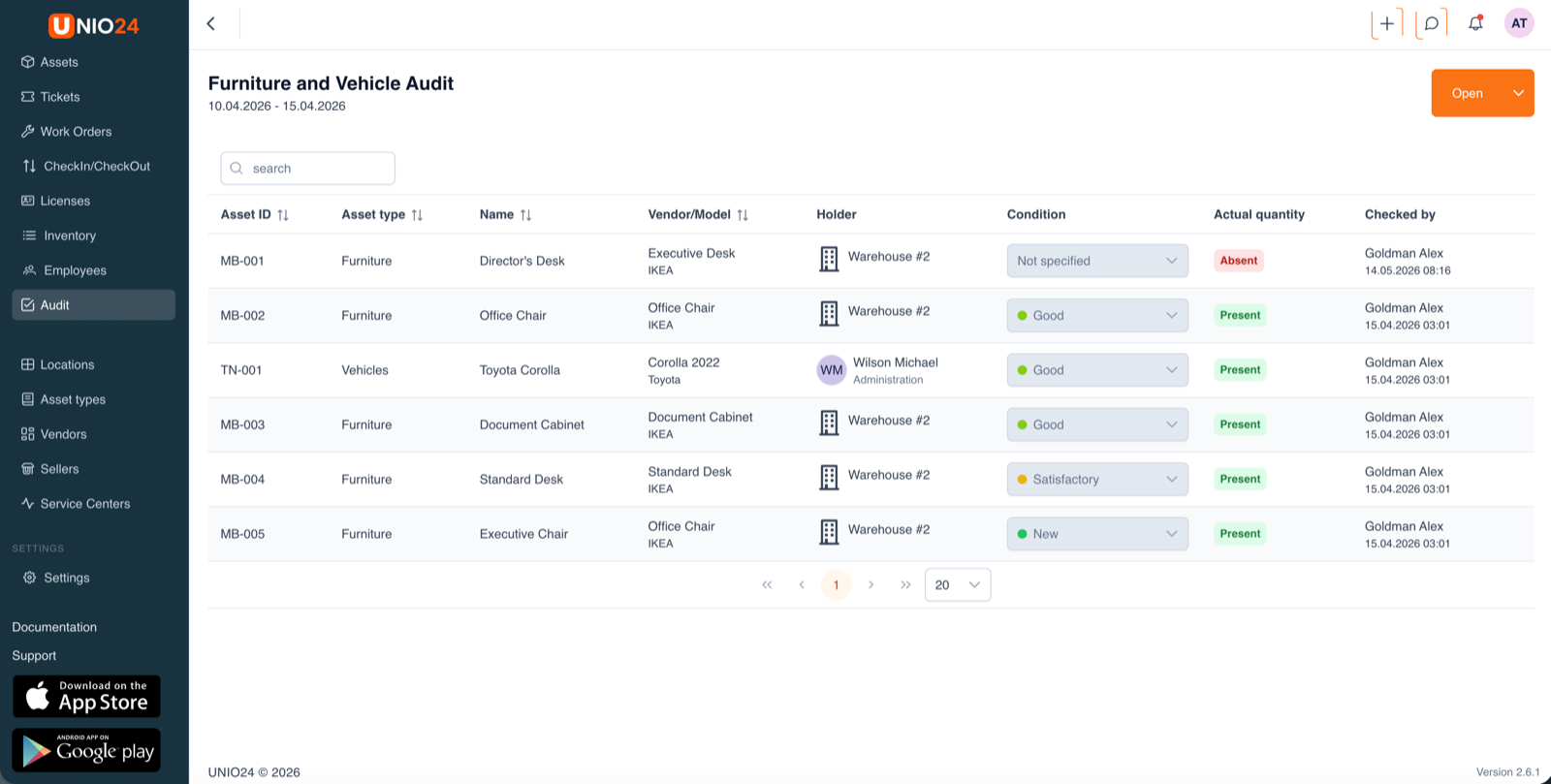 An audit in progress, from inside UNIO24. Each row carries an ID-prefix by class (MB- for furniture, TN- for transport), a condition picked from a controlled list (Good / Satisfactory / New / Not specified), a present/absent tag, and the auditor's name with timestamp. The red "Absent" flag on MB-001 is the kind of finding you want surfaced immediately, investigate it after the walkthrough, not during. Status stays "Open" until someone signs the audit off, which is the simplest mechanism I know for keeping half-finished audits from quietly disappearing.
Post-Audit: Turning Findings Into Action
The audit isn't done when the scanning is done. Now comes the important part: asset reconciliation.
1. Generate discrepancy report
- Assets not found (in system, not in reality)
- Assets found but not in system (in reality, not in system)
- Location mismatches
- Status mismatches
- Assignment errors
2. Investigate each discrepancy
Don't just mark an asset as "missing" and move on. Find out why.
Was it transferred but not scanned? Talk to the person who moved it. Was it disposed of but not recorded? Find the disposal paperwork. Was it stolen? File an incident report. Was it "borrowed" by another department? Time for a conversation about check-out procedures.
3. Update the system
Once you know what happened, update your records. But also update your processes so it doesn't happen again.
4. Report results
Create an asset audit report for leadership:
- Total assets audited
- Accuracy rate (% of assets correctly recorded)
- Discrepancy rate (% with issues)
- Types of discrepancies found
- Actions taken
- Process improvements implemented
The Metrics That Actually Matter
You can't manage what you don't measure. Here are the asset tracking KPIs I track for every audit:
1. Audit Accuracy Rate
Formula: (Assets Correctly Recorded / Total Assets Audited) × 100%
This is your headline number. If you audit 1,000 assets and 950 match their records exactly, your accuracy rate is 95%.
| Accuracy Rate | Assessment |
|---|---|
| 98-100% | Excellent, your processes are rock solid |
| 95-97% | Good, minor issues to address |
| 90-94% | Concerning, systemic problems emerging |
| Below 90% | Critical, major process failures |
Don't expect 100% on your first audit after go-live. 92-95% is realistic. By the third audit you should be at 97%+. If you're at 100% the first time around, you missed something, sorry to the optimists in the room.
2. Discrepancy Rate by Category
Formula: (Assets with Discrepancies in Category / Total Assets in Category) × 100%
Don't just track overall discrepancy rate. Break it down by asset category. You might have 98% accuracy on desktop computers but 85% accuracy on hand tools. That tells you where to focus your process improvements.
3. Time to Resolution
What it measures: Average days from discovering a discrepancy to resolving it.
Why it matters: Finding a problem is only half the battle. If it takes you three weeks to investigate and fix a location mismatch, your data is wrong for three weeks.
Target: Under 5 business days for routine discrepancies. Under 1 day for high-value or critical assets.
4. Repeat Discrepancy Rate
What it measures: Percentage of assets that had discrepancies in multiple consecutive audits.
Why it matters: If the same laptops keep showing up in the wrong location audit after audit, you have a process problem, not a data problem.
5. Audit Completion Rate
What it measures: Percentage of scheduled audits actually completed on time.
Why it matters: If you plan monthly spot checks but only complete 60% of them, your audit strategy exists on paper but not in reality.
Building an Audit Workflow That People Actually Follow
I've seen beautiful audit procedures documented in 40-page manuals. Nobody reads them. Nobody follows them. The procedures that survive contact with real teams have one thing in common. They fit on one page.
Keep It Simple
Your audit workflow should fit on one page. Seriously. If someone can't understand the process in 5 minutes, they won't do it correctly.
Before Audit:
- Schedule audit date (2 weeks notice minimum)
- Assign team members and locations
- Prepare equipment (scanners, labels, backup batteries)
- Send notification to affected departments
During Audit:
- Walk systematically through assigned area
- Scan every asset (or record manually if tag is damaged)
- Flag discrepancies in real-time
- Replace damaged labels immediately
- Complete assigned area, don't skip assets
After Audit:
- Upload scan results (if using offline scanners)
- Generate discrepancy report
- Investigate discrepancies (assigned owner, 3-day deadline)
- Update system records
- Report results to stakeholders
That covers it. Anything else you bolt on, you'll regret within two months.
Assign Clear Ownership
Every audit needs a Directly Responsible Individual (DRI). Not a committee. One person who owns the outcome.
For large organizations:
- Audit Program Owner: Oversees the entire audit strategy
- Location Auditors: Responsible for auditing specific buildings/floors
- Discrepancy Investigators: Research and resolve flagged issues
- System Administrator: Updates records based on findings
Make It Part of the Calendar
Don't audit "when you have time." Schedule it like you schedule payroll. Put it on the calendar. Protect the time.
Example annual audit calendar:
- January: Spot check (high-value assets)
- February: Cycle count, IT equipment
- March: Cycle count, Facilities equipment
- April: Spot check (all categories)
- May: Cycle count, Office furniture
- June: Departmental audit (largest dept)
- July: Spot check (high-value assets)
- August: Cycle count, Tools and equipment
- September: Pre-annual audit preparation
- October: Full physical audit (all assets)
- November: Discrepancy resolution
- December: Audit results reporting and planning for next year
Notice how the big annual audit happens in October? That's intentional. It gives you November to fix issues and December to report clean numbers before the fiscal year ends (for most companies).
How to Actually Reduce Your Discrepancy Rate
Let's talk about the real goal: getting your data quality from "okay" to "excellent." Here's what works based on actual implementations:
Fix the Root Causes, Not Just the Symptoms
When you find 30 laptops assigned to employees who left the company, don't just reassign them. Ask: why didn't we collect them during offboarding?
Then fix the process:
- Make equipment return part of the HR offboarding checklist
- Don't process final paycheck until equipment is returned
- Send automatic reminders when an employee's termination date is entered
One company I worked with had over 10% of their IT equipment assigned to former employees. We integrated their asset tracking system with HR, when HR marks someone as "terminated," the system automatically flags all their assigned assets for recovery. Discrepancy rate dropped into the low single digits within six months. The integration took a sprint to build; the savings paid for the audit team's coffee budget the rest of the year.
Make Scanning Easier Than Not Scanning
People take shortcuts when the "right way" is painful. Make it easy to do the right thing.
Bad process: To transfer a laptop, you have to:
- Log into the desktop system
- Find the asset record
- Fill out a 12-field transfer form
- Wait for manager approval
- Print a confirmation
Result: Nobody does it. They just hand over the equipment.
Good process:
- Open mobile app
- Scan asset QR code
- Tap "Transfer to.."
- Select or scan employee badge
- Done (approval happens in background)
Result: People actually do it because it takes 15 seconds.
Train People on the Why, Not Just the How
Don't just teach people "here's how to scan an asset." Explain why it matters.
What I tell warehouse staff: "When you scan this forklift as 'back from maintenance,' it automatically updates the system so other warehouses know it's available. That means fewer calls asking 'where's the forklift?' and less time wasted searching. It saves you time."
What I tell IT staff: "When you mark a laptop as 'disposed,' it removes it from our insurance coverage and our depreciation schedule. That saves the company real money on premiums and taxes. That money could be your department's budget next year."
People are more motivated by "this makes my life easier" or "this helps the company" than "it's policy."
Celebrate Improvements
When your audit accuracy goes from 88% to 94%, tell people. Send an email. Mention it in the all-hands meeting. Thank the teams who made it happen.
What doesn't work: "We're at 94% but we should be at 98% so we need to do better."
What works: "Last quarter we were at 88%. This quarter we hit 94%. That's a huge improvement. The IT and Facilities teams really stepped up their scanning discipline. Let's keep this momentum going, our goal is 97% by next quarter."
Positive reinforcement beats criticism every time.
Case Study: From a 15% Discrepancy Rate to Under 3%
A 6-month audit turnaround usually plays out in stages, the version below is composited from similar engagements, with names and details changed.
Company: Regional construction firm, 6 job sites plus headquarters Assets: roughly 1,000 items (tools, equipment, vehicles, office assets) Problem: First audit after implementing tracking system showed a 15% discrepancy rate
What was wrong:
- Tools moved between job sites constantly, rarely scanned
- Vehicles were tracked, but attached equipment (trailers, generators) wasn't
- Office had decent accuracy (around 7% discrepancy), but job sites were chaos (north of 20%)
- Nobody felt responsible for data quality
The Fix (implemented over 6 months):
Month 1: Root Cause Analysis
- Interviewed site managers, discovered scanning process was too complicated
- Identified that equipment transfers often happened Friday afternoon when office was closed (couldn't update system)
Month 2: Process Changes
- Simplified scanning process (QR code scan + "transfer to site X" button)
- Gave site managers mobile scanning authority (didn't need office approval anymore)
- Made weekly tool inventory a paid task (30 minutes every Friday afternoon)
Month 3: Training and Accountability
- Trained site managers on mobile scanning (hands-on, not just presentation)
- Made audit accuracy part of site manager performance reviews
- Created a weekly "discrepancy dashboard" showing each site's accuracy rate (a little healthy competition)
Month 4: First Follow-Up Audit
- Discrepancy rate dropped to roughly 8% overall
- Office: around 3%, job sites: still around 10% (improvement, but not good enough)
- Discovered remaining issues were mostly "forgotten to scan returns"
Month 5: Automated Reminders
- System sends automatic reminder if equipment borrowed >14 days
- Site managers get weekly summary of "equipment checked out to your site"
- Reduced "forgotten returns" by 80%
Month 6: Second Follow-Up Audit
- Discrepancy rate: under 3% overall
- Office: around 1%, job sites: around 3%
- Remaining discrepancies were mostly legitimately missing items (theft, loss), not data errors
The results:
- Audit accuracy improved from the mid-80s to ~98% in six months
- Time spent searching for equipment dropped significantly
- Insurance claim for stolen equipment was processed faster (accurate records)
- Annual audit time roughly halved, from 4 days to about a day and a half
What made it work wasn't more frequent auditing. It was fixing the processes that caused discrepancies in the first place. (The part I usually leave out at conferences: in month 3 the ops lead almost quit because the accountability dashboard read as blame for two weeks before we re-framed it. Took a real conversation to fix.)
Common Audit Mistakes (and How to Avoid Them)
Mistakes I see repeatedly in the field, including ones I've made myself:
Mistake 1: Auditing Without a Plan
What it looks like: "Let's just walk around and scan stuff today."
Why it fails: You miss entire areas. Multiple people audit the same location. Nobody knows when you're done.
Fix: Create a written plan. Assign specific areas to specific people. Set a deadline. Track completion.
Mistake 2: Ignoring Discrepancies
What it looks like: You find 47 assets with incorrect locations. You note it in a report. Then.. nothing happens.
Why it fails: The audit becomes a meaningless ritual. Data stays wrong. Next audit shows the same problems.
Fix: Every discrepancy needs an assigned owner and a resolution deadline. Track it like any other task.
Mistake 3: Using Audits to Punish People
What it looks like: "The warehouse team had 20% discrepancies so they're getting written up."
Why it fails: People start hiding problems instead of reporting them. They become resistant to audits.
Fix: Use audits to find process problems, not to blame people. If one team has chronic issues, dig deeper, maybe their process is broken.
Mistake 4: Auditing Only the Easy Stuff
What it looks like: You audit the main office thoroughly but skip the storage room, the warehouse, and the remote locations because "they're hard to access."
Why it fails: The hard-to-access places are usually where the worst data quality is.
Fix: Include difficult areas in your audit plan. Schedule them when you can get access. If a location is truly impossible to audit, maybe it shouldn't have trackable assets there.
Mistake 5: No Follow-Through Between Audits
What it looks like: Annual audit shows 12% discrepancy rate. You fix the issues. Then nothing happens for 11 months until the next annual audit.
Why it fails: Data quality decays immediately after the audit. By month 6, you're back to 12% discrepancies.
Fix: Regular spot checks or cycle counting between full audits. Monitor data quality metrics monthly.
Integration with Your Annual Calendar
Teams that get this right tend to anchor audits in the business calendar, not just their own to-do list:
Align with Fiscal Calendar
- Q1: Post-holiday spot check (catch any year-end equipment changes)
- Q2: Cycle counting (high-value assets)
- Q3: Mid-year departmental audits
- Q4: Full annual physical audit before fiscal year-end
Why this works: Your annual audit results are available for year-end financial reporting. Your data is cleanest when external auditors show up.
Coordinate with Other Events
Before major purchases: Audit existing equipment to confirm you actually need new stuff.
After office moves: Departmental audit 2-4 weeks after the move.
During slow periods: Schedule intensive audits when business is slower (retail in January, education in summer, etc.).
Before insurance renewal: Audit confirms your asset values are accurate for insurance coverage.
Technology: Tools That Make Audits Easier
Good asset audit software and the right tools make modern audits actually work. Let's talk about what to look for.
Mobile Scanning Apps
The game-changer for asset audits. Instead of printing lists and checking boxes, you scan QR codes or NFC tags with your phone. The app instantly shows: ✓ Asset found or ✗ Discrepancy.
What to look for:
- Offline mode (audits happen in warehouses and basements with no WiFi)
- Photo capture (document damaged assets or wrong locations)
- Real-time sync when back online
- Batch scanning (scan 20 items quickly in one area)
QR Codes vs. Barcodes vs. NFC vs. RFID
QR codes: Best for most organizations. Print them yourself. Scan with any phone. High information density.
NFC: Modern and convenient. Tap-to-scan with smartphones. No line of sight needed. More durable than printed codes. Ideal for metal surfaces and harsh environments.
Barcodes: Legacy technology. Still works. Requires dedicated scanner. Less flexible than QR.
RFID: Great for high-volume, fast scanning (think retail inventory). Expensive. Overkill for most asset tracking.
My recommendation: QR codes for 95% of organizations. NFC for assets in harsh environments or where tap-to-scan convenience matters. RFID only if you have thousands of assets and need to scan entire rooms in seconds.
Asset Auditing and Reporting: The Reports That Actually Matter
An audit without a report is just counting. Reports turn raw scan data into decisions, which departments need help, which asset categories are decaying, whether accuracy is improving over time.
Don't drown in data. Focus on these five reports:
Pre-Audit Report: Asset list by location, so auditors know what they're looking for before they walk the floor. Include asset ID, current location, assigned user, last-seen date.
Discrepancy Report: Assets not found, assets in the wrong location, status mismatches (e.g. "active" in the system but physically disposed). This is your action list for remediation.
Accuracy Trend Report: Track your audit accuracy month-over-month. Plot discrepancy rate over time. Is it improving? Plateauing? Getting worse after a reorg? Trend beats snapshot every time.
Category Performance Report: Which asset categories have the worst data quality? If laptops are at 98% accuracy but tools are at 74%, that tells you where to focus tagging and check-in discipline.
Audit Completion Report: Did all locations complete their assigned areas? Shows audit process adherence, not just data quality. A 100% accuracy rate on 60% completion is a false signal.
Who gets what:
- Operations manager, Discrepancy Report + Completion Report (weekly during audits)
- Finance, Accuracy Trend + Category Performance (quarterly, for asset register integrity)
- Executive summary, Single-page dashboard: discrepancy rate trend, top 3 problem areas, planned fixes
Automation matters. If pulling these reports requires a manual spreadsheet exercise every month, you'll skip them. Modern asset management platforms should generate them in seconds, otherwise, you're choosing between audit quality and your team's time.
Making Your Audit Strategy Sustainable
Here's the truth about asset audit best practices: the perfect audit program that you execute once is worthless. A simple audit program that you execute consistently is gold.
Start Small, Scale Up
Don't do this: Implement a complex cycle counting program across all asset categories, all locations, weekly, starting immediately.
Do this: Start with monthly spot checks of high-value assets. Get comfortable with that. Then add cycle counting for one asset category. Get that working. Then expand.
Build It Into Job Responsibilities
Audits can't be "extra work that we do when we have time." They need to be part of someone's actual job.
Examples:
- Warehouse manager: 30 minutes every Friday for cycle counting
- IT asset manager: Monthly spot check (2 hours)
- Facilities coordinator: Quarterly departmental audit
Put it in job descriptions. Include it in performance reviews. Make it normal, not special.
Create Accountability Without Bureaucracy
What doesn't work: A 15-page "Asset Audit Policy" that nobody reads.
What works: A one-page quick reference guide + a clear ownership structure + regular check-ins.
Iterate Based on Results
After each audit, ask:
- What worked well?
- What was difficult or frustrating?
- What took longer than expected?
- What can we simplify for next time?
Then adjust. The goal is to maintain asset records with minimal friction, and your audit process should improve over time.
What Success Looks Like
After six months of consistent auditing, here's what you should see:
Quantitative improvements:
- Audit accuracy rate: 95%+ (up from 85-90% at go-live)
- Time to complete full audit: Decreased by 30-50%
- Time to resolve discrepancies: Under 5 days average
- Repeat discrepancy rate: Under 3%
Qualitative improvements:
- People scan assets without being reminded
- Fewer "where is this equipment?" questions
- Finance trusts the data for depreciation and insurance
- External audits go smoothly (no surprises)
Cultural shift:
- Audits are seen as helpful, not punitive
- People proactively report issues instead of hiding them
- Data quality is "just how we do things" not a special initiative
Your Audit Strategy Checklist
Ready to build your audit program? Use this asset audit checklist:
Foundation (Month 1)
- Choose audit types for your organization (full annual + spot checks + cycle counting)
- Set audit frequency for each asset category
- Assign audit program owner
- Create one-page audit workflow document
- Set up mobile scanning if not already in place
First Audit (Month 2)
- Schedule first full audit (with 3-4 weeks notice)
- Assign locations/areas to specific auditors
- Prepare equipment and tools
- Communicate to all departments
- Execute audit
- Generate discrepancy report
Follow-Through (Month 3)
- Investigate all discrepancies
- Update system records
- Document root causes of issues
- Implement process fixes
- Report results to stakeholders
- Calculate baseline metrics (accuracy rate, discrepancy rate)
Ongoing (Month 4+)
- Execute scheduled spot checks and cycle counts
- Track metrics monthly
- Adjust processes based on results
- Celebrate improvements
- Plan next full audit
The Bottom Line
Across the audits I've watched succeed, one pattern dominates: the best audit strategy is the one you'll actually execute consistently.
It doesn't matter if you have the most sophisticated cycle counting program in the world if you abandon it after three months. It doesn't matter if you plan quarterly full audits if you actually only complete one per year.
Start with something simple. Do it consistently. Track your metrics. Improve over time.
Your goal isn't perfection. It's continuous improvement. Moving from 85% accuracy to 90%. Then to 95%. Then staying there.
Because when asset data is accurate, everything else gets easier. Procurement decisions get made against reality. Insurance coverage matches what you actually own. External audits stop being a fire drill. People start trusting the system, which is the slowest and most valuable shift of all.
And the investment you made in implementing asset tracking? It actually delivers the ROI you promised. Your tracking system becomes a valuable business tool instead of an expensive database that nobody trusts.
How UNIO24 Makes Audits Actually Work
UNIO24 is built with audits in mind, not as an afterthought, but as a core feature. Scan assets with your mobile phone, and the system instantly flags discrepancies. Work offline in warehouses and basements, sync when you're back online. Track your audit accuracy over time with built-in dashboards. Export reports for Finance and compliance teams.
The migration is clean, the tagging is smart, and the audits are simple.
Start with 50 assets free. No credit card. No commitment. Just see how it works with your real equipment and real audit process.
Ready to stop worrying about data quality? Try UNIO24 today.